
oncaapliomaamlbopdmhmdompfemljhm

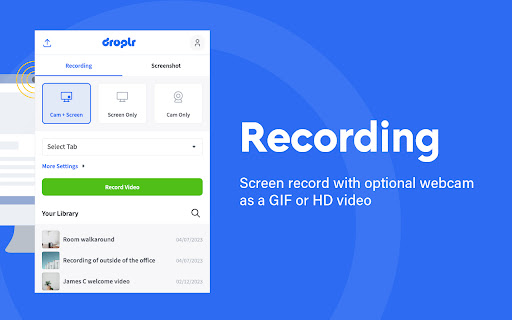

The Easiest All-In-One Screenshot & Screen Recorder Capture screenshots and screen recordings instantly: it's saved to the cloud with a link you can share with anyone, anywhere. Simple and easy to use. Screenshots: Capture part of your screen, the entire screen, or the full webpage: then mark it up. Screen recorder: Screen record with audio and optional webcam as a GIF or HD video. Features: * Your screenshot or screen recording automatically saves to the cloud with a link saved to your clipboard. Paste it and share it with anyone, anywhere like email or Slack. Or download your screenshot as a PNG or screen recording as a WebM right to your device. * Annotate by adding text or color highlight. Use the image editor to add shapes like lines, circles, arrows, and boxes. Have fun with over 30 emojis to add to your screenshots 😀👌💯🎉 * All your screenshots and screen recording are saved to your personal Droplr cloud account, so you can access them anytime. Add our top-rated Chrome app; used by 5 million people to share billions of screenshots and screen recordings.

Explain and Send Screenshots
Capture or record a video of your screen, write text or arrows and share it. The safest extension with NO crazy permissions! ✨ A Secure Screen Capture & Annotation Tool to Capture, record, annotate, and share your screen— all with unmatched privacy and speed. 🛡️ Why The Extension is the Safest Choice Stop compromising your security for basic screen tools. As an experienced developer, I built this extension to delivers the same robust features without requesting invasive "read and change all your data" permissions found in every other popular screenshot extension. Screen Recording: Record a video of your screen and include audio narration via your microphone. Intuitive Editor: Use the built-in, clean editor to: Annotate: Draw arrows, circles, and lines to highlight key information. AI Background Removal: Remove and substitute image backgrounds right on your device (done locally with AI). 📤 Seamless Sharing & Workflow Sharing your annotated image or video is simple and flexible: Direct Link Sharing: Get a direct cloud link for instant sharing on social media (Facebook, X/Twitter) or in chat apps. Quick Copy/Paste: Copy the image to the clipboard to easily paste it directly into emails (Gmail, Outlook, etc.) or documents. Local Download: Download the image directly to your desktop. ⚙️ Power User Accessibility Customize your experience for maximum efficiency: Assign Shortcut Keys for lightning-fast captures. Use the Right-click Context Menu for quick screen capture options. Extra features are unlocked for contributors who support my safe development philosophy. Give it a try and see the difference a secure, powerful tool makes!

Web Clipper (Nimbus)
Web Clipper that works! The easiest way to clip text, pics, links, email and pdf from internet pages and save them. A Web Clipper that works! Grab all kinds of content from web pages. We have created a Nimbus Web Clipper, so you could save text, images, links, email addresses from the Internet. It is not just a pdf clipper! Nimbus Web Clipper is a Chrome extension that can help you save text, images, links, email addresses, and other content from web pages. Add your notes and save them to your Nimbus Note account for future references. You can easily organize your clutter with a Nimbus Note and a Web Clipper! Create a note or folder in your Nimbus Note account and save your web clipping there. Access content that you've made with a clipper even offline. Use any devices and read later files, documents, articles and so on. Do you want to save some web pages without any ads and links? Use a Web Clipper to clip the needed pages or their fragments and edit them before sending them to your Nimbus Note account. Easily delete any ads, images, or links from clipped content. Look at all you can do with Nimbus: - Capture the entire web page and store it for future use - Capture only a part of the web page - Highlight text before saving the web clipping - Add tasks to the clipping before sending it to a colleague - Clip images from a web page - Clip PDF files and annotate them before saving (a function that many PDF clippers lack) - Clip emails, including all responses and attachments (Gmail, Outlook, Mail.com, Yahoo) - Clip anything, with just one click!

Easy Screenshot - a Web Clipper
all-in-on capturing tool for the visual part, the entire page, or a selective area with auto-scrolling and editing support You can capture screenshots from the active tab with just two clicks. It provides multiple options for capturing specific portions of the page, the visual viewport, or even the entire page if it extends beyond the screen with both vertical and horizontal scroll bars. The captured image can be saved to the default download directory, copied to the clipboard, or opened in an online paint editor. The extension currently integrates JSPaint, a web-based replica of MS Paint, which offers offline functionality, allowing you to edit your images without an internet connection. The extension adds a toolbar button to the browser's action area. Clicking on this button opens a popup window with three options: 1. Capture the Entire Screen (3 methods. Works even if the page contains fixed-position elements) 2. Capture Visual Part 3. Capture a Portion Supported formats: PNG, JPEG, Avif, and WebP These options are also accessible via the right-click context menu on any page, providing easy access to the screenshot functionality. Here are some additional notes about the extension: 1. When selecting the "Capture Entire Screen" option, and the page size exceeds the window size, the extension will automatically scroll through the entire page to capture different sections and merge them into a single image. This process may take a few seconds to complete. 2. The resolution of the captured image depends on the screen resolution. For instance, if you have a 4K display, such as a Retina display, the image resolution will be at least four times higher than a regular display. 3. To ensure compatibility across various devices, the extension saves all captured screenshots in the widely supported PNG format, which offers high-quality lossless images. 4. The extension does NOT add watermarks to the captured images. 5. If you prefer to customize the format of the filenames for downloaded images, you can visit the options page and utilize the "filename mask" option to make the desired changes.

ApowerREC Screen Recorder
One-click to start your unlimited recordings! ApowerREC Screen Recorder is a lightweight screen recording software providing a bunch of amazing features. With its high flexibility, you can customize the whole screen, browser window, or tab exclusively. More so, if you desire include the audio, sure it can! Multifunctional Screen Recorder ▶ Microphone & System sound recorder Record system sound, microphone, or both audio sources at the same time. ▶ Browser Recorder Screen record a selected browser tab. ▶ Desktop Recorder Record all the desktop activities. ▶ Webcam Recorder Include webcam screen into the recording. ▶ Application window Recorder Record designated application interface. Contact Us ☛ Customer Service: support@apowersoft.com ☛ Desktop Program: https://www.apowersoft.com/record-all-screen
