
poeonbclpmnoomoaidabfndafbnhjcfa
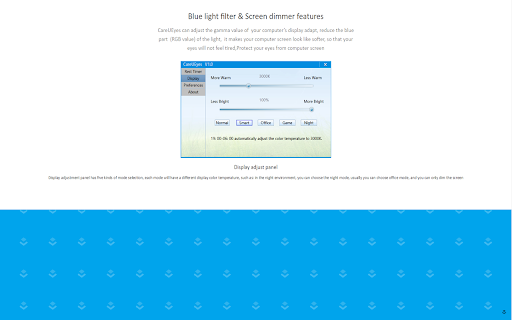

screen dimmer Screen dimmer control the brightness of the computer’s screen, when you work in a light or darker environment it can help you, It can dim all screens and monitors; LCD, TFT and LED backlit types, it can adjust the gamma value of your computer’s display adapt, reduce the blue part (RGB value) of the light, filter blue light, it makes your computer screen looks more comfortable.

Night Mode Pro
Switch to night mode and the display is much easier on your eyes! Night Mode Pro is an extension to change the screen's luminosity (Day/Night modes) when you surf the Internet. Besides, you can easily adjust the screen's brightness. Some features: 1. Protect your eyes with Night Mode extension by dimming the light when the environment is dark or vise-versa. 2. Easily change the screen brightness on either Day or Night modes. 3. In Night Mode, the entire page will be fading to dark and all text colors will be adjusted to the dark color as well. 4. In Day Mode, the page and all text colors will be switched to normal. Note 1: to whitelist a website from Night Mode, open the options page and add the URL to the list. Note 2: to report bugs, please fill the bug report form in the addon's homepage: https://mybrowseraddon.com/night-mode.html

Blue light filter
Blue light filter extension can adjust the gamma value of your computer’s display adapt, reduce the blue part (RGB value) of the light, filter the blue light, it makes your computer screen looks more comfortable, so that your eyes will not feel tired ,Protect your eyes from computer screen Blue light filter extension for all versions of Windows, including Windows XP, Windows 7, Windows 8, Windows 10. Tip!!! 1、To control the blue light and brightness of Windows system, you need to download CareUEyes.exe

Adjust Screen Brightness for Browser
Changes the color temperature of websites. This extension helps to reduces the screen brightness level for both daytime and nighttime periods to reduce eye strain when using the computer. It is designed to reduce eyestrain while reading documents online. To enhance the usability the extension offers two different values for daytime and nighttime duration. Note: It is possible to have no effect on daytime duration by setting the brightness level to 100% . Blue Light - Take care of your eyes by eliminating the blue light coming from your screen. Highly recommended especially during late night browsing. Simply slide to the preferred level of warmth. Blue light affects the quality of your sleep. Hence it is recommended for users to stop using their phones/computers at least two hours before they go to sleep. Brightness / Saturation / Contrast - Adjust the brightness, the contrast and the saturation to match the recommended healthy levels and protect your eyes.

Screen Dimmer
Screen Dimmer, light filters & break timer for eye protection. Reduces eye strain, encourages breaks, relax your vision. Eye Guardian: Screen Dimmer & Blue Light Filter by Eyeletic Eye Guardian is a lightweight screen dimmer and blue light filter Chrome extension designed to reduce eye strain, screen glare, and brightness discomfort caused by long hours in front of a screen. Unlike system brightness controls or dark mode, Eye Guardian works as a full-page screen dimmer and brightness filter, allowing you to darken or brighten any website beyond your device’s default limits. This makes it ideal for night use, low-light environments, and users with sensitive eyes. Screen Dimmer & Brightness Filter Dim or brighten your screen on any website using a smooth overlay. Works even when your system brightness is already at its minimum or maximum. Blue Light Filter Reduce exposure to harmful blue light to help prevent eye fatigue, headaches, and sleep disruption. Screen Brighter Mode Increase perceived brightness without increasing eye strain. Vision Trainer & Vision Tester Simple tools to help assess and improve visual comfort and focus. Customizable Break Timer (20-20-20 Rule) Get automatic reminders every 20 minutes to take a 20-second break and look 20 feet away, helping reduce digital eye strain. Reduces eye strain and visual fatigue from prolonged screen use Helps relax your eyes and maintain healthier screen habits Supports better sleep by lowering blue light exposure Enables comfortable screen viewing in any lighting condition Easy to use, lightweight, and adjustable at any time What is the best screen dimmer for Chrome? How can I dim my screen more than the default brightness? How do I dim my screen in Chrome? How can I reduce screen brightness at night? How can I relax my eyes while using a computer? How do I reduce eye strain from long screen use? Is a screen dimmer better than dark mode? Can lowering screen brightness help with sleep? Eye Guardian is a simple and effective eye protection and screen dimmer extension for anyone who spends a lot of time in front of a computer. By combining a screen dimmer, brightness filter, blue light filter, and break reminders, it helps protect your eyes, improve comfort, and support overall well-being. Ideal for remote workers, students, developers, designers, and night users.
