
poaddkofidcihbbodleahclcjoghdilh

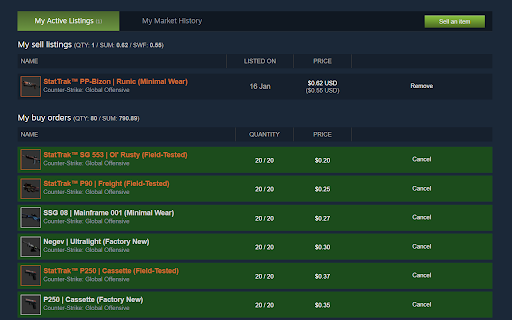
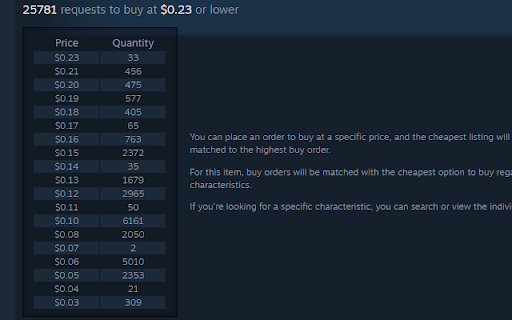


Helps keep your Steam Market buy orders profitable and enhances market pages with useful features. Steam Order Scanner (SORS) is a Google Chrome browser extension which main function is to keep your Steam Community Market buy orders profitable. The extension also adds some useful functionality to the Market pages.

Steam Market History Cataloger
Indexes your Steam Market transactions to be viewable within the extension and exportable to JSON and CSV. Steam Market History Cataloger is a Chrome extension used for loading and storing your listings from the Steam Community Market. Steam does not offer this data in a format that is easily consumable for those that need extensive information of their transactions. This tool aims to fulfill that role in a user-friendly way. Features: - Loads transactions from the Steam Community Market in any language or currency. Listings are stored to a local database in your browser for use at any time. - Allows viewing and filtering of all data loaded in a neat and responsive format within the extension. Transaction data can be exported to JSON and CSV. Data models for JSON can be found on the Github page. - Loads purchase history from your Steam account history. However, this data is not persisted to the extension. - Allows background loading. Not enabled by default. Enable this option from the preferences page. Loads are polled at an interval of 1 hour. - History pages at https://steamcommunity.com/market are displayed 100 results per page. More options are provided which allow you to move around your history easier. * Steam Market History Cataloger is not affiliated with Valve or Steam.

Buy Order Planner
Buy Order Planner is a simple Chrome extension to plan Steam Community Market (SCM) buy orders and quickly place buy order with your planned settings. This extension was created to ease the process of buy order creation and give ability to plan buy orders for items that might be listed soon. There was no intention to automate buy order creation process. Features - Plan buy order on any SCM listing page (via popup) - Set price & amount to buy at - View quick information about active buy orders on SCM listing page (via popup) - View list of all set planned buy orders. Following features available: - Filter by item name - Remove planned buy order - Quickly open native "Set buy order" modal (via popup) - Price & amount fields will be automatically filled with your values - Manually add items from any page (via popup) - View stats about planned orders - Quickly open "Set buy order" modal on all open SCM Listing pages via one button click - Shortcuts to open popup with settings and buy order modal (works only with enabled popup)

Buff Currency Converter
Don't you hate having to convert every price on buff.163.com? Well hate that no more, as with this solution we've solved the problem. It's VERY simple. 1. Install the extension 2. Click the Buff Currency icon in the extensions bar and choose the currency you want to convert to

Steamlevels Steam Enhancer
Autocraft Steam Badges & Steam Gems! Features to come: - Manage trades & friend invites - Upload animated artwork & invisible characters - See when someone is actually Online/Away from their Steam profile We are not affiliated with Valve, Steam or any of their partners. The Steam Data we use is from the Steam Web API and is provided on "as-is" terms. Made by King and Nacho with
