
dhpcikljplaooekklhbjohojbjbinega

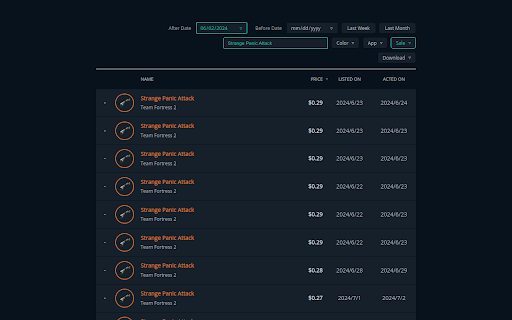


Indexes your Steam Market transactions to be viewable within the extension and exportable to JSON and CSV. Steam Market History Cataloger is a Chrome extension used for loading and storing your listings from the Steam Community Market. Steam does not offer this data in a format that is easily consumable for those that need extensive information of their transactions. This tool aims to fulfill that role in a user-friendly way. Features: - Loads transactions from the Steam Community Market in any language or currency. Listings are stored to a local database in your browser for use at any time. - Allows viewing and filtering of all data loaded in a neat and responsive format within the extension. Transaction data can be exported to JSON and CSV. Data models for JSON can be found on the Github page. - Loads purchase history from your Steam account history. However, this data is not persisted to the extension. - Allows background loading. Not enabled by default. Enable this option from the preferences page. Loads are polled at an interval of 1 hour. - History pages at https://steamcommunity.com/market are displayed 100 results per page. More options are provided which allow you to move around your history easier. * Steam Market History Cataloger is not affiliated with Valve or Steam.

Export Chrome History
Export your Chrome History as an Excel-readable CSV file or as a JSON file. To use this extension, click the puzzle piece in the top right, then click on Export Chrome History. This extension is limited by Chrome's 3 month limit - this is separate from your google account's history. If you have a Google account and need browser history from more than 3 months ago, please search online for help with Google Takeout instead. Version 1.0.1.0 * Indicate that the "Forever" option is limited by Chrome's 3 month (90 day) browsing history memory. * Pad the .csv minute and second times. For example, the time goes from 5:3:7 to 5:03:07 when viewed in plain text.

Lovable Chat Exporter
Export your Lovable chat history as Markdown, HTML, or JSON. Lovable Chat Exporter lets you save and download your complete Lovable.dev project chat history — something the platform doesn’t offer natively. Lovable renders its chat using a virtualized list, meaning only ~20 messages are in the DOM at any given time. Without a tool like this, older messages are simply inaccessible once you close the tab. This extension solves that. An “Export” button is injected directly into Lovable’s top navigation bar. As you scroll through your conversation, every message that enters the screen is captured and stored locally in your browser. Each message is identified by its unique ID (data-message-id), so there are never any duplicates — even if you reload the page or scroll back over the same messages. Want the full history at once? Click “Capture full history” and the extension will automatically scroll to the top of the conversation, waiting for each batch of older messages to load before continuing. • Markdown (.md) — paste into Obsidian, Notion, or any Git repo. Code blocks and formatting are preserved. • HTML (.html) — a clean, self-contained page you can open offline in any browser. • JSON (.json) — structured raw data for scripting, archiving, or building on top of. All captured data is stored exclusively in your browser using chrome.storage.local. Nothing is sent to any server — not to us, not to Lovable, not anywhere. The extension activates only on lovable.dev and requests only the permissions it needs: storage and downloads. Backup your build log before closing a project. Document AI-assisted development sessions for your team. Archive decision trails for future reference. Feed conversation history into other tools or LLMs. The source code is available on GitHub. Contributions and bug reports are welcome.

Bookmarks Exporter
Browser can export bookmarks as HTML file and there are extensions that can export bookmarks as JSON file, but their export files keep folder structure/hierarchy. Sometimes, the flat file structure (without folder hierarchy) is easier to read and import into other program. For instance, flat JSON and CSV files can be easily imported into database or tools like Notion, Excel. To keep folder structure info, this extension exports folder(s) as tags, it's easy to tell what folder(s) a particular bookmark item was in by looking at tags.

CoinGecko CSV Portfolio Exporter
Exports CoinGecko portfolios and transactions to CSV. Finally take full control of your crypto portfolio with the CoinGecko CSV Portfolio Exporter – the ultimate tool for exporting your CoinGecko portfolio and transaction data into CSV format in just a few clicks! Perfect for Tax Reporting! 🐸 Why Use This Extension? ✔️ Fast & Easy Exports – Download your total portfolio holdings and transactions directly from CoinGecko. ✔️ Accurate Data Capture – Exports all relevant details, including prices, holdings, PNL, and more. ✔️ Compatibility – Compatible with all major CSV software (Excel, Numbers, Google Sheets, and more!) ✔️ Secure & Private – No third-party servers; your data stays on your device. ✔️ One Free Export – Try it out! Then unlock unlimited exports with a small one-time payment. ✔️ Protect Your Data – If you ever lose your CoinGecko account your portfolio and transaction data will be protected by your own CSV file backups! 1️⃣ Open your CoinGecko Portfolio or Transactions page. 2️⃣ Click the CoinGecko Portfolio Exporter extension icon. 3️⃣ Name your export and choose your data columns (optional). 4️⃣ Click Export Data to CSV (or JSON). 5️⃣ Download your CSV file instantly! 🚀 Perfect for Crypto Investors, Analysts, and Tax Reporting! Version 1.0.4 Update: Now supports JSON file exports, customized data columns, see previews, and more visually appealing UI. ⚠️ Note: This extension is not affiliated with nor endorsed by CoinGecko. It simply automates data collection for personal use. ⚠️ Note: If the extension fails to export after confirming you are on the correct CoinGecko page, simply refresh the page. ⚠️ Note: Make sure to load all table rows (or most if more than 300). 🐸 Get started now and simplify your crypto tracking!
