
dgoaaennnmpodfdjdenapiaalbbeabkf
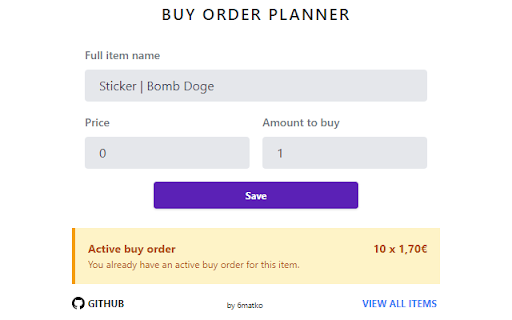

Buy Order Planner is a simple Chrome extension to plan Steam Community Market (SCM) buy orders and quickly place buy order with your planned settings. This extension was created to ease the process of buy order creation and give ability to plan buy orders for items that might be listed soon. There was no intention to automate buy order creation process. Features - Plan buy order on any SCM listing page (via popup) - Set price & amount to buy at - View quick information about active buy orders on SCM listing page (via popup) - View list of all set planned buy orders. Following features available: - Filter by item name - Remove planned buy order - Quickly open native "Set buy order" modal (via popup) - Price & amount fields will be automatically filled with your values - Manually add items from any page (via popup) - View stats about planned orders - Quickly open "Set buy order" modal on all open SCM Listing pages via one button click - Shortcuts to open popup with settings and buy order modal (works only with enabled popup)

Steam Plus
SteamPlus is an extension that will enhance your steam experience (Like Steam Inventory Helper, Csgofloat or Csgotrader.app)… SteamPlus is an extension that will enhance your steam experience (Like Steam Inventory Helper, Csgofloat or Csgotrader.app) Enhance work with tradeoffers (Fast check summary of offer, total cost). Auto accept gift offers (Empty from your side). With SteamPlus you can list multiple items, quick remove items from listing, edit etc. With SteamPlus you can check who's selling a specific item on Steam Market. You can quickly inspect on csgo items floats,rare patterns and prices (including extra charges). You can quickly inspect how much your csgo inventory costs. Check lowest price and volume of sales on steam market. Fast inspect items, stickers, prices on csgo items. Quick sell or quick buy items on steam market

BetterFloat
Enhance your website experience on 15+ CS2 skin markets! BetterFloat is a open-source skins shopping assistant enhancing your experience on CSFloat, Skinport & 8+ more CS2 markets. Highlights: - Inline display Buff163 & YouPin prices (highest buy order & lowest listing price) - Instantly see the price difference to Buff prices in a colored label - Display and gradual coloring of price percentages of applied stickers (%SP) - Get the accurate listing age of an item - Auto-refresh for newest items and apply up to 4 different filters - Extension popup offers highly customizable experience And much more: - No excessive delays or network traffic during your shopping session as Buff prices are temporarily stored locally and are only fetched every hour - You dislike certain functionality? Don't worry, most parts can be disabled separately in the extension popup - Privacy first: the extension has no access to your private data, accounts or keys whatsoever. So that your data stays your data This extension is in active development and more features will be added in the future. If you got any privacy concerns, feel free to check out the source code on Github: https://github.com/GODrums/BetterFloat Join the community on Discord: https://discord.com/invite/VQWXp33nSW NOTE: BetterFloat is developed independently, and uses all trademarks is under the fair use policy. If you are a legal representative of an affected company and would like your site to be removed, please contact me directly at legal@rums.dev. BetterFloat offers the option to upgrade to a paid plan. When creating a new account while actively using the extension on a supported market, the extension may apply an affiliate code. We will never overwrite other codes or do so when the extension is not actively used.

Buff Currency Converter
Don't you hate having to convert every price on buff.163.com? Well hate that no more, as with this solution we've solved the problem. It's VERY simple. 1. Install the extension 2. Click the Buff Currency icon in the extensions bar and choose the currency you want to convert to

CSFloat Market Checker
Shows the float value, paint seed, and more of Counter-Strike (CS:GO & CS2) items on the Steam Market or Inventories CSFloat Market Checker uses the dedicated CS Float (formerly CSGO Float) API to allow you to retrieve the float values, 3d models, and screenshots of market items directly from the page! GitHub: https://github.com/csfloat/extension * Allows verification for trades on CSFloat Market * Allows you to retrieve the float, paint seed, and float rank of any market or inventory item * Allows you to fetch the 3D model and screenshot of the item directly on the page * Fetches all floats on the page fast and automatically on page load * User-definable filters to highlight items with low floats or certain paint seeds * Shows market item stickers at a glance and their wear * Change the amount of items on the page up to 100 Compatibility: * This extension has been tested to work with Steam Inventory Helper and Enhanced Steam * Since this extension doesn't hook and modify HTTP headers to bypass steamcommunity.com CSP, it should have greater compatibility with other extensions. Please report issues using our GitHub issue tracker (https://github.com/csfloat/extension/issues).
