
bphfhlfhnohppnleaehnlfigkkccpglk

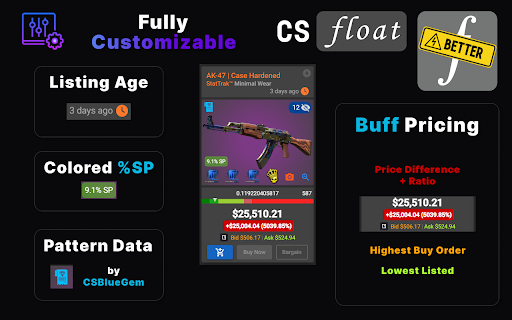

Enhance your website experience on 15+ CS2 skin markets! BetterFloat is a open-source skins shopping assistant enhancing your experience on CSFloat, Skinport & 8+ more CS2 markets. Highlights: - Inline display Buff163 & YouPin prices (highest buy order & lowest listing price) - Instantly see the price difference to Buff prices in a colored label - Display and gradual coloring of price percentages of applied stickers (%SP) - Get the accurate listing age of an item - Auto-refresh for newest items and apply up to 4 different filters - Extension popup offers highly customizable experience And much more: - No excessive delays or network traffic during your shopping session as Buff prices are temporarily stored locally and are only fetched every hour - You dislike certain functionality? Don't worry, most parts can be disabled separately in the extension popup - Privacy first: the extension has no access to your private data, accounts or keys whatsoever. So that your data stays your data This extension is in active development and more features will be added in the future. If you got any privacy concerns, feel free to check out the source code on Github: https://github.com/GODrums/BetterFloat Join the community on Discord: https://discord.com/invite/VQWXp33nSW NOTE: BetterFloat is developed independently, and uses all trademarks is under the fair use policy. If you are a legal representative of an affected company and would like your site to be removed, please contact me directly at legal@rums.dev. BetterFloat offers the option to upgrade to a paid plan. When creating a new account while actively using the extension on a supported market, the extension may apply an affiliate code. We will never overwrite other codes or do so when the extension is not actively used.

TradeUpSpy & SkinSnipe Inventory Tool
TradeUpSpy and SkinSnipe's inventory loader for Steam. Please verify that you are logged in to Steam to get your latest items. TradeUpSpy & SkinSnipe's inventory loader for Steam. Get your latest inventory items for trading up! Please verify that you are logged in to Steam to get your latest items. The extension uses the cookies permission to access Steam session cookies exclusively on the steamcommunity.com domain, with the sole purpose of identifying the user's SteamID. No data is shared with third parties or stored permanently.

CS2 Case Opening Stats
The ultimate tool for tracking, analyzing and visualizing your Counterstrike inventory history. Securely track & analyze your CounterStrike Case Opening Stats! YOUR CASE DATA, YOUR CHOICE : If you want to keep your cases locally, you're free to do so! You can see: - Your Most opened Items - The total amount of cases opened - All gold items you pulled - The number of cases you've opened since your last knife unboxing - The number of cases it took until you unboxed your first knife - Search skins by rarity or name By syncing you can: - Search by Rarity, Name or DATE - See your longest streak - Amount of case types you've opened - See Case with most Golds (Coverts, Classified etc.) HISTORIC CASE PRICE DATA - Get a calculation of money spent on cases (live price on the day of opening the case) - Filter by case AND MORE TO COME! If you have feature suggestions, join the Discord or message me on Twitter / X!

Buff Currency Converter
Don't you hate having to convert every price on buff.163.com? Well hate that no more, as with this solution we've solved the problem. It's VERY simple. 1. Install the extension 2. Click the Buff Currency icon in the extensions bar and choose the currency you want to convert to

Steam Inventory Helper
Enhances Steam: auto-selling skins, affordable items from various sources, and much more. Enhanced Steam Experience with SIH Streamline your Steam trading and inventory management with powerful tools for easier item selling, price comparisons, and inventory valuation. - Fast Multi-Item Sales: List hundreds of items for sale with just a few clicks. - Detailed Item Information: See float values, pattern indices, and prices of applied stickers and charms directly on item listings. - Inventory Valuation: View the total worth of your inventory based on prices from your chosen marketplace or service. - Price Comparisons: Compare item prices across global marketplaces for more informed trading. - Stacking Feature: Group identical items for easier browsing and organization. - Profit Calculation: Calculate profitability of items on the Steam Market. - Trade Notifications and Quick Accept: Get real-time trade information, with optional quick-accept features to confirm incoming trades directly. - Inventory Insights: Check if items are currently in use within the game or are part of a pending trade. - Quick Purchase Options: Buy items on the Steam Marketplace faster, with a quick-set purchase button to complete your collection directly from the inventory. Additional functionalities and enhanced features are exclusive to Steam Inventory Helper! Some features require authentication in the Steam community. - Access to Steam Sites (`://*.steampowered.com/* & *://steamcommunity.com/*`): This allows the extension to enhance your experience on Steam-powered platforms, displaying item information, inventory valuation, and pricing features. - Access to Gainskins API (`://sih.gainskins.com/*`): Provides Steam item pricing within your inventory, allowing access to public data on games, user profiles, and item details for improved accuracy in pricing and item statistics. - SteamCharts Access (`://steamcharts.com/*`): Used to gather real-time game statistics and currency conversion rates for accurate market information. - Market.CSGO Access (`://market.csgo.com/*`): Enables integration with market.csgo for trade offers (only after the user enables this feature within settings). - SteamRep Access (`://steamrep.com/*`): Allows access to public profile information, such as trade bans, VAC bans, or community bans, helping you make safer trading decisions. - Host_permissions": "" Fetching data from Steam and other marketplaces: Required for integration and display of real-time item prices and other relevant information across various trading platforms. This enables users to view up-to-date data for effective price comparison and optimal purchasing. - notifications: Used to send important notifications to the user about trade statuses, price updates, and other real-time events related to item trading on Steam. - alarms: Required for scheduling periodic tasks, such as price and inventory updates, to keep user information current without impacting browser performance. - storage: Used to locally store user preferences and settings, enhancing personalization and usability without the need to reconfigure the extension each time it’s opened. - unlimitedStorage: Required for storing large volumes of price and inventory data, allowing the extension to deliver information quickly without the 5 MB standard limit. - background: This permission allows SIH to operate in the background to perform tasks like price updates and trade monitoring, improving the functionality and efficiency of the extension. - webRequest: Used for analyzing and adjusting network requests, which ensures proper integration with trading platforms and protects against fraudulent sites. Access to web requests allows SIH to integrate accurately with various trading platforms. - declarativeNetRequest: This permission helps filter and modify network requests to protect user data and provide only relevant information about trades and prices. It avoids the need to route data through our servers. - declarativeNetRequestFeedback: Used to receive feedback on the status of network requests, allowing SIH to provide users with accurate information while maintaining proper data security. - cookies: Used to store login status information, allowing SIH to operate without repeatedly requesting login credentials, while providing personalized access to Steam and trade data. - activeTab: This permission allows SIH to interact with the active tab, automatically loading prices and item information for the user without extra navigation steps. - management: Used to check compatibility with other installed extensions that might conflict with SIH, allowing SIH to warn the user of potential risks and maintain extension stability. For more information and updates, please visit our official channels: Please refer to our change logs and FAQs for updates.
