
pnmchffiealhkdloeffcdnbgdnedheme

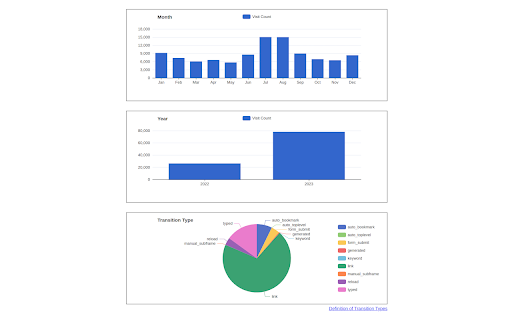
Search and analyze your unlimited history. History Trends Unlimited regularly syncs your history to a local database to work around the (approximate) 3-month time limit imposed by Chrome. Your history is saved locally; it's never shared or sent over the network. Features: * Interactive charts and stats. Click any of the bar/line/pie charts to filter by a value. * Search your history by keyword. Or browse it chronologically. * Access the raw data to perform your own analysis. Click the "Export These Results" link on the Trends or Search page. * Transfer your history to a new computer. See instructions on the Options page. NOTES: * This extension now requires a minimum of Chrome v109. * Uninstalling this extension will delete all of the history it has saved. To create a backup of your history, use the "Export History" button on the Options page. * This extension stores your history separate from Chrome's history, which means 1) clearing Chrome's history will not delete your history in this extension, and 2) this extension will not preserve the color of links you have already visited.

U History
Save & Read Chrome History on Your Google Drive - Backup selected month browsing history to your Google Drive.

Export Chrome History
Export your Chrome History as an Excel-readable CSV file or as a JSON file. To use this extension, click the puzzle piece in the top right, then click on Export Chrome History. This extension is limited by Chrome's 3 month limit - this is separate from your google account's history. If you have a Google account and need browser history from more than 3 months ago, please search online for help with Google Takeout instead. Version 1.0.1.0 * Indicate that the "Forever" option is limited by Chrome's 3 month (90 day) browsing history memory. * Pad the .csv minute and second times. For example, the time goes from 5:3:7 to 5:03:07 when viewed in plain text.

Export History/Bookmarks to JSON/CSV*/XLS*
Allows to export Chrome history and bookmarks into JSON file, which can be converted to CSV/XLS/XLSX file at http://www.json-xls.com Save Chrome history and bookmarks as JSON files. Click on 'Chrome History.json' or 'Chrome Bookmarks.json' button to download JSON file with your browser history/bookmarks. Also extension allows to transform original history JSON file exported with Google Takeout. If you want to convert downloaded JSON file to CSV/XLS/XLSX format please use online converter https://www.JSON-XLS.com/json2xls. NOTICE: This extension doesn't export history or bookmarks into CSV or Microsoft Excel Binary File Format (.xls) file. Any JSON file can be converted to CSV/XLS/XLSX format at https://json-xls.com/. ----------- v2.6: - Added link to 'Google Takeout' page. - Added button to transform 'Google Takeout' history json file (remove metadata information). v2.4: - Added 'no limit' options for customer. But please remember that Chrome limitations (not more than 3 months) are still primary. v2.3: - Changed maximum period due to Chrome limitations (not more than 3 months). v2.2: - Fixed downloading bookmarks (invalid 'Added date'). v2.1: - Fixed download on second attempt. v2.0: - Fixed download if "Ask where to save each file before downloading" is Checked in Chrome's Settings v1.9: - JSON files have been formatted! v1.8: - Extension requires 'Manage your downloads' permission (for Chrome v65.0.3325.181 or later)! v1.6: - Two new limits were added for history records: 100K and 500K! v1.4: - Allows to limit number of history records! v1.3: - CSV/TSV formats are available! v1.2: - human readable format for date/time stamp!

View Chrome History
You can easily delete, edit your history on Chrome browser A simple Chrome history manager which is user friendly and has an simple UI. This extension will replace Chrome's default history manager. It can search or clear browsing history by date range. This extension allows you to replace the default Chrome history with this chrome history plugin. Our extension replaces Chrome's history viewer with a more simple view. You can navigate directly and just scroll down to load your browsing history day by day How to use: • Click this extension's icon • Click menu item from Chrome -> History -> Show Full History • Use Chrome keyboard shortcuts Permissions Needed - This extension requires access to your browsing history so that our software can display your browsing history in a more simple and user-friendly manner. Please note your browsing history is kept in your local computer and NOT sent to any servers. We value your privacy.
