
dcoegfodcnjofhjfbhegcgjgapeichlf
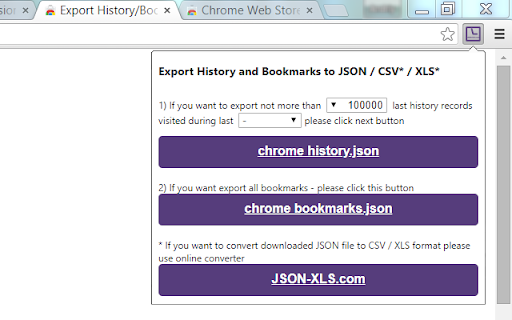
Allows to export Chrome history and bookmarks into JSON file, which can be converted to CSV/XLS/XLSX file at http://www.json-xls.com Save Chrome history and bookmarks as JSON files. Click on 'Chrome History.json' or 'Chrome Bookmarks.json' button to download JSON file with your browser history/bookmarks. Also extension allows to transform original history JSON file exported with Google Takeout. If you want to convert downloaded JSON file to CSV/XLS/XLSX format please use online converter https://www.JSON-XLS.com/json2xls. NOTICE: This extension doesn't export history or bookmarks into CSV or Microsoft Excel Binary File Format (.xls) file. Any JSON file can be converted to CSV/XLS/XLSX format at https://json-xls.com/. ----------- v2.6: - Added link to 'Google Takeout' page. - Added button to transform 'Google Takeout' history json file (remove metadata information). v2.4: - Added 'no limit' options for customer. But please remember that Chrome limitations (not more than 3 months) are still primary. v2.3: - Changed maximum period due to Chrome limitations (not more than 3 months). v2.2: - Fixed downloading bookmarks (invalid 'Added date'). v2.1: - Fixed download on second attempt. v2.0: - Fixed download if "Ask where to save each file before downloading" is Checked in Chrome's Settings v1.9: - JSON files have been formatted! v1.8: - Extension requires 'Manage your downloads' permission (for Chrome v65.0.3325.181 or later)! v1.6: - Two new limits were added for history records: 100K and 500K! v1.4: - Allows to limit number of history records! v1.3: - CSV/TSV formats are available! v1.2: - human readable format for date/time stamp!

Bookmarks Table
View your Chrome bookmarks by date in a sortable searchable table Search your entire Chrome bookmarks collection in a table format. Each column is sortable and searchable. To open click the icon to the right of your address bar. This is an Open Source source project, please see the website link for more info.

Bookmarks Backuper
Never lose your Chrome bookmarks again! Back up all your Chrome bookmarks to your Google Drive or Dropbox. Open and view in readable format from any computer, even on mobile. Why to back up: * never lose your bookmarks again * cloud storage for your bookmarks backup * have access to your bookmarks from any device Changelog 0.2.1.2 (February 17, 2026) * honoring user font preferences 0.2.1.1 (February 8, 2026) * added support for user preference media features 0.2.1.0 (February 7, 2026) * added Dropbox destination option 0.2.0.15 (January 6, 2026) * integrated Trusted Types with Content Security Policy, per Trusted Types (W3C Working Draft, 3 November 2025) 0.2.0.14 (January 5, 2026) * applied strict CSP, per Content Security Policy Level 3 (W3C Working Draft, 6 November 2025) 0.2.0.13 (November 12, 2025) * fixed credentials 0.2.0.12 (November 10, 2025) * improved compatibility with future Chrome versions 0.2.0.11 (June 2, 2025) * improved performance with reducing network data of API responses 0.2.0.10 (January 24, 2025) * stopped requesting user email 0.2.0.9 (March 6, 2024) * use instance id for error reporting 0.2.0.8 (February 23, 2024) * security update 0.2.0.7 (December 2, 2023) * updated extension manifest version to 3 0.2.0.6 (February 29, 2020) * ask before log out 0.2.0.2 (February 9, 2020) * improved error managing with Stackdriver Error Reporting 0.2.0.0 (February 2, 2020) * updated extension to use Chrome identity sign-in 0.1.2.5 (May 13, 2018) * improved stability 0.1.2.3 (April 29, 2018) * authorization - refresh token fix 0.1.2.2 (April 25, 2018): * fixed authorization fails for some users * added "Log out" link (viewable on popup mouse hover)

History Plus
A better browsing history. Save more history beyond 90 days, advanced search, autobackup and import/export. Better ways to manage your browsing history 🚀 Features 🚀 ✅ Save browsing history beyond 90 days before Chrome deletes it. ✅ Export history for backup or transfer to another computer ✅ Import history. Compatible with History Trends Unlimited's export. ✅ Pin most important pages in a single category page for easy access ✅ Automatically categorize your visits ✅ Advanced search ✅ Export current results ✅ Dark mode ✅ Quick filtering by click website logos ✅ Top visits by category ✅ Top visits by website

Starmarks Bookmark Manager
Unleash the power of your bookmarks! Effortlessly filter, sort, and organize your favorite websites with Starmarks. • Smart collections for advanced categorization • 5-star ratings and visit tracking for all your most-loved bookmarks • Drag select and edit multiple bookmarks at once • Full backup support with data export and download • Dark mode theme option for a sleek browsing experience Transform your bookmarking experience and never lose track of an important website again!
