
kloodnjmhgicecceindgbfpjencnhajh


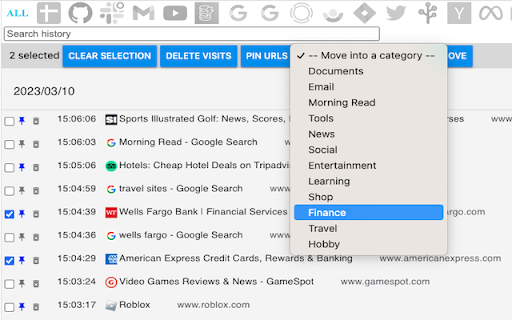
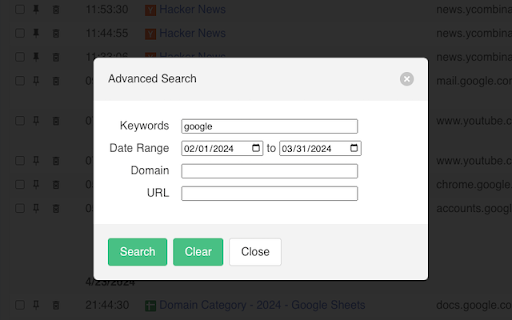

A better browsing history. Save more history beyond 90 days, advanced search, autobackup and import/export. Better ways to manage your browsing history 🚀 Features 🚀 ✅ Save browsing history beyond 90 days before Chrome deletes it. ✅ Export history for backup or transfer to another computer ✅ Import history. Compatible with History Trends Unlimited's export. ✅ Pin most important pages in a single category page for easy access ✅ Automatically categorize your visits ✅ Advanced search ✅ Export current results ✅ Dark mode ✅ Quick filtering by click website logos ✅ Top visits by category ✅ Top visits by website

Tree Style History
This extension displays your recent history in a tree style. This extension displays your recent history in tree style. This Work is based on Recent History(https://github.com/umarsheikh13/recent-history) and has get the permission to modify and publish the code as a new exttension, many thanks to Umar.

History Trends Unlimited
Search and analyze your unlimited history. History Trends Unlimited regularly syncs your history to a local database to work around the (approximate) 3-month time limit imposed by Chrome. Your history is saved locally; it's never shared or sent over the network. Features: * Interactive charts and stats. Click any of the bar/line/pie charts to filter by a value. * Search your history by keyword. Or browse it chronologically. * Access the raw data to perform your own analysis. Click the "Export These Results" link on the Trends or Search page. * Transfer your history to a new computer. See instructions on the Options page. NOTES: * This extension now requires a minimum of Chrome v109. * Uninstalling this extension will delete all of the history it has saved. To create a backup of your history, use the "Export History" button on the Options page. * This extension stores your history separate from Chrome's history, which means 1) clearing Chrome's history will not delete your history in this extension, and 2) this extension will not preserve the color of links you have already visited.

Bookmark Import/Export
Import and export your bookmarks easily 🚀 Bookmark Import/Export: Your Ultimate Bookmark Management Tool! 📚 Effortlessly transfer, backup, and organize your bookmarks across browsers and devices. Our powerful extension makes managing your digital library a breeze! ✨ Key Features: 📤 Export bookmarks to JSON, HTML, and CSV formats 📥 Import bookmarks from JSON, HTML, and CSV files 🔍 Advanced Export for fine-tuned control over your bookmarks 🎨 Clean, intuitive user interface for seamless navigation 🌙 Dark mode support that automatically matches your system theme 🌍 Multi-language support: Available in English and Spanish, adapting to your browser's language ⚡ Lightning-fast bookmark processing with improved performance 🔗 Seamless integration with Chrome's bookmark system 📁 Preserve your entire bookmark structure, including folders and subfolders 🔒 100% offline functionality - your data stays on your device 🛠️ How to use: 1. Click the extension icon in your toolbar 2. Choose between "Export" and "Import" tabs 3. For basic exporting: Select your preferred format (HTML, JSON, or CSV) and click "Export". 4. For advanced exporting: Click "Advanced Export" for more options and control 5. For importing: Click the "Import" button, select your bookmark file (HTML, JSON, or CSV), and watch as your bookmarks are instantly added! 💼 Perfect for: - Switching between browsers without losing your carefully curated bookmarks - Creating regular backups of your digital library - Sharing your favorite sites with friends and colleagues - Organizing your professional and personal browsing efficiently 🔒 Privacy-focused: We respect your data. Bookmark Import/Export works entirely offline, ensuring your browsing history and bookmarks remain private. 🆘 Need help or have suggestions? Visit our support page: https://github.com/AndryOre/bookmarks-import-export/issues 💡 Pro tip: Regular backups can save you from losing important bookmarks. Set a reminder to export your bookmarks weekly! Download Bookmark Import/Export today and take control of your digital bookmarks! 🌟

Better History
Replace the default browser history with this better history display. Powerful history manager for Chromium
