
pmpdhckhjldidihleecnmhiighbmpefn
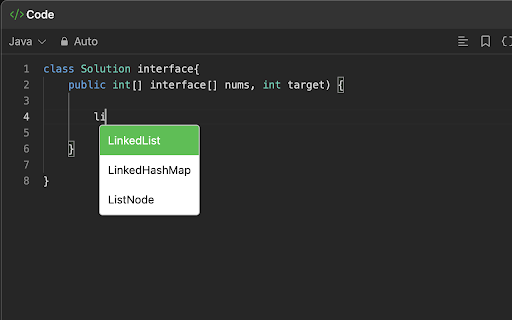


Provides autocomplete functionality for LeetCode. **🚀 Java AutoComplete Extension for LeetCode** *Master LeetCode challenges faster with real-time Java autocompletion!* Take your Java coding on LeetCode to the next level with this powerful Chrome extension. Whether you're solving algorithmic problems or practicing coding challenges, this extension offers instant suggestions for Java keywords, classes, and commonly-used methods as you type—directly on LeetCode. - **⚡ Instant Java Autocomplete**: - Automatically get suggestions for Java keywords like `class`, `try`, `finally`, and more as you code on LeetCode. - Type faster and reduce the risk of errors with real-time code suggestions. - **💡 Java Class Autocomplete**: - Supports Java standard library classes like `ArrayList`, `HashMap`, `Scanner`, etc. - Pre-filled code snippets to quickly insert common syntax patterns in your LeetCode solutions. - **🖱️ Cursor & Keyboard Navigation**: - Choose code suggestions using both **keyboard keys** (arrow keys, Enter) and **mouse clicks**—no need to leave your coding flow! - **🌟 Optimized for LeetCode**: - Tailored specifically for Java users practicing on LeetCode, helping you focus on solving problems, not typing out boilerplate code. - **🎨 Intuitive Design**: - Modern, user-friendly dropdown for easy suggestion selection with automatic scrolling and highlighting. - **🔧 Custom Variable Suggestions (upcoming in V2)**: - As you create your own variables while solving problems, they automatically appear in the suggestion list. Level up your coding speed and accuracy on LeetCode with this must-have Java autocomplete tool. Say goodbye to tedious typing and focus on what really matters—solving the problem! 💻 *Perfect for anyone practicing LeetCode using Java!*

LeetBoost: Auto-Complete for LeetCode
Provides context-unaware intellisense for LeetCode code editor. Allows users to make custom code snippets. LeetBoost is a free, lightweight Chrome extension designed to enhance your coding experience on LeetCode with context-unaware auto-complete and custom snippets. -Custom Snippets: Create, store, and insert your own code snippets into the LeetCode editor, saving time and reducing repetitive typing. - User-Friendly Interface: Manage snippets and use auto-complete features without interrupting your coding flow. - Designed for LeetCode: Specifically optimized for smooth integration with the LeetCode platform. -Multi-Language Support: Works for all programming languages used on LeetCode. Don't worry about using long, descriptive variable names. With LeetBoost, you can quickly insert them and custom snippets, saving you time and keeping your code readable. This extension streamlines your coding process. Do you have macros that are hundreds of lines long? Store them as snippets with LeetBoost to avoid copying and pasting every time. If you use LeetCode, there's no reason not to install this extension.

Leetcode Custom Themes
Allows you to change Leetcode Code Editor Themes With this extension, you may personalize the Leetcode Code Editor with a number of different themes. New Leetcode UI: Added support for new Leetcode UI. Provides a list of monaco based themes. Old Leetcode UI: Added two new themes, "Google Interview - Light and Dark" which simulates Google Doc where you will have no color schemes.

Leetcode Explained
Enhances Leetcode problems with solution code, video explanations, and GPT code analysis. Key features 🚀 Added into the Leetcode problem page 1️⃣ Code solutions in Python, Java, C++, and Javascript. 2️⃣ Top 5 popular youtube solution videos. 3️⃣ Top 5 companies asking that problem. Click the company tag to view all problems asked by that company GPT Features 🤖 Pin and open the extension and open to access 1️⃣ Generates the solution code using the problem description, constraints, hints, etc. 2️⃣ Gets the time and space complexity of your code Additional Features ⭐ 1️⃣ Elo rating added to 1500 problems. Number difficulty instead of Easy, Medium, Hard 2️⃣ Open settings in the popup to hide Leetcode examples and difficulty to simulate a real interview environment. Tutorial 📚 This extension only works with the new Leetcode UI. 1️⃣ Solution videos & code are available in the "Solutions" tab 2️⃣ Company tags are available in the Description tab Privacy 🔒 Everything is stored locally in your browser. No API key needed for GPT functionality. Simply login to chat.openai.com in your browser.

CF Analytics
CF Analytics Chrome extension improves the Codeforces profile webpage to include statistics of problems solved by the user. The ‘Problem Rating’ graph is a bar chart showing problems solved for each problem rating. The ‘Tags Solved’ graph is a doughnut chart displaying tags solved across any problem and also lists a count for each tag. The ‘Unsolved Problems’ shows a count of all problems attempted with not correct verdict and also lists them. The extension communicates only with the Codeforces API and runs entirely on the browser.
