
pmhchjgmgioomimpjkfpofmpfgnepiab

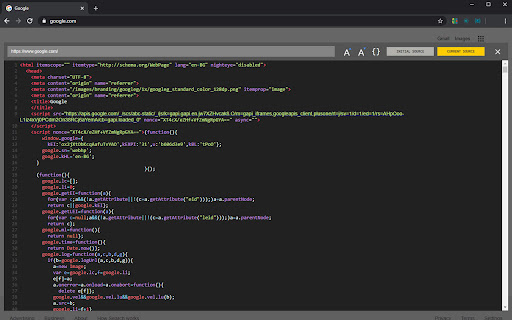

Night Viewer enables dark mode for the View Page Sources, structures and formats the code to make it more readable A lightweight and free Chrome Extension that enables dark mode for the View Page Source. Not only that, it also shows you how the browser has rendered a page’s original HTML into a functioning DOM, including modifications made by JavaScript. Night Viewer allows you to modify the font size of the View Page Source by increasing or decreasing it to make it more readable. CORE FEATURES ➤ Enable dark mode for the View Page Source ➤ Allow you to modify (increase and decrease) the font size at the View Page Source ➤ Beautify the source code to make it more readable ➤ Show you source code before JavaScript execution (returned from server) ➤ Show you source code after JavaScript execution (same as Developer FREE FOREVER Night Viewer is completely FREE extension that is developed by the team behind one of the best dark mode extensions - Night Eye More details can be found at http://nighteye.app WE CARE ABOUT PRIVACY Instead of simply pointing you to our privacy policy. We would like to address this topic in the most understandable language here. This extension is serverless - no requests are being made. The only data it collects and stores locally (on your computer) is what type of font have you chosen and the preferred source code view. FOLLOW US:: Facebook - https://facebook.com/night.eye.extension/ Twitter - https://twitter.com/nighteye_ext Pinterest -https://pinterest.com/nighteyeextension/

View Page Source
Get access to the page source with the click of a button. Easily view the page source with the click of a button

Code Beautifier (JS, CSS, HTML)
A lite and free JavasScript, CSS and HTML beautifier for your browser. Code Beautifier, is an extension that lets you easily beautify codes in your browser. This addon supports JavaScript, CSS, and HTML as input languages. You can either browser files via the (+) button at the UI (top-left corner) or drag & drop a file in the left textarea. The former method is preferred as the coding language for the input file can be detected automatically and the interface will be updated accordingly (no need to adjust the input language manually). Code Beautifier can work offline without the need for an internet connection. It uses an open-source library called "js-beautify" and available in this (https://github.com/beautify-web/js-beautify) GitHub repo. Moreover, it also uses the famous CodeMirror (https://github.com/codemirror/CodeMirror) library to format the input and output codes. Within the interface, there are several buttons at the top toolbar which are self-explanatory. There is also a settings list at the top which contains several options for the beautifier. Change any desired settings and see the live result in the output field. To download the beautified result, please click on the download button at the top toolbar. If you have a feature request or found a bug to report, please fill the bug report form on the addon's homepage (https://mybrowseraddon.com/code-beautifier.html).

Night XML - dark mode XML viewer
Night XML enables dark mode on all XML web pages. A lightweight and free Chrome Extension that enables dark mode for XML web pages. FREE FOREVER Night XML is completely FREE extension that is developed by the team behind one of the best dark mode extensions - Night Eye More details can be found at http://nighteye.app WE CARE ABOUT PRIVACY Instead of simply pointing you to our privacy policy. We would like to address this topic in the most understandable language here. This extension is serverless - no requests are being made. The only data it collects and stores locally (on your computer) is what type of font have you chosen and the preferred source code view. FOLLOW US: Facebook - https://facebook.com/night.eye.extension/ Twitter - https://twitter.com/nighteye_ext Pinterest - https://pinterest.com/nighteyeextension/

Quick source viewer
View current page sources: HTML + Javascript + CSS Displays HTML, Javascript and CSS sources of a page in a fast and compact way. Source code is syntax colorized and beautified for easy reading. Badge in the toolbar shows Javascript node counts. File size and cache header is displayed. Display onclick handlers with inline javascript. Look and feel can be modified with custom CSS. Selected urls can be hilighted in the list of source files.
