
cfmcghennfbpmhemnnfjhkdmnbidpanb
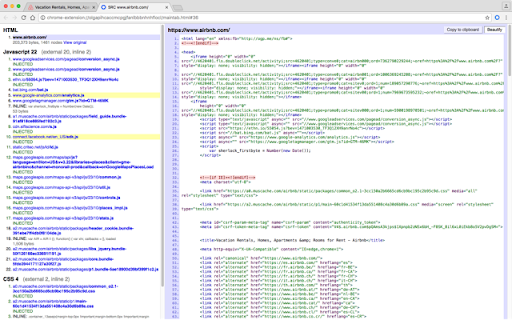


View current page sources: HTML + Javascript + CSS Displays HTML, Javascript and CSS sources of a page in a fast and compact way. Source code is syntax colorized and beautified for easy reading. Badge in the toolbar shows Javascript node counts. File size and cache header is displayed. Display onclick handlers with inline javascript. Look and feel can be modified with custom CSS. Selected urls can be hilighted in the list of source files.

View Rendered Source
View source is dead. See how the browser renders a page, not just what the server sends. A lightweight Chrome Extension that shows you how the browser has constructed (rendered) a page's original HTML into a functioning DOM, including modifications made by JavaScript. An essential tool for web developers using JavaScript frameworks like Angular, ReactJS and Vue.js, and for SEOs to understand how search engines see your pages, especially considering Google's dynamic serving workaround. Differences between raw and rendered versions are highlighted line-by-line showing how JavaScript has modified a page at render time. * Raw: The source code sent from the server to the browser before the DOM is rendered. The same as you'll see with traditional 'View Source' in the browser (after minor formatting tweaks) * Rendered: The rendered page after the source has been interpreted into a DOM, including any modifications made by Javascript * Difference: The difference between the rendered source and the raw source. Differences occur when JavaScript has modified the DOM. Adaptive website? If you serve different source code to mobile devices, emulate this easily with a mobile user-agent checkbox. Dynamic serving for Google? (More info: https://developers.google.com/search/docs/guides/dynamic-rendering) Using Google's dynamic rendering workaround designed for Javascript-heavy sites? Just request the raw source as Googlebot and ensure perfect technical SEO. Works with GatsbyJS and Prerender. DM the developer: https://twitter.com/ItsHogg

Live editor for CSS, Less & Sass - Magic CSS
Run this extension and start writing your CSS/Less/Sass code which gets applied immediately. The code you write will be saved in the browser extension's storage space or the site's local storage. ✓ Live editor for CSS/Less/Sass code - Preview changes as you write code ✓ Autocomplete ✓ Live edit CSS files and auto-save on file system ✓ Open code editor in external window ✓ CSS reloader ✓ Option to reapply styles automatically ✓ Syntax Highlighting ✓ Auto-generate CSS selectors with point-and-click ✓ Emmet support ✓ Color picker ✓ Convert code from Less/Sass to CSS ✓ Beautify / Format code ✓ Minify code ✓ Highlight DOM elements matching the CSS selectors ✓ Option to load this extension in iframes as well ✓ Get SVG icons ✓ Lint CSS code This extension is available for: You might want to use it for: ➤ No need to refresh pages to test your CSS/Less/Sass code ➤ Auto-save your changes to filesystem as you write the code ➤ Reload CSS resources without refreshing the page ➤ Speed-up development by writing code directly on your page ➤ Develop and test your code before finalizing your changes ➤ Apply some temporary styles (like hiding some components) ➤ Do CSS changes on any website ➤ The CSS/Less/Sass code you write gets applied as you write it ➤ The CSS reloader watches CSS files and live updates them immediately ➤ You can develop the code and see the output at the same time ➤ The code is saved in file/browser as soon as you write it ➤ The code editor is draggable and resizable ➤ Use code editor in external window for developing responsive pages ➤ The code you write is auto-saved for the site ➤ You can use "TAB" key to indent your code ➤ Running Magic CSS again, while it is already loaded, disables the code ➤ Press "Esc" or click on close to hide it ➤ The code is added at the bottom of the tag ➤ It includes CSS/Less/Sass beautifier ➤ It includes CSS minifier ➤ It highlights the DOM elements matching the CSS selectors ➤ Use it along with Chrome/Edge/Firefox/Opera Developer tools ➤ You might find it useful in creating your custom themes for websites based on Stylish / Stylist ➤ This extension was previously known as "MagiCSS - Live CSS Editor" Security and privacy: ⓘ No permissions approval is required for installing the extension ⓘ For advanced features, like "Apply styles automatically", permissions are requested on-demand ⓘ Mixpanel is used to get anonymized stats for improving UX ⓘ Browser extension's storage, localStorage etc are utilized for the extension's core features. Visit https://webextensions.org/ for further details. Connect with us:

CSS Scan
The fastest and easiest way to check, copy and edit CSS. This extension is paid and requires a license to use it. You can buy yours at https://getcssscan.com CSS Scan is the fastest way to inspect and copy CSS. Visualize the CSS of any element you hover over instantly and copy its entire CSS rules with a single click. Featured in: CSS Tricks, Smashing Magazine, Product Hunt, Designer News, t3n and many more websites.

Checkbot: SEO, Web Speed & Security Tester 🚀
Checkbot is a powerful website testing tool that tells you how to improve the SEO, page speed and security of your website. Checkbot crawls 100s of pages at the same time checking for 50+ common website problems based on web best practices recommended by Google and Mozilla. These checks include: 📊 SEO TESTS: Broken link checker, missing or long page titles/descriptions/headings, duplicate page content, HTML/CSS/JavaScript validator, canonical URLs, image ALT tags, robots.txt, URL naming, mobile friendly pages, deprecated web features, 404 pages, meta tags, temporary/meta redirects, thin pages & sitemap setup. 🚀 PAGE SPEED TESTS: Minification, network compression, resource caching, render blocking or duplicate CSS/JavaScript, excessive inlining of CSS/JavaScript, redirecting URLs & redirect chains. 🔒 WEB SECURITY TESTS: Security headers, HTTPS and mixed content checker, HSTS with preloading, content sniffing, iframe restrictions & password forms security. See https://www.checkbot.io/guide/ for the 50+ web best practices Checkbot will test for you to help make your site faster, more secure and rank higher in search results. 🏆 HubSpot, Best Chrome Extensions 2021 - "Checkbot combines technical SEO with modern security to help you analyze both how safe and how optimized a website is for search engines" https://blog.hubspot.com/marketing/best-chrome-extensions 🏆 Einstein Marketer, "11 Must-Have Google Chrome Extensions (for Marketers, Entrepreneurs and Businesses)...If you own a website, this Chrome extension is going to help you supercharge your load speed, rank higher in Google and improve the security" https://www.einsteinmarketer.com/chrome-extensions-marketers/ 🏆 Product Hunt, #3 Product of the Day award https://www.producthunt.com/posts/checkbot-for-chrome The free version lets you check unlimited small websites as often as you want but you need to upgrade to run website audits with these features: - Advanced crawl settings to exclude pages by URL pattern, type, folder and subdomain See https://www.checkbot.io/#pricing for more. Follow Checkbot for updates: Visit https://www.checkbot.io/faq/ for support, answers to frequently asked questions and to give feedback. Checkbot will ask for the "Read and change all your data..." permission for the sole purpose of crawling and testing the websites you ask Checkbot to check. This is currently the most restrictive permission we can ask for that allows this and Google has also reviewed this extension to check it follows best practices on requesting permissions. Your regular browsing will be unaffected: Checkbot does not observe or modify anything outside of the Checkbot tab. If you still have concerns, you can opt to create a new Chrome user profile to install Checkbot inside of to isolate it from your regular browsing.
