
gieabiemggnpnminflinemaickipbebg
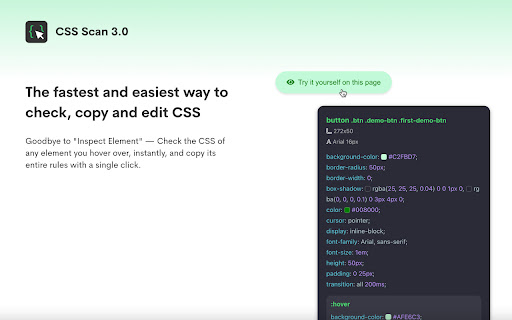


The fastest and easiest way to check, copy and edit CSS. This extension is paid and requires a license to use it. You can buy yours at https://getcssscan.com CSS Scan is the fastest way to inspect and copy CSS. Visualize the CSS of any element you hover over instantly and copy its entire CSS rules with a single click. Featured in: CSS Tricks, Smashing Magazine, Product Hunt, Designer News, t3n and many more websites.

Screen Ruler - Measure and Inspect the Web
Web inspector for designers & developers. Measure elements, extract CSS & colors, capture screenshots & more. Screen Ruler is the perfect companion for web developers and designers wanting to validate the implementation of their websites. Once activated, it allows you to view the sizes, margins, paddings, tag names, IDs, and classes simply by hovering over any web content. You can also select an item to measure distances to others. - Toggle the extension by clicking the icon, selecting from the right-click context menu, or using the shortcut `Alt/Option + Shift + R`. - Hover over items on web pages to display their sizes, margins, paddings, tag names, IDs, and classes. - Select an item by clicking on it directly; this will turn the highlight red. To deselect, click again, press Escape or select a different item. - To select the parent, use `Alt/Option + Up`. Use `Alt/Option + Down` to reverse your selection. - View the computed CSS of the currently selected item in the side panel. Click the "Copy CSS" button to copy the computed CSS to your clipboard. - Measure the pixel size of any element. - Measure the pixel distance between any two elements. - HTML tag names, class names and IDs. - Parent/child selection shortcuts. - Responsive selections resize with your browser window. - Access from the context menu. - Computed CSS inspect. - Copy CSS to clipboard. - Page rulers for precise measurements (horizontal and vertical guides with crosshair). - Color picker tool to sample and copy colors from anywhere on the page. - Element Screenshots: Capture cropped screenshots of selected items using `Ctrl/Cmd + Shift + S`. - Accessibility Issues: Automatically detect and highlight WCAG contrast failures in your selection with actionable recommendations. - Works on any web page. - Customize keyboard shortcuts by visiting `chrome://extensions/shortcuts`. Screen Ruler PRO A PRO tier is also available which unlocks additional features. - Floating Inspector: See detailed properties when you hover, including position, size, rendered font, colors and more. - Responsive Mode: Test your designs across different device viewports with an interactive device emulator and custom dimensions. - Box Shadow Visualization: Interactive breakdown of multi-layer box shadows with an exploded view. - Animation Analysis: Visualize CSS animation timing curves and copy animation properties. - Asset Extraction: Extract and download images, SVGs, and vector assets. - Color Extraction: Extract and copy color palettes from selected content with hex, RGB, and HSL values. - Layout Grid Overlay: Overlay a customizable layout grid for perfect design alignment. - CSS Selector Search: Find and highlight items using CSS selectors. - Typography: Analyze and extract all typography styles used in your selection. - X-Ray Mode: Reveal the underlying structure of the page by outlining all content. PRO requires a one-off payment for lifetime access. Made For - Developers: Spot layout issues or identify alignment problems. Whether you're tweaking margins and paddings, or just making sure everything lines up correctly, this tool becomes an indispensable addition to your development toolkit. - Designers: Ensure your designs have been implemented with pixel-perfect accuracy. It acts as a bridge between design and development, allowing you to check if every component aligns exactly as you intended. - Designed specifically for stability in Google Chrome 116+. - Installable on any Chromium browser; however, for the best experience, make sure your browser supports all the required APIs (like Side Panel and Offscreen). If there are any issues with installation, update your browser to the latest version and try again.

Inspecta - visual QA and CSS editor
Inspect, compare and update CSS visually 🛠 Inspecta – Find and Fix UI Bugs on Live Websites. Inspecta lets designers and developers inspect, compare, and visually edit live website styles. Copy styles from Figma, compare CSS, fix mismatches, and export the updated CSS or send is straight to AI code agents for implementation —all without writing code. ✨New: Send text and CSS changes straight to Cursor AI and GitHub Copilot agents. 🔗 Figma Plugin Use our companion Figma plugin to instantly compare styles between Figma and live web pages: Figma to Inspecta: https://www.figma.com/community/plugin/1397609843224212500/figma-to-inspecta-compare-design-to-web ✨ Key Features 🔁 Compare with Figma Copy styles from a Figma element and apply them directly to a live element. Detect mismatched colors using Figma color styles and variables. Replace SVGs (temporary method) from Figma onto live elements. 🧠 Batch Color and Fonts Fixes Fix all your website colors and fonts in one click using Figma suggested colors popup. 🔍 Inspect Elements Hover any element to view its CSS properties: text, colors, spacing, layout, borders, and more. Use the eyedropper to identify colors. Draw guides for more accurate inspection. 🎨 Visual CSS Editing Edit CSS in real-time with a visual interface—just like in your design tools. Easily modify: display, size, spacing, colors, typography, borders, radius, position, box-shadow, and opacity. 🧾 Page Overview Get a full breakdown of used colors (backgrounds, texts, borders) and fonts (family, size, weight, line height). Ideal for design audits and QA reviews. 🧘 Isolate Elements Select any element and hide everything else to inspect and edit in focus mode. 📏 Spacing Overlays & Distance Guides Hover to view padding and margin overlays. Measure distances between elements for pixel-perfect layout refinement. 🖼 Pixel-Perfect Comparison Upload or paste your Figma design as an overlay for accurate side-by-side comparison with the live page. 📤 Export & Share CSS Export all your CSS changes as a single file or copy individual snippets. Share updates directly with developers or use with your Vibe-code AI tool for faster implementation.

UI Inspector - Visual CSS Editor
Inspect and visually edit elements and their CSS directly on the page for faster design and UI debugging. A Visual CSS Editor for the Browser Elevate your web development and design workflow with UI Inspector, a powerful Chrome extension that lets you inspect, edit, and style any web page visually and in real-time. Skip the hassle of diving into DevTools and make instant adjustments directly on the page. With UI Inspector, you can: - Inspect elements — activate the extension and click on any element to view its attributes. - Edit attributes — modify styles in the visual editor and see changes in real time. - Control typography — adjust font family, size, weight, line height, and letter spacing. - Configure layout and spacing — set margins, paddings, display properties, and alignment. - Enhance backgrounds and shadows — apply custom colors, gradients, background blurs, and shadow effects. - Customize borders — adjust border width, style, color, and radius. - Fine-tune appearance — control opacity, blend modes, and transforms like rotation. - View all changes — see a list of every element you've updated in one place. - Copy CSS — view and copy the compiled CSS of your changes instantly. Unlock UI Inspector PRO and: - Apply changes globally — use the sensitivity slider to automatically apply style changes to similar elements across the page. - Style presets — save any element as a reusable preset and apply it across any website with a single click. - Export as Tailwind, SCSS, or JSX — copy your changes in the code format your project needs. - Export screenshots — capture high-resolution PNG screenshots of individual styled elements. - Export to GitHub — generate a GitHub issue with your design changes compiled to CSS. Who Is UI Inspector For? Web Developers: - Accelerate front-end development: quickly identify and fix layout or styling issues by editing elements on the fly. - Simplify CSS debugging: bypass DevTools with an intuitive, visual editor. - Export production-ready code: copy changes as CSS, Tailwind, SCSS, or JSX directly into your codebase. Web Designers: - Real-time design validation: adjust and perfect designs in the browser to ensure pixel-perfect implementation. - Bridge design and development: collaborate more effectively by directly tweaking live pages. - Save and reuse presets: build a library of reusable styles and apply them consistently across projects. 1. Activate the Extension: click the UI Inspector icon in your browser toolbar or press Alt/Option + Shift + I. 2. Inspect and Edit Elements: hover over any element to select it and instantly view its adjustable styles. 3. Modify Styles Visually: use the intuitive interface to change typography, layout, spacing, backgrounds, borders, shadows, and more. 4. Save and Apply Presets: create style presets for consistent design and apply them to any element on any site. 5. Export and Share: copy CSS in multiple formats, capture screenshots, or export changes as a GitHub issue. Compatible with any Chromium browser that supports the Side Panel API. For best results, ensure your browser supports all required APIs. If installation issues arise, update your browser to the latest version and try again.

Live editor for CSS, Less & Sass - Magic CSS
Run this extension and start writing your CSS/Less/Sass code which gets applied immediately. The code you write will be saved in the browser extension's storage space or the site's local storage. ✓ Live editor for CSS/Less/Sass code - Preview changes as you write code ✓ Autocomplete ✓ Live edit CSS files and auto-save on file system ✓ Open code editor in external window ✓ CSS reloader ✓ Option to reapply styles automatically ✓ Syntax Highlighting ✓ Auto-generate CSS selectors with point-and-click ✓ Emmet support ✓ Color picker ✓ Convert code from Less/Sass to CSS ✓ Beautify / Format code ✓ Minify code ✓ Highlight DOM elements matching the CSS selectors ✓ Option to load this extension in iframes as well ✓ Get SVG icons ✓ Lint CSS code This extension is available for: You might want to use it for: ➤ No need to refresh pages to test your CSS/Less/Sass code ➤ Auto-save your changes to filesystem as you write the code ➤ Reload CSS resources without refreshing the page ➤ Speed-up development by writing code directly on your page ➤ Develop and test your code before finalizing your changes ➤ Apply some temporary styles (like hiding some components) ➤ Do CSS changes on any website ➤ The CSS/Less/Sass code you write gets applied as you write it ➤ The CSS reloader watches CSS files and live updates them immediately ➤ You can develop the code and see the output at the same time ➤ The code is saved in file/browser as soon as you write it ➤ The code editor is draggable and resizable ➤ Use code editor in external window for developing responsive pages ➤ The code you write is auto-saved for the site ➤ You can use "TAB" key to indent your code ➤ Running Magic CSS again, while it is already loaded, disables the code ➤ Press "Esc" or click on close to hide it ➤ The code is added at the bottom of the tag ➤ It includes CSS/Less/Sass beautifier ➤ It includes CSS minifier ➤ It highlights the DOM elements matching the CSS selectors ➤ Use it along with Chrome/Edge/Firefox/Opera Developer tools ➤ You might find it useful in creating your custom themes for websites based on Stylish / Stylist ➤ This extension was previously known as "MagiCSS - Live CSS Editor" Security and privacy: ⓘ No permissions approval is required for installing the extension ⓘ For advanced features, like "Apply styles automatically", permissions are requested on-demand ⓘ Mixpanel is used to get anonymized stats for improving UX ⓘ Browser extension's storage, localStorage etc are utilized for the extension's core features. Visit https://webextensions.org/ for further details. Connect with us:
