
lflcmgiebpalnlcjbadhamjfkmkfpjmg

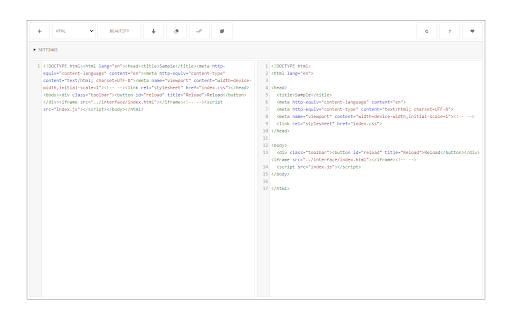


A lite and free JavasScript, CSS and HTML beautifier for your browser. Code Beautifier, is an extension that lets you easily beautify codes in your browser. This addon supports JavaScript, CSS, and HTML as input languages. You can either browser files via the (+) button at the UI (top-left corner) or drag & drop a file in the left textarea. The former method is preferred as the coding language for the input file can be detected automatically and the interface will be updated accordingly (no need to adjust the input language manually). Code Beautifier can work offline without the need for an internet connection. It uses an open-source library called "js-beautify" and available in this (https://github.com/beautify-web/js-beautify) GitHub repo. Moreover, it also uses the famous CodeMirror (https://github.com/codemirror/CodeMirror) library to format the input and output codes. Within the interface, there are several buttons at the top toolbar which are self-explanatory. There is also a settings list at the top which contains several options for the beautifier. Change any desired settings and see the live result in the output field. To download the beautified result, please click on the download button at the top toolbar. If you have a feature request or found a bug to report, please fill the bug report form on the addon's homepage (https://mybrowseraddon.com/code-beautifier.html).

Source Code Formatter & Beautifier
a JavasScript, CSS, and HTML beautifier for your browser that is lightweight. Source Code Formatter & Beautifier, is an extension that lets you easily beautify codes in your browser. This addon supports JavaScript, CSS, and HTML as input languages. You can either browser files via the (+) button at the UI (top-left corner) or drag & drop a file in the left textarea. The former method is preferred as the coding language for the input file can be detected automatically and the interface will be updated accordingly (no need to adjust the input language manually). [+] Features 1. When the UI is closed, a stand-alone popup window is present with no background activities. 2. purely web-based and capable of beautifying HTML, CSS, and Javascript. 3. has many interface-based adjustment options.

Code Formatter
A Chrome extension to identify fonts & stlyes used by a web page. Instant Code Formatting: Beautify your code with a single click, saving time and improving readability. Multi-Language Support: Supports a wide range of popular languages including JavaScript, TypeScript, React, HTML, XML, GraphQL, and SQL. User-Friendly Interface: Easy-to-use design that integrates smoothly into your workflow. On-the-Go Convenience: Format code instantly wherever you are, right from your browser.

Code Beautifier Online
Free java script beautifier for your browser. A lightweight and free JavasScript, CSS, and HTML beautifier. "Code Beautifier Online" is an add-on that allows you to quickly beautify scripts in your browser. JavaScript, CSS, and HTML are among the input languages this extension supports. You may either browse files using the (+) button at the UI (top-left corner) or drop a file into the left textarea. Because code formatting is based on detected coding language, it's preferable to utilize the latter method since the input language can be determined automatically and the user interface will be updated accordingly (no need to modify the input language manually). With "Code Beautifier Online," you may use it offline. It makes use of an open source library called js-beauty. Furthermore, it utilizes the well-known CodeMirror (https://github.com/codemirror/CodeMirror) library to format input and output codes. The interface has a number of buttons in the top toolbar that are self-explanatory. There is also a list of preferences at the top with various options for the beautifier. Select any option and observe the effect straight away in the output field by changing any desired setting. To obtain a beautified result, please click the download button in the top toolbar.

Javascript Formatter
Want to format your javascript files? You can do so once you install this software. Here is how to format your javascript files. Copy and paste the javascript code into the textbox. Choose the level of indentation you wish to use Press the Format javascript button. The main benefit in using a javascript formatter is to make your javascript code more easy to read for humans. This helps to prevent simple syntax errors/bugs can be caught quickly after you make your javascript code easier to read for the human eye.
