
deecjbhfakhcegonhediiniinjdgmfie
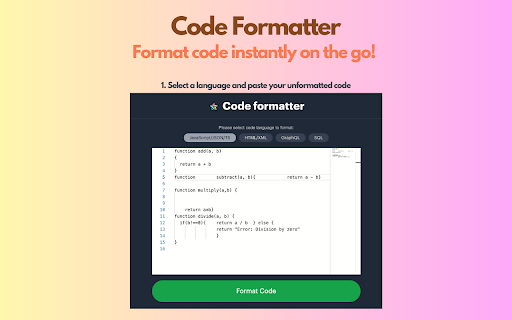


A Chrome extension to identify fonts & stlyes used by a web page. Instant Code Formatting: Beautify your code with a single click, saving time and improving readability. Multi-Language Support: Supports a wide range of popular languages including JavaScript, TypeScript, React, HTML, XML, GraphQL, and SQL. User-Friendly Interface: Easy-to-use design that integrates smoothly into your workflow. On-the-Go Convenience: Format code instantly wherever you are, right from your browser.

Fontstorage
The simplest extension for identifying and selecting fonts on a website. The extension enables you to identify fonts on any website, allowing you to select a font from the Fontstorage collection directly on the site and obtain the CSS code for embedding.

Font Picker
Use font picker for detection and as google font finder extension. A picker used for identify size on website with fond finder tool. The font detection is a fast, visual inspector for colors, spacing, and contrast. It works on any site, opens in a compact panel, and remembers a safe size. You can close the extension font reader either by clicking the cross in the window or by clicking on the icon. ⭐ Clean CSS copy presets: All, fint finder, typography, colors. ⭐️ Live on-page inspection with hover and click on any element. ⭐️ Web/Local badges Chrome font picker app rendered entity. ⭐️ Saved elements for typographic references and components. Hover or click to lock an element; the panel shows selector, Copy CSS. Enhanced mode in font finde tells you if access is blocked. You need to download every time you launch the extension, but you don't need to give the browser permission again in the font picker from website. Show or hide typography, color, and spacing sections to keep the UI minimal. The window of font picker Chrome extension clamps to your screen, starts on the element tab, and won’t open minimized. - All CSS data for a complete style block. - Typography for layout-ready text sets. - Colors for palette with font extensions. Family and stack, weight with readable names, size, line-height, letter/word spacing, style, variant, plus quick weight copy buttons. The font finder chrome extension is grouped so you see the essentials without clutter. 1️⃣ Quick domain-based local info loading on a permitted domain. 2️⃣ Safe bounds font size picker Chrome extension offscreen resize. 3️⃣ Duplicate saved items are strictly prevented to keep cleanliness. Front-end may find font on website, considering devs verifying rendered data and spacing; UI/UX designers auditing typography, colors, and contrast; QA/accessibility teams checking WCAG levels quickly. Also front finder for teams sharing data for consistent design systems. Temporarily halt selection so you can interact with the page freely and the web font picker tool won't work. Tap it when you need to scroll, click, or trigger UI states without losing your place—then resume inspection in a single step and you can identify font on website. • URL to webpage. • Hostname stamp. • A font style picker. • Size and weight. • Style + line-height. When you do something in font picker for website, the panel shows clear visual cues: a check mark toast updates the saved counter, copy actions trigger a brief copied message hint on the icon, and font picker access-denied states surface a warning so you know exactly what to fix before continuing. Q: Do I need DevTools open? A: No, everything is in the floating panel. Q: Will it slow my page? A: The chrome extension font picker is well optimized. When the inspector is active, the font finder from website grabs your cursor to highlight elements, so page clicks and hovers are intercepted. Turn on pause and the extension “steps aside”: you can click buttons and interact with the page normally. Ready to use font family picker again? Switch off pause and keep going. ◆ Drag to reposition the panel. ◆ Resize edges to fit your view. ◆ A font picker remembers size. ◆ Clamp to your current screen. ◆ Maximize for a safe big view. 📝 Comparison with Other Tools Unlike What Font extension, which mainly reports the declared family name, our tool reveals the actual rendered source, offers one-click clean CSS presets coping and saves full element snapshots. Different from whatfont extension, you can also load local presents for accuracy and keep a list. 1️⃣ Begin using website font picker download, click the icon, hover or click an element. 2️⃣ Explore the information in the window by hiding sections with data you don't need now. 3️⃣ Set pause mode when you need to change something without blocking from tool. We really tried to make a great picker extension and are always open to your feedback for further improvements. Install and enjoy comfortable use.

Documulate: Web & PDF Annotation
A Chrome extension for highlighting and annotating web pages **Transform how you read, research, and learn online with Documulate – your all-in-one annotation powerhouse for the web and PDFs.** Documulate seamlessly integrates with your browsing experience, allowing you to highlight important information, add contextual notes, and organize your research across websites and PDF documents in one unified system. ### 🖌️ Effortless Highlighting & Annotation Instantly highlight text on any webpage or PDF with customizable colors. Add personal notes and comments to capture your thoughts and insights as you browse. ### 🔄 Seamless Cross-Device Sync Your annotations follow you everywhere. Access your highlights and notes across all your devices with secure cloud synchronization. ### 🔐 Secure & Private Your data belongs to you. Documulate offers robust user authentication and secure storage of all your annotations. ### 📚 Personal Knowledge Library (NEW) Build your digital library of annotated content. Easily search, filter, and organize your highlights and notes for quick reference. ### 🔍 Smart Research Assistant (NEW) Ask questions about the current page or your uploaded documents and get intelligent answers based on your content. ## Perfect For: - Students capturing key concepts from online resources - Researchers collecting and organizing information - Professionals reviewing documents and extracting insights - Anyone who wants to remember and organize what they read online Boost your productivity and transform your digital reading experience with Documulate – where highlighting is just the beginning. **Install now and start building your personal knowledge base today!**

QR Code Reader
A chrome extension for reading QR code from webpage. Get the link to the QR Code shown on any web page. To use just open extension or use 'Command/Ctrl+Shift+F' shortcut to read QR code on current tab. Yes it is that easy.
