
anbgbmokacodghgnkilkgbcbkbhhndbf
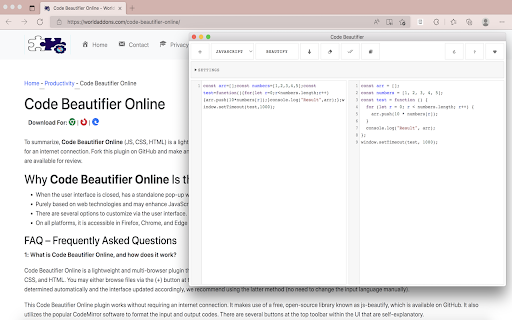
Free java script beautifier for your browser. A lightweight and free JavasScript, CSS, and HTML beautifier. "Code Beautifier Online" is an add-on that allows you to quickly beautify scripts in your browser. JavaScript, CSS, and HTML are among the input languages this extension supports. You may either browse files using the (+) button at the UI (top-left corner) or drop a file into the left textarea. Because code formatting is based on detected coding language, it's preferable to utilize the latter method since the input language can be determined automatically and the user interface will be updated accordingly (no need to modify the input language manually). With "Code Beautifier Online," you may use it offline. It makes use of an open source library called js-beauty. Furthermore, it utilizes the well-known CodeMirror (https://github.com/codemirror/CodeMirror) library to format input and output codes. The interface has a number of buttons in the top toolbar that are self-explanatory. There is also a list of preferences at the top with various options for the beautifier. Select any option and observe the effect straight away in the output field by changing any desired setting. To obtain a beautified result, please click the download button in the top toolbar.

Live editor for CSS, Less & Sass - Magic CSS
Run this extension and start writing your CSS/Less/Sass code which gets applied immediately. The code you write will be saved in the browser extension's storage space or the site's local storage. ✓ Live editor for CSS/Less/Sass code - Preview changes as you write code ✓ Autocomplete ✓ Live edit CSS files and auto-save on file system ✓ Open code editor in external window ✓ CSS reloader ✓ Option to reapply styles automatically ✓ Syntax Highlighting ✓ Auto-generate CSS selectors with point-and-click ✓ Emmet support ✓ Color picker ✓ Convert code from Less/Sass to CSS ✓ Beautify / Format code ✓ Minify code ✓ Highlight DOM elements matching the CSS selectors ✓ Option to load this extension in iframes as well ✓ Get SVG icons ✓ Lint CSS code This extension is available for: You might want to use it for: ➤ No need to refresh pages to test your CSS/Less/Sass code ➤ Auto-save your changes to filesystem as you write the code ➤ Reload CSS resources without refreshing the page ➤ Speed-up development by writing code directly on your page ➤ Develop and test your code before finalizing your changes ➤ Apply some temporary styles (like hiding some components) ➤ Do CSS changes on any website ➤ The CSS/Less/Sass code you write gets applied as you write it ➤ The CSS reloader watches CSS files and live updates them immediately ➤ You can develop the code and see the output at the same time ➤ The code is saved in file/browser as soon as you write it ➤ The code editor is draggable and resizable ➤ Use code editor in external window for developing responsive pages ➤ The code you write is auto-saved for the site ➤ You can use "TAB" key to indent your code ➤ Running Magic CSS again, while it is already loaded, disables the code ➤ Press "Esc" or click on close to hide it ➤ The code is added at the bottom of the tag ➤ It includes CSS/Less/Sass beautifier ➤ It includes CSS minifier ➤ It highlights the DOM elements matching the CSS selectors ➤ Use it along with Chrome/Edge/Firefox/Opera Developer tools ➤ You might find it useful in creating your custom themes for websites based on Stylish / Stylist ➤ This extension was previously known as "MagiCSS - Live CSS Editor" Security and privacy: ⓘ No permissions approval is required for installing the extension ⓘ For advanced features, like "Apply styles automatically", permissions are requested on-demand ⓘ Mixpanel is used to get anonymized stats for improving UX ⓘ Browser extension's storage, localStorage etc are utilized for the extension's core features. Visit https://webextensions.org/ for further details. Connect with us:

Beautifer & Minify
This extension helps you quickly to minify and beautify CSS, HTML and JavaScript code! Make your website smaller and faster to load by minifying the JS, HTML and CSS code. Featuring: ✅ CSS, HTML, JavaScript minifier ✅ CSS, HTML, JavaScript beautifier ✅ Multiple files minifier. Merge more files in one and minify it faster ✅ Possibility to sort multiple files by name ✅ Ace editor with monokai theme ✅ Emmet support ✅ Offline support for CSS, HTML and JS beautifier ✅ Open tools in new tab ✅ Minimal design Credits for open source code used by this extension: * Einar Lielmanis's beautifier JS library * Andy Chilton API's for minify * jQuery * Ace Editor Library * Emmet for JS

Text Editor
A free, highly customizable text and code editor extension for your browser. Text Editor is a full-featured text & code editor add-on for your browser. This add-on has plenty of options to adjust and is built on top of the famous CodeMirror open-source JavaScript library (https://codemirror.net/). Once you open the add-on for the first time, you will see a sidebar at the left and an empty text editor at the right. The left sidebar includes file I/O buttons. For example, a button to open file(s) or settings. There is also a right sidebar that includes all the options for this app. Note 1: This extension uses the new file system access API (https://web.dev/file-system-access/) to open and save files to disk. But, if your browser does not support this new API, it uses the - downloads - API instead to save files to disk in the default download folder (asks for downloads permission when opening the interface). Note 2: Currently, Text Editor supports three key-maps for famous text editors (i.e. sublime). Moreover, it supports more than 100 coding languages (i.e. JavaScript, CSS, HTML, etc.) If you have a feature request or found a bug to report, please fill the bug report form in the add-on's homepage (https://mybrowseraddon.com/text-editor.html).

CSS Pro Editor & Debugger
Visual CSS styling and debugging tool for developers. CSS Pro Editor is the ultimate visual styling tool for developers and designers. Forget inspecting elements and manually typing CSS values. With CSS Pro, you just click an element and edit it visually. 🚀 Why CSS Pro is Different? Most "inspector" tools in the store are read-only or require you to write raw code. CSS Pro is a full Visual Editor. It's like having Figma or Webflow tools directly inside your browser, working on any live website. ✨ Key Features 👆 Click & Edit Select any element on the page and change its color, font, size, spacing, and more with a simple visual interface. 📦 Computed Box Model (NEW) Visualize margins, borders, and padding instantly. See the exact computed pixel values for every layer of your element. 💎 Glassmorphism (Instant frosted glass effect) ☁️ Neumorphism (Soft, extruded shadows) 📏 Debug Redline (Instantly outline all elements) 🃏 Card Shadows (Beautiful, elevated dropshadows) 📐 Layout Engine Debug Flexbox and Grid layouts efficiently with visual alignment controls (Start, Center, End, Space-Between). 📋 One-Click Copy Happy with your changes? One click copies the clean generated CSS code to your clipboard, ready to paste into your project. 100% Offline: We don't send data to any server. No Tracking: Your usage is completely private. Lightweight: Zero impact on page load speed. Perfect for: Designers: Test fonts and colors on live sites. Developers: Debug layout issues in seconds. Students: Learn how CSS works by interacting with it. Try CSS Pro Editor today and design the web at the speed of thought! ⚡
