
pmcpffnpjncfplinfnjebjoonbncnjfl
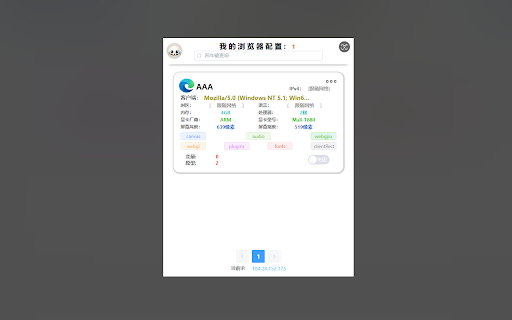


Your browser, your rules — your digital fingerprint, in your control. CthulhuJs Is A Browser Fingerprint Obfuscation Extension This browser extension aims to enhance user privacy and security by disguising browser fingerprints, protecting users from tracking and identification. Here are its key features: Multiple Fingerprint Obfuscation Techniques: It supports obfuscating various browser fingerprints, including canvas, audio, webgl, webgpu, fonts, plugins, clientRect, webrtc, language, timezone, screen, gpu, memoryCapacity, processors, and useragent. Dynamic Random Fingerprint Generation: Based on network information and user configuration, it dynamically generates random fingerprints, making them harder to identify. Flexible Fingerprint Switching Strategies: Users can choose different fingerprint switching strategies, such as time intervals, page load counts, or custom rules. Tab-Level Fingerprinting: Each tab can use a different fingerprint, enhancing privacy protection. Persistent Fingerprint Configuration: Fingerprint settings persist across sessions without any limitations. This browser extension helps users better safeguard their privacy, preventing tracking by advertisers, analytics tools, and other trackers. If you’re interested, you can search for and install it from the browser extension store.

Fingerprint Spoofer
Automatically solve reCaptcha using AI and Spoofer browser fingerprint.

ClientRects Fingerprint Defender
ClientRects Fingerprint Defender is a browser extension that lets you easily hide your real ClientRects fingerprint by reporting a random fake value. The native getClientRects() method in JavaScript returns a collection of rectangles (DOMRect objects) that enclose an element border-box in the viewport. Using the metrics from this method (i.e. x, y, width, height, etc.) one can generate a fingerprint to identify users. This add-on adds a small noise to the actual fingerprint and renews it every time you visit a website or reload a page. To disable this add-on, please visit the extensions page in your browser and then click on the disable button. Please note that this add-on does not have any options page. If you have a feature request or found a bug to report, please fill out the bug report form on the add-on's homepage (https://mybrowseraddon.com/clientrects-defender.html).

Fingerprint Spoofer
Browser fingerprinting refers to the practice of collecting information about a user's web browser and using it to create a unique digital profile that can be used to track the user's online activities across different websites. This can include information about the user's device, operating system, browser version, installed plugins, screen resolution, and more. A combination of these attributes can be used to identify the user. We want to safeguard the user against this profiling. Here is a Chrome extension that anonymizes the user. -It can spoof the navigator values. It replaces real value with dummy values. -It can protect against Canvas fingerprinting. It replaces canvas elements with a dynamically generated image, which is unique every time. -It can spoof the User Agent to a random device -Block Images -Block Javascript from running on pages try out our Chrome extension here: -https://amiunique.org/ -https://coveryourtracks.eff.org/ -https://browserleaks.com/canvas - for canvas fingerprinting Note: - that only one spoofing feature works at a time. you can try multiple but they are not guaranteed to work - if you spoof the canvas element it causes a gray-scale/ gibberish/ garbage screen to appear. Commonly spotted while playing YouTube videos above the progress bar. just disabling canvas spoofing will make it go away. This is due to creating a unique canvas element every time fooling the fingerprinters.

WebGL Fingerprint Defender
WebGL Fingerprint Defender is a browser extension that let you easily hide your real WebGL fingerprint by reporting a random fake value. According to many tech blogs, completely blocking WebGL API is not a good idea, therefore reporting a fake fingerprint could be the best solution to better protect your privacy. This add-on simply adds a small noise to the actual fingerprint and renews it every time you visit a website or reload a page. With the browser's WebGL API, in general, two types of fingerprints can be generated. One with WebGL constants and the other with an image that is rendered with the WebGL API. This add-on can spoof both values at the same time. To disable this add-on, please visit the extensions page in your browser and then click on the disable button. Please note that this add-on does not have any toolbar icon/button. This extension is made in collaboration with the author of "Canvas Fingerprint Defender": https://chrome.google.com/webstore/detail/canvas-fingerprint-defend/lanfdkkpgfjfdikkncbnojekcppdebfp If you have a feature request or found a bug to report, please fill out the bug report form on the add-on's homepage (https://mybrowseraddon.com/webgl-defender.html).
