
plndpkefghmnapmbpieopgahgackleeb


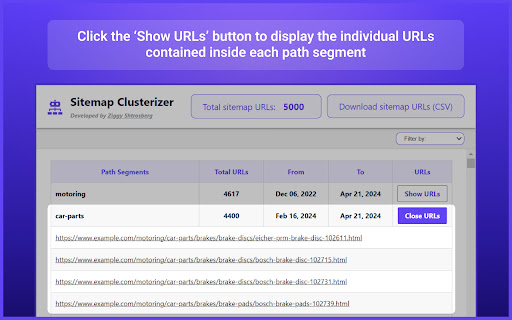


Streamline your SEO workflow with intelligent XML sitemap analysis After all, XML sitemaps are designed for search bots, not humans. But that's where Sitemap Clusterizer steps in. The extension transforms unwieldy XML data into a digestible pivot table. In seconds, you can transform your sitemap into actionable insights by grouping your website's pages by path segments based on the URL structure. So, making sense of large XML sitemaps is effortless. Pivot Table Conversion: Automatically extract URLs and their last modified dates from any XML sitemap and view them in an organized pivot table format. Dive deeper into your website's structure by grouping URLs based on their path segments, making it easier to analyze and manage your site's content. Customizable Segment Filtering: Tailor the pivot table to match your site’s URL structure by filtering path segments using forward slashes, hyphens, or underscores. This flexibility allows you to customize how the segments are broken down, optimizing the pivot table generation for deeper, more meaningful analysis. Comprehensive URL Count: Get a clear overview with a total count of all URLs contained in the sitemap. This feature helps you track the size and scale of your website's content at a glance. CSV Download: Need to share or further analyze your data? With just one click, download the entire list of sitemap URLs as a CSV file. This makes it easy to share insights with your team or import data into other SEO tools. Common tasks that Sitemap Clusterizer can assist with your own site: Identify gaps: By reviewing your own XML sitemap, you can identify if there are any important pages that are not being indexed. Content hierarchy: Understand how your content is structured and whether it aligns with your SEO goals, ensuring that priority pages are prominent. Content audit: The sitemap can help in auditing your content to check for outdated or underperforming pages that might need updating or improvement. URL optimization: Ensure that your URLs are optimized for SEO, including proper keyword usage. Track content updates: The sitemap can help track how frequently your content is updated, an important factor in SEO. Product category analysis: In ecommerce verticals, analyzing sitemaps can be especially useful to understand category and product taxonomies. For Competitor Sites: Site architecture insights: Analyzing a competitor's sitemap gives you a clearer picture of their site architecture, including how they prioritize their pages in terms of navigation and SEO. Content themes and focus: By reviewing the URLs and their organization in the sitemap, you can identify what types of content themes and product categories are most important to your competitors. Keyword opportunities: Spot potential keyword gaps in your strategy by analyzing the keywords that competitors seem to be targeting in their URL structures and metadata. Content freshness: See how often competitors update or add new content, which might give insights into their content strategy and how they manage SEO freshness signals. Marketing strategies: By examining how new products or categories are added to a sitemap, you can infer competitors’ market focus areas or seasonal strategies.

Fast Schema Markup Checker - By Vryse SEO
Analyze and check on-page schemas and structured data of a webpage. Ideal for developers and SEOs Fast Schema Analyzer is a versatile Chrome extension designed to streamline the process of analyzing and validating schema markups directly within your browser. This tool is essential for anyone who needs to ensure that their web pages are properly optimized with structured data, meeting the necessary standards for Google’s rich results. ⭐️ Key Features 1. Schema Markup Checker: Instantly analyze any web page to determine whether it includes schema markup. This feature is the cornerstone of Fast Schema Analyzer, allowing users to quickly check if a URL has schema. 2. Validate Schemas: The extension goes beyond basic checking by validating the schemas found on the page. It ensures that the structured data is correctly implemented according to Google’s guidelines, making it a robust json-ld validator. 3. Copy JSON Code: Easily copy the JSON-LD structured data code from the page. This feature allows developers and SEOs to reuse or modify existing schema markup effortlessly. 4. Dropdown Accordion: The extension features a user-friendly interface with collapsible sections that allow users to expand and review each schema type found on the page. This makes the schema checking process more organized and efficient. 5. Rich Result Checker: Understand the potential impact of your schema on Google’s search results by checking which types of schema might trigger rich results, enhancing your site’s visibility. ❓ How It Works 1. Simple Interface: Just click the extension icon while browsing any webpage, and Fast Schema Analyzer will automatically scan the page for structured data. 2. Automatic Detection: The extension instantly checks if a URL has schema and presents the findings in a structured, easy-to-understand format. 3. Schema Validation: It validates the schema markup directly in your browser, making sure it adheres to Google’s standards, helping you avoid common errors that could affect your SEO performance. 4. Comprehensive Analysis: The extension supports all common schema types, including Article, Product, Event, FAQPage, and more, ensuring a wide application across different content types. 🤝 Benefits 1. Quick Schema Checking: No need for complex tools; simply open the extension to check structured data on any webpage in real-time. 2. Improved SEO: Ensure your pages are eligible for Google’s rich results by using the built-in rich result checker, which verifies the correct implementation of structured data. 3. Developer-Friendly: The ability to copy JSON-LD data directly from the extension makes it a practical tool for developers looking to implement or tweak structured data on their sites. 💡Frequently Asked Questions Q: What types of schema markups does Fast Schema Analyzer support? A: The extension supports a wide range of schema types, including but not limited to Product, Event, Article, and FAQPage schemas. Q: Can Fast Schema Analyzer check structured data on competitor sites? A: Yes, simply navigate to any URL, and the extension will check if the URL has schema and validate the structured data if present. Q: How does the extension validate schemas? A: Fast Schema Analyzer acts as a json-ld validator, ensuring that the structured data on the page conforms to Google’s guidelines, reducing the risk of errors.

Sitemap Generator
Generate XML sitemaps effortlessly with Sitemap Generator. Convenient structured file creator for better SEO and website indexing. Looking for an easy way to map out your website's structure? Our Google Chrome extension is here to help! Whether you're a seasoned webmaster or just starting out, our extension makes the process simple and efficient. Boost your website optimization, get your site indexed faster, and make navigation easier for your users. Let's explore what makes our extension the best choice for you! 📖 How to Use Sitemap Generator Getting started with our tool is easy! Follow these steps: 1️⃣ Install the extension from the Chrome Web Store. 2️⃣ Add the extension to your Chrome toolbar. 3️⃣ Navigate to the website for which you want to create an XML file. 4️⃣ Click the extension icon in the toolbar. 5️⃣ Select the option to generate the site map. A new tab will open, and you'll be able to download the generated file from there. It's that simple! 🔝 Key Features Our extension offers a range of powerful features: ⭐Easy to Use: No technical skills needed! Just a few clicks to generate your site's structure file. ⭐Fast and Efficient: Quickly scan your entire website and create a comprehensive structured XML file. ⭐Compatibility: Works with any website to which you have access via FTP or File Manager including HTML, WordPress, Joomla, Drupal, and custom websites. 💎 Benefits of Using Sitemap Generator 1️⃣ Improved SEO: A well-structured file helps search engines understand your site's architecture. 2️⃣ Better User Experience: Linking to an XML file makes it easier for visitors to navigate your site, enhancing their experience. 3️⃣ Comprehensive Coverage: Ensure all your site’s pages, including those that might be missed by search engines, are indexed. 4️⃣ Time-Saving: Create your site structure file with just a few clicks, saving you time and effort. 🧐 How to Upload Your File to Your Website After generating your XML file, you’ll need to upload it to your web hosting or server. Here is how: 🔹Login to your hosting provider or web server. 🔹Find the File Manager option or connect using FTP. 🔹Upload the XML file to your root directory using FTP or your web hosting file manager. 🔹Verify the upload by visiting yoursite.com/sitemap.xml. 🔹Add your XML file URL to Google Search Console. 📌 FAQ ❓ How do I create an site structure XML file for Google? 💡 Use our extension to generate the file and then submit it to Google Search Console. ❓ Is the tool free? 💡 Yes, our free generator allows you to create site maps at no cost. ❓ Can I customize the output file? 💡 We are currently working on features where you can include/exclude pages, set custom priorities, and define update frequencies. ❓ Does it support WordPress? 💡 Yes, our generator extension supports WP-based websites. ❓ How often should I update my site structure file? 💡 You should regularly update it whenever you add or remove significant content from your site. Why Choose Sitemap Generator? Our tool is designed to handle websites of various sizes. Whether you have a small blog or a large e-commerce site, our tool can help you create a comprehensive XML structure file. Here’s why you should choose us: ⭐ Free Generator: Create your site structure file without any cost. ⭐ Multiple Website Types: Supports both traditional HTML and CMS-based websites. ⭐ Regular Updates: Our tool is regularly updated to ensure optimal performance. ⭐ User-Friendly: Intuitive interface makes it easy for anyone to use. How to Generate Your Site Structure File 1️⃣ Install the extension. 2️⃣ Add it to your Chrome toolbar. 3️⃣ Visit your website. 4️⃣ Click the extension icon. 5️⃣ Select “Generate”. Uploading Your File to Google 1️⃣ Login to Google Search Console. 2️⃣ Navigate to the Sitemaps section. 3️⃣ Enter your file URL (e.g., yoursite.com/sitemap.xml). 4️⃣ Click Submit. Sitemap Generator is the perfect tool for anyone looking to improve their website’s SEO🥇. Whether you need an XML file for your static HTML, Blog, or WordPress site, our tool has got you covered. Install our free generator extension today and see the difference it makes for your website!

XML Formatter
Transform your XML files effortlessly with XML Formatter. This extension acts as an XML beautifier and viewer for easy reading. 🌟 Say goodbye to the headaches of tangled XML files with our Google Chrome extension, the ultimate XML formatter, beautifier, and viewer! 😊 Effortless Markup Beautifier: ⬛️ Transform your XML files into beautifully formatted and easily readable structures with just a single click. ⬛️ No more squinting at tangled messes; effortlessly beautify XML documents to perfection. ⬛️ Enjoy clarity and precision in your XML formatting experience. 🎨 Intuitive XML Viewer: - Delve into your data with our intuitive viewer. - Effortlessly navigate through your XML hierarchy, inspecting elements and attributes with clarity and ease. - Whether you're a seasoned developer or a curious novice, our viewer makes understanding a breeze. 🚀 XML Pretty Print Power: Leverage the power of pretty printing with our XML formatter. Achieve precise indentation and line breaks for neatly organized code. Present your data professionally and impressively. 💻 Online Convenience, Chrome Extension Speed: 🔹 Enjoy the convenience of an online XML viewer directly in your Chrome browser. 🔹 No need for bulky software downloads or tab-switching; access powerful formatting tools instantly. 🔹 Seamlessly integrate into your browsing experience for swift and efficient XML formatting. 💯 Our XML editor extension seamlessly integrates with your preferred XML formatter to boost productivity. This integration ensures that whether you're working online or on your desktop, our intuitive tools complement your workflow perfectly. By using our extension, you can streamline your editing process for maximum efficiency. 🔧 XML Formatting Made Simple: 1. Bid farewell to struggling with inconsistent formatting or manual adjustments. 2. Simplify the formatting process, saving time and frustration. 3. Let our tool do the heavy lifting while you sit back and relax. ▸ Flexible Formatting Options: 🔶 Tailor XML format to your preferences with customizable options. 🔶 Control indentation, line wrapping, and more for XML presentation on your terms. 🔶 Enjoy the flexibility of a personalized online XML formatter. 💰 Free and Unlimited: ♦️ Access our XML formatter for free, with unlimited usage. ♦️ Experience powerful XML formatting tools without breaking the bank. ♦️ Make data beautification accessible to everyone. 1️⃣ Online XML Formatter: Format XML files directly in your browser for ultimate convenience. Say goodbye to downloads and installations with our hassle-free online tool. Format eXtensible Markup Language files on the go, anytime, anywhere. 2️⃣ Streamlined Workflow: Boost productivity with a streamlined XML formatting workflow. Integrate seamlessly into your browser environment for effortless XML formatting. Keep your workflow smooth and efficient with our extension. 3️⃣ Precise Formatting: Achieve pixel-perfect online XML formatting with our advanced toolset. Maintain the integrity of XML files while improving readability. Align elements and maintain comments for clear and concise XML code. ➤ Our collaborative features make sharing beautifully formatted XML files effortless, fostering teamwork by ensuring that everyone can easily understand and work with data. This clear communication is further supported by our extension's seamless collaboration tools, enabling efficient teamwork and smooth project progress. ▸ Future-Proof: ① Prepare your eXtensible Markup Language files for the future with our extension. ② Ensure compatibility and readability across platforms and applications. ③ Archive and share data confidently with beautifully formatted XML. 🔗 Seamless Integration: ❗️Integrate our extension seamlessly into your Chrome browser setup. ❗️Enjoy a lightweight footprint and intuitive interface of the formatter for an enhanced browsing experience. ❗️Make our tool an indispensable part of your browsing routine. 🕗 Empower Your Development: ♻️ Equip your development team with the tools they need to succeed. ♻️ Facilitate faster debugging, clearer documentation, and smoother collaboration. ♻️ Empower your team to achieve their goals with confidence. 🕘 Efficiency at Scale: 🌀 Manage XML tasks of any size with ease. 🌀 Tackle single files or large-scale projects with lightning-fast processing. 🌀 Scale our extension to meet your online XML formatting needs effortlessly. 🕤 Stay Organized: ▪️ Keep your Markup files organized and easy to manage. ▪️ Spend less time deciphering code and more time building great software. ▪️ Maintain consistency and clarity in your XML editor online. ❗️In addition, we care about your comfort and eye health, so our extension also includes a dark mode option. 📮 Get in Touch: Have queries or suggestions? Don't hesitate to drop us a line at 💌 info.shift.dev@gmail.com. Try our extension now and transform your development or testing experiences!

XML Reader
Use XML Reader as a fast XML viewer, formatter & beautifier. Easily read, format, and edit XML online. 🗂️ Working with XML can be confusing if you do not have the right tool. That is why xml reader was created – a simple yet powerful extension that helps you view and structure your xml documents directly in the browser. Whether you need a quick solution for work, study, or testing, xml Readerprovides everything in one place. 📖 With xml reader, you no longer need to ask how to read xml file. Simply open your document and instantly see a clean, structured display. ✨ Why choose this xml reader online Using xml reader makes handling xml much easier. Here are just a few reasons: 1️⃣ Works online without extra software 2️⃣ Handles both small and large files 3️⃣ Easy guide for how to open xml file and how to read xml files instantly 4️⃣ Modern, simple interface with practical features 5️⃣ Trusted by developers, students, and analysts 🔍 How to open and view files Many users ask how do you read an xml file without special programs. The answer is simple: install this extension and let the xml reader online handle it. You can: - Upload or paste your code - Save time when you need to check data on the go ⚡ Fast formatting and beautifying Sometimes xml code looks messy. This is where the xml formatter online and beautify xml options come in. You can: - Format xml instantly - Use xml beautifier for improved readability - Export clean results - Share formatted code with colleagues 📝 Step by step: how to use XML Reader 1️⃣ Install the extension 2️⃣ Open any file in xml reader 3️⃣ Instantly see structured results 4️⃣ Copy or save the clean output 5️⃣ Continue working without distractions 🏆 Benefits of XML Reader • Runs directly in your browser • Helps you understand how to open xml file quickly • Provides structured results in seconds • Works as a universal viewing tool • Supports international users including those searching for formatador xml online 👨💻 Designed for professionals and beginners Whether you are an advanced developer or just wondering how to read an xml document, xml Rreader is made for you. It gives you: - A fast xml viewer to display content - A reliable way to understand your data ⏱️ Work faster, save time Stop searching how do i read xml files again and again. With xml reader, you always know how to check the content quickly. One click shows a structured result you can trust. ❓ Frequently Asked Questions 📌 How does it work 💡 xml reader is a Chrome extension that lets you work with xml instantly. Just open your file, and xml reader will show the content in an easy-to-read structure. 📌 How do I install 💡 To install xml reader, go to the Chrome Web Store and select Add to Chrome. Once installed, you can start using it immediately. 📌 How to open xml file 💡 Simply click on your file and choose xml reader. The extension acts as your viewer with no extra tools needed. 📌 How do you read an xml file with this extension 💡 Upload the document or paste your code. Use the built-in xml formatter online tool, beautify xml, and enjoy a structured xml format. 📌 Is my privacy protected when using xml reader 💡 Absolutely ✅ xml reader runs locally in your browser. When you view or format, no data is sent to external servers. 📌 Can it handle large files 💡 Yes, the xml file reader is designed to work with both small and large documents. Whether you want to format xml or read xml files, it will handle the task efficiently. 📌 Does it support multiple languages 💡 Yes. For example, Brazilian developers can also use it as formatador xml online or an ml formatter online tool. 📌 What can I do if xml looks messy 💡 Just click format xml and beautify xml. The xml formatter online will instantly organize your document, making it easy to read xml document structures. 🚀 XML Reader continues to evolve with new updates. If you are asking how can i read xml files faster, this extension is your solution. Is your go-to solution whenever you need to read, format, or beautify xml. From developers to students, from analysts to everyday users, everyone asking how to read xml files will find an answer here. Use this file reader, viewer, and online xml formatter to simplify your daily workflow. If you have ever wondered how to read xml document content, now you know the fastest way. Install this extension today and make working with xml format smooth, clean, and efficient
