
kgidpmgjombekdkhnlkbhaoenldlpmeb

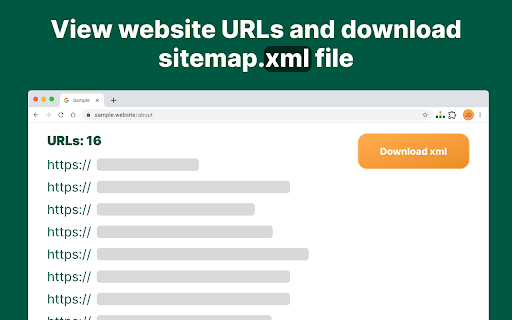
Generate XML sitemaps effortlessly with Sitemap Generator. Convenient structured file creator for better SEO and website indexing. Looking for an easy way to map out your website's structure? Our Google Chrome extension is here to help! Whether you're a seasoned webmaster or just starting out, our extension makes the process simple and efficient. Boost your website optimization, get your site indexed faster, and make navigation easier for your users. Let's explore what makes our extension the best choice for you! 📖 How to Use Sitemap Generator Getting started with our tool is easy! Follow these steps: 1️⃣ Install the extension from the Chrome Web Store. 2️⃣ Add the extension to your Chrome toolbar. 3️⃣ Navigate to the website for which you want to create an XML file. 4️⃣ Click the extension icon in the toolbar. 5️⃣ Select the option to generate the site map. A new tab will open, and you'll be able to download the generated file from there. It's that simple! 🔝 Key Features Our extension offers a range of powerful features: ⭐Easy to Use: No technical skills needed! Just a few clicks to generate your site's structure file. ⭐Fast and Efficient: Quickly scan your entire website and create a comprehensive structured XML file. ⭐Compatibility: Works with any website to which you have access via FTP or File Manager including HTML, WordPress, Joomla, Drupal, and custom websites. 💎 Benefits of Using Sitemap Generator 1️⃣ Improved SEO: A well-structured file helps search engines understand your site's architecture. 2️⃣ Better User Experience: Linking to an XML file makes it easier for visitors to navigate your site, enhancing their experience. 3️⃣ Comprehensive Coverage: Ensure all your site’s pages, including those that might be missed by search engines, are indexed. 4️⃣ Time-Saving: Create your site structure file with just a few clicks, saving you time and effort. 🧐 How to Upload Your File to Your Website After generating your XML file, you’ll need to upload it to your web hosting or server. Here is how: 🔹Login to your hosting provider or web server. 🔹Find the File Manager option or connect using FTP. 🔹Upload the XML file to your root directory using FTP or your web hosting file manager. 🔹Verify the upload by visiting yoursite.com/sitemap.xml. 🔹Add your XML file URL to Google Search Console. 📌 FAQ ❓ How do I create an site structure XML file for Google? 💡 Use our extension to generate the file and then submit it to Google Search Console. ❓ Is the tool free? 💡 Yes, our free generator allows you to create site maps at no cost. ❓ Can I customize the output file? 💡 We are currently working on features where you can include/exclude pages, set custom priorities, and define update frequencies. ❓ Does it support WordPress? 💡 Yes, our generator extension supports WP-based websites. ❓ How often should I update my site structure file? 💡 You should regularly update it whenever you add or remove significant content from your site. Why Choose Sitemap Generator? Our tool is designed to handle websites of various sizes. Whether you have a small blog or a large e-commerce site, our tool can help you create a comprehensive XML structure file. Here’s why you should choose us: ⭐ Free Generator: Create your site structure file without any cost. ⭐ Multiple Website Types: Supports both traditional HTML and CMS-based websites. ⭐ Regular Updates: Our tool is regularly updated to ensure optimal performance. ⭐ User-Friendly: Intuitive interface makes it easy for anyone to use. How to Generate Your Site Structure File 1️⃣ Install the extension. 2️⃣ Add it to your Chrome toolbar. 3️⃣ Visit your website. 4️⃣ Click the extension icon. 5️⃣ Select “Generate”. Uploading Your File to Google 1️⃣ Login to Google Search Console. 2️⃣ Navigate to the Sitemaps section. 3️⃣ Enter your file URL (e.g., yoursite.com/sitemap.xml). 4️⃣ Click Submit. Sitemap Generator is the perfect tool for anyone looking to improve their website’s SEO🥇. Whether you need an XML file for your static HTML, Blog, or WordPress site, our tool has got you covered. Install our free generator extension today and see the difference it makes for your website!

Sitemap Explorer
This extension helps you find, inspect, export, and view XML Sitemap files for any site you navigate in a browser. The helpful and easy-to-use extension helps you find, inspect, export, and view XML Sitemap files for any site you navigate in a browser. Extension features: - Automatically detects links declared in the robots.txt file of any site you develop, administer or analyze. - Displays XML contents of files in a human-readable form. - Validates XML syntax (Standard XML and Atom protocols are supported). - One-click export of URLs from XML to a local CSV file. - Contains “Your Helpful Button” that you can use to easily create a Sitemap, RSS, or Product feed (for eCommerce sites) file from the current URL. How to use: 1. Open the URL of any site in your browser and click the app icon in your toolbar. 2. Get information about the linked files for the current website. 3. Now, you can open file view or copy the full URL of the file to your clipboard. This extension for Chrome is a software product of MySitemapGenerator.com.

Sitemap Generator Tool
Free professional XML sitemap generator tool - Create search engine optimized sitemaps instantly for better website visibility

VisualSitemaps
https://VisualSitemaps.com is a SaaS platform that automatically generates beautiful visual sitemaps + high-resolution screenshots of any Public or Private site or web-app, making it fast and easy to perform in-depth site audits for UI, UX, SEO, and marketing research. 🚀You get 50 for FREE every month. This add-on is solely designed to help you during private-website crawling. For example: a user’s dashboard or a site in production/staging. You must have the authorized credentials for this crawling to work. What this tool does is allow you to easily copy all the cookie sessions our crawler needs to access and crawl the private pages. **Your Security is our 100% Top Priority** These cookies are never stored on our servers. They are 128-bit Encrypted using Advanced Encryption Standard (AES). Once the crawl is complete, the cookies are automatically deleted. Instructions for use: http://bit.ly/VSM-ChromeAddon :: Features Available TODAY :: Password-Protected Site Crawling + Export as PDF ( then import it into your fav design tool for further grooming ) + Advanced Filtering + Sitemap Sharing ( with non-users ) + Add Team Members + Screenshot Commenting & Workflow Management + Export as Zip ( all screenshots, organized by directories ) or CSV + Page Design & Content Change Tracking + Sitemap Redesign & Forking + Mobile Viewport Screenshots + Sitemap Embedding [ 🔥New ] + Flow Canvas Stop wasting your valuable time. A 100-page sitemap will take you +/- 10 hours to manually design and costing you at least $500 of your billable time. Get it done in just 10 minutes..and get on with your life.

Sitemap Finder
Check for the existence of a sitemap file and download URLs. SiteMap Finder is your go-to tool for effortlessly locating sitemaps on any website you visit. Whether you're a developer, SEO specialist, or just curious about a site's structure, this intuitive Chrome extension simplifies the process of finding sitemaps, saving you time and effort. With SiteMap Finder, you can: Quickly discover XML sitemaps for any website with just a click. Streamline your SEO workflow by efficiently identifying sitemaps to analyze site structure and content organization. Access sitemaps for improved website indexing, search engine visibility, and overall optimization efforts. Enhance website auditing and content management processes by easily accessing comprehensive sitemap data. Effortless Sitemap Discovery: Instantly locate sitemaps on any website you visit. Intuitive Interface: User-friendly interface for seamless navigation and operation. Time-Saving: Save valuable time by eliminating the hassle of manual sitemap searches. Optimization Assistance: Simplify SEO tasks and improve website performance with streamlined sitemap access. Reliable Support: Continuous updates and support to ensure compatibility with the latest Chrome versions and web standards. Install SiteMap Finder from the Chrome Web Store. Navigate to any website. Click on the SiteMap Finder extension icon in your Chrome toolbar. Instantly view and access available sitemaps for the current website. Get Started with SiteMap Finder today and take the guesswork out of sitemap discovery!
