
acogpmfdhkmhbnhfkcamjgdffklfofho

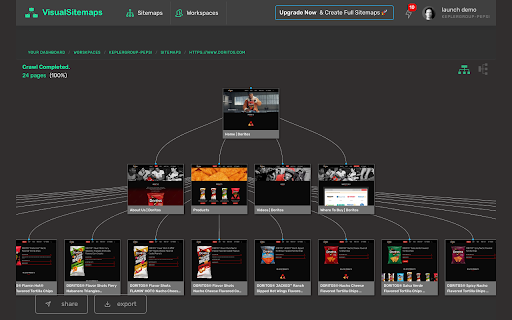
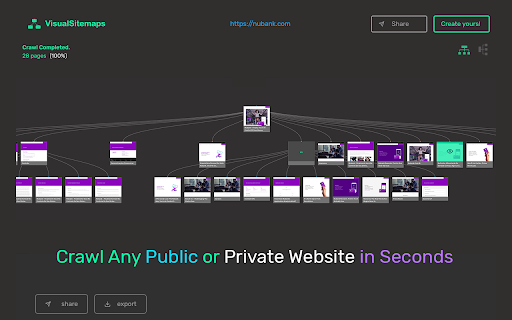

https://VisualSitemaps.com is a SaaS platform that automatically generates beautiful visual sitemaps + high-resolution screenshots of any Public or Private site or web-app, making it fast and easy to perform in-depth site audits for UI, UX, SEO, and marketing research. 🚀You get 50 for FREE every month. This add-on is solely designed to help you during private-website crawling. For example: a user’s dashboard or a site in production/staging. You must have the authorized credentials for this crawling to work. What this tool does is allow you to easily copy all the cookie sessions our crawler needs to access and crawl the private pages. **Your Security is our 100% Top Priority** These cookies are never stored on our servers. They are 128-bit Encrypted using Advanced Encryption Standard (AES). Once the crawl is complete, the cookies are automatically deleted. Instructions for use: http://bit.ly/VSM-ChromeAddon :: Features Available TODAY :: Password-Protected Site Crawling + Export as PDF ( then import it into your fav design tool for further grooming ) + Advanced Filtering + Sitemap Sharing ( with non-users ) + Add Team Members + Screenshot Commenting & Workflow Management + Export as Zip ( all screenshots, organized by directories ) or CSV + Page Design & Content Change Tracking + Sitemap Redesign & Forking + Mobile Viewport Screenshots + Sitemap Embedding [ 🔥New ] + Flow Canvas Stop wasting your valuable time. A 100-page sitemap will take you +/- 10 hours to manually design and costing you at least $500 of your billable time. Get it done in just 10 minutes..and get on with your life.

Sitemap Explorer
This extension helps you find, inspect, export, and view XML Sitemap files for any site you navigate in a browser. The helpful and easy-to-use extension helps you find, inspect, export, and view XML Sitemap files for any site you navigate in a browser. Extension features: - Automatically detects links declared in the robots.txt file of any site you develop, administer or analyze. - Displays XML contents of files in a human-readable form. - Validates XML syntax (Standard XML and Atom protocols are supported). - One-click export of URLs from XML to a local CSV file. - Contains “Your Helpful Button” that you can use to easily create a Sitemap, RSS, or Product feed (for eCommerce sites) file from the current URL. How to use: 1. Open the URL of any site in your browser and click the app icon in your toolbar. 2. Get information about the linked files for the current website. 3. Now, you can open file view or copy the full URL of the file to your clipboard. This extension for Chrome is a software product of MySitemapGenerator.com.

Sitemap Finder
Check for the existence of a sitemap file and download URLs. SiteMap Finder is your go-to tool for effortlessly locating sitemaps on any website you visit. Whether you're a developer, SEO specialist, or just curious about a site's structure, this intuitive Chrome extension simplifies the process of finding sitemaps, saving you time and effort. With SiteMap Finder, you can: Quickly discover XML sitemaps for any website with just a click. Streamline your SEO workflow by efficiently identifying sitemaps to analyze site structure and content organization. Access sitemaps for improved website indexing, search engine visibility, and overall optimization efforts. Enhance website auditing and content management processes by easily accessing comprehensive sitemap data. Effortless Sitemap Discovery: Instantly locate sitemaps on any website you visit. Intuitive Interface: User-friendly interface for seamless navigation and operation. Time-Saving: Save valuable time by eliminating the hassle of manual sitemap searches. Optimization Assistance: Simplify SEO tasks and improve website performance with streamlined sitemap access. Reliable Support: Continuous updates and support to ensure compatibility with the latest Chrome versions and web standards. Install SiteMap Finder from the Chrome Web Store. Navigate to any website. Click on the SiteMap Finder extension icon in your Chrome toolbar. Instantly view and access available sitemaps for the current website. Get Started with SiteMap Finder today and take the guesswork out of sitemap discovery!

WizWrite - Record, Rewrite, WizWrite
Record with the mic or type text, select an AI action - rewrite, summarize, translate, and much more! WizWrite amplifies your words Record with the mic or type text, select an AI action - rewrite, summarize, translate, and much more! WizWrite amplifies your words. A super handy tool to talk to AI. Hone your thoughts and create awesome pieces of content with WizWrite.

Debug Master: Debugging with ease
Simplify console errors with clear explanations for web dev. Debug Master is an innovative chrome extension that utilizes AI technology to provide detailed explanations for complex error messages. With just a simple copy and paste, users can easily understand what went wrong and how to fix it. Debug Master makes it easy for developers to quickly and efficiently solve programming issues, saving valuable time and frustration. Say goodbye to spending hours trying to decipher confusing error messages, and hello to faster debugging with Debug Master. The extension help developers save valuable time and increase their productivity, allowing them to focus on developing new features and improving their website. Additionally, the extension's ability to understand and explain various types of errors means that it can be used across different programming languages and frameworks, making it a versatile tool for any web developer. With Debug Master, web developers can more efficiently and effectively debug their code, leading to faster and more successful web development projects.
