
pkonhbljhhbhbdjkacgmafheaebijmjh
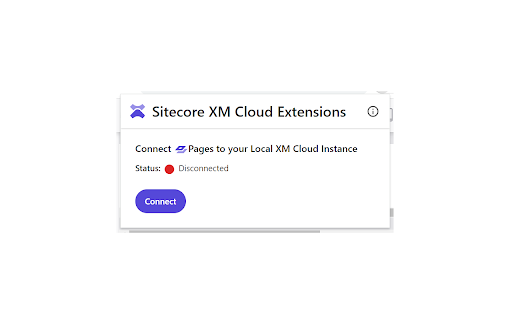
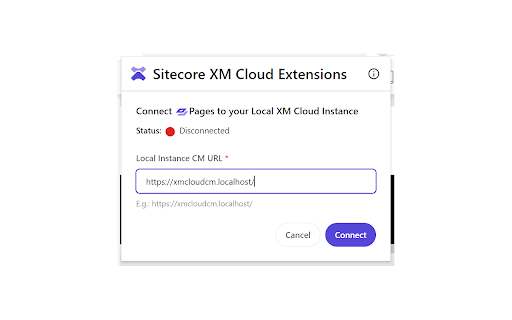
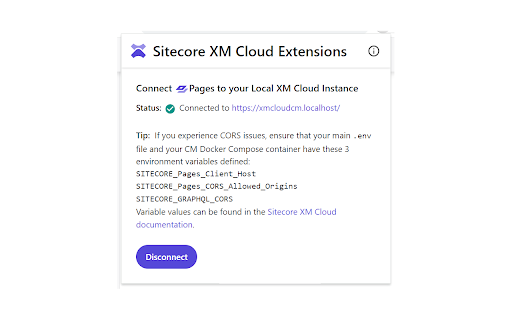
Browser extension that improves Sitecore XM Cloud user experience. Sitecore XM Cloud Extensions is a browser extension that improves Sitecore XM Cloud user experience. It is a work in progress with only one feature for the moment. Features: - Connecting XM Cloud Pages to your local XM Cloud instance.

NameMC Extras
An extension that enhances your NameMC experience with a range of powerful features. Add a Skin & Cape Tester, custom themes, account creation dates, pin accounts, display elytra’s and deadmau5's ears, hide dashed-out (hidden) names in name history, download high-quality skin art, and other QoL improvements. You can also explore custom OptiFine and Bedrock capes, generate an accounts showcase image and more. It is extremely customizable with many settings. Uncover even more features today! NameMC Extras is not affiliated with or endorsed by NameMC.

Relume Chrome Extension for Webflow
Boost your productivity in Webflow with the Relume Chrome Extension. ★ Access 1,000+ Webflow components from the Relume Library, right inside of Webflow designer. Copy components into your project with 1 click. ★ Class Sync enables you to sync Relume components with updated classes in the designer, preventing class duplication. When you turn on Class Sync and paste a component, the component will adapt to match the styles of your Webflow project. ★ Paste SVGs directly into your Webflow project, with Relume's free SVG to HTML embed converter. ★ Create and save components in your own private Relume Library. Share with with clients and your team. The Relume Library includes everything you need to start a Client-First Webflow project: ✓Navbars ✓Footers ✓Header sections ✓Feature sections ✓CTA sections ✓FAQ sections ✓Contact sections ✓Pricing sections ✓UI Elements (including Buttons, Accordions, Sliders, Dropdowns, Cards, Tabs & more) ✓Page Templates (including Home, About, Blog, Contact, Portfolio & more) Browse the full library online: https://library.relume.io/dashboard Don't waste time rebuilding layouts for every new project. Install the Relume Chrome Extension to access all of these components right inside Webflow. Some features require a Relume account or paid subscription. Find out more inside the extension or online: https://library.relume.io/pricing

Zoom Out Chrome
Control your web page zoom with Zoom Out Chrome! This extension makes it easy to zoom out on Chrome, improving readability. Zoom Out Chrome: Master Your Web View! 🔍🔎 🥱 Tired of squinting at tiny text or feeling overwhelmed by giant images on websites? Wish you could easily adjust the view or magnify with total precision? Take command of your browsing experience with the Zoom Out Chrome extension! No more fiddling with awkward browser settings – get the perfect view on every page, instantly. With our extension, you gain effortless control over your web page display size. How to zoom out on Chrome becomes a question of the past! One click, and you're in control. 🚀 Get Started in Seconds: ⬇️ Install the "Zoom Out Chrome" extension directly from the Chrome Web Store. 🖱️ Click the extension icon to reveal the user-friendly size controls. ➕➖ Use the slider or buttons to adjust the scale to your exact preference. Double click on icon and reset the view to default size (100%). 🌟 Key Features That Make You the Display Master: 🤯 Forget Complex Menus: No more hunting through settings! Chrome scaling in and out is now at your fingertips. 🎯 Precise Scale Control: Use the intuitive slider for fine-grained adjustments, or the buttons for quick jumps. How to magnify and shrink on Chrome has never been easier! 💾 Per-Tab View Memory: The extension remembers your preferred display size for each tab! Revisit a site, and it's exactly how you left it. No more constantly having to figure out how to zoom out on google chrome! 🌍 Global Scale Control: Want to apply the same level to all open tabs? We've got you covered! 💯 Double-Click Reset: Instantly return to 100% view with a simple double-click on the extension icon. Perfect if your chrome scaled out unexpectedly. 🛠️ Customizable Scale Range: Set your preferred minimum and maximum levels in the extension's settings. Take total control and solve how to control the scale on google chrome once and for all! 🔔 Visual Badge Indicator: The extension icon displays the current percentage, so you're always in the know. 🚫 HTTP-Only Safety: A helpful modal window alerts you if you try to use it on a non-HTTP page (like Chrome's internal settings), keeping things secure. 💎 Ideal for Every Chrome User: 👓 Visual Comfort: Whether you need larger text for readability or want to see more content at once, easily adjust the display for optimal viewing. How to shrink a webpage? Simple! 💻 Developers & Designers: Quickly check how your website looks at different sizes for responsive design testing. 🖥️ Presentations: Ensure everyone in the room can see your screen clearly by adjusting the display on the fly. 🧑💻 Multi-Monitor Setups: Match sizes across different screens for a consistent experience. 📰 Reading Articles: Make long-form content more comfortable to read, you no need think how to magnify in browser. 🖼️ Viewing Images: Enlarge details or shrink to see the whole picture. ❓Anyone: Easy way to change text size chrome. 💬 Frequently Asked Questions: ❓ How to zoom out in Chrome using this extension? 💡 Simply click the extension icon and use the slider or buttons! ❓ How do you shrink on Chrome if it's stuck enlarged? 💡 Double-click the extension icon to reset to 100%. ❓ How to magnify and reduce in Chrome on specific pages? 💡 The extension remembers your size level for each tab individually. ❓ How to scale down Chrome entirely? 💡 Use the global feature to apply the same level to all tabs. ❓ I accidentally scaled! How to unzoom google? 💡 Double click on extention icon! ❓ How to unzoom a web page? 💡 Adjust the slider to a smaller percentage. ❓Can i use chrome custom scaling? 💡Yes! You can set any level you like. ❓My chrome screen zoomed in, what should I do? 💡Use the Zoom Out Chrome extension to quickly reduce to your preferred level. ❓ How to enlarge google screen? 💡 Use the + in slider to make things bigger. ❓How to reduce the size of a website? 💡Use extension settings. 🚀 Take Control of Your Visual Experience! 👆🏻 Click "Add to Chrome" now and enjoy a more comfortable and productive browsing experience. Say goodbye to eye strain and hello to perfectly sized web pages!

Hacker News UX
Hacker News UX v2, enhances your experience with Hacker News. Check out the demo video, and screenshots to get a glimpse of the features! User Preferences (font-size, column, dark/classic switch) is available by hovering your username, or login, link in the bottom-left corner. 1. Auto-Load, and Columns Browse lists with auto-load, and columns, enhancing surfacing of interesting content. 2. Dynamic Reply Reply to comments in-place, and without page-refresh. 3. Explore, with Profile Pop-Up, and Columns Explore content with profile tooltips, and by opening threads, and profiles into columns, and without managing tabs, or losing progress. 4. Secure, and Private
