
faealiclainndclipfmdlilahphkhedi
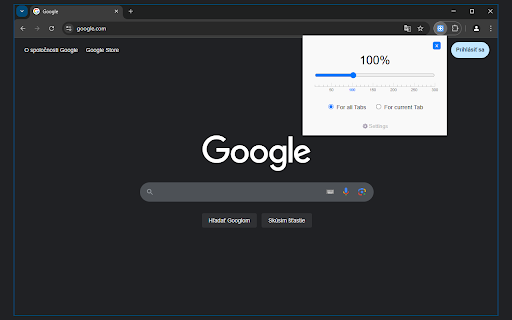
Control your web page zoom with Zoom Out Chrome! This extension makes it easy to zoom out on Chrome, improving readability. Zoom Out Chrome: Master Your Web View! 🔍🔎 🥱 Tired of squinting at tiny text or feeling overwhelmed by giant images on websites? Wish you could easily adjust the view or magnify with total precision? Take command of your browsing experience with the Zoom Out Chrome extension! No more fiddling with awkward browser settings – get the perfect view on every page, instantly. With our extension, you gain effortless control over your web page display size. How to zoom out on Chrome becomes a question of the past! One click, and you're in control. 🚀 Get Started in Seconds: ⬇️ Install the "Zoom Out Chrome" extension directly from the Chrome Web Store. 🖱️ Click the extension icon to reveal the user-friendly size controls. ➕➖ Use the slider or buttons to adjust the scale to your exact preference. Double click on icon and reset the view to default size (100%). 🌟 Key Features That Make You the Display Master: 🤯 Forget Complex Menus: No more hunting through settings! Chrome scaling in and out is now at your fingertips. 🎯 Precise Scale Control: Use the intuitive slider for fine-grained adjustments, or the buttons for quick jumps. How to magnify and shrink on Chrome has never been easier! 💾 Per-Tab View Memory: The extension remembers your preferred display size for each tab! Revisit a site, and it's exactly how you left it. No more constantly having to figure out how to zoom out on google chrome! 🌍 Global Scale Control: Want to apply the same level to all open tabs? We've got you covered! 💯 Double-Click Reset: Instantly return to 100% view with a simple double-click on the extension icon. Perfect if your chrome scaled out unexpectedly. 🛠️ Customizable Scale Range: Set your preferred minimum and maximum levels in the extension's settings. Take total control and solve how to control the scale on google chrome once and for all! 🔔 Visual Badge Indicator: The extension icon displays the current percentage, so you're always in the know. 🚫 HTTP-Only Safety: A helpful modal window alerts you if you try to use it on a non-HTTP page (like Chrome's internal settings), keeping things secure. 💎 Ideal for Every Chrome User: 👓 Visual Comfort: Whether you need larger text for readability or want to see more content at once, easily adjust the display for optimal viewing. How to shrink a webpage? Simple! 💻 Developers & Designers: Quickly check how your website looks at different sizes for responsive design testing. 🖥️ Presentations: Ensure everyone in the room can see your screen clearly by adjusting the display on the fly. 🧑💻 Multi-Monitor Setups: Match sizes across different screens for a consistent experience. 📰 Reading Articles: Make long-form content more comfortable to read, you no need think how to magnify in browser. 🖼️ Viewing Images: Enlarge details or shrink to see the whole picture. ❓Anyone: Easy way to change text size chrome. 💬 Frequently Asked Questions: ❓ How to zoom out in Chrome using this extension? 💡 Simply click the extension icon and use the slider or buttons! ❓ How do you shrink on Chrome if it's stuck enlarged? 💡 Double-click the extension icon to reset to 100%. ❓ How to magnify and reduce in Chrome on specific pages? 💡 The extension remembers your size level for each tab individually. ❓ How to scale down Chrome entirely? 💡 Use the global feature to apply the same level to all tabs. ❓ I accidentally scaled! How to unzoom google? 💡 Double click on extention icon! ❓ How to unzoom a web page? 💡 Adjust the slider to a smaller percentage. ❓Can i use chrome custom scaling? 💡Yes! You can set any level you like. ❓My chrome screen zoomed in, what should I do? 💡Use the Zoom Out Chrome extension to quickly reduce to your preferred level. ❓ How to enlarge google screen? 💡 Use the + in slider to make things bigger. ❓How to reduce the size of a website? 💡Use extension settings. 🚀 Take Control of Your Visual Experience! 👆🏻 Click "Add to Chrome" now and enjoy a more comfortable and productive browsing experience. Say goodbye to eye strain and hello to perfectly sized web pages!

Zoom Per Tab
Zoom one tab without affecting other tabs of the same domain! Chrome doesn't let you adjust the zooming of different tabs under the same domain independently? Well you found the cure! I know there are a couple of similar extensions out there. At first, I wanted to just download one and save myself some time. I soon realized that existing extensions out there for this purpose are so bulky and complicated. Some of them even ask you to install a daemon process that's available on Windows only - this is real bad, and dangerous, but also real bad. This extension simply makes page zoom settings independent across tabs, regardless of whether they have the same origin. It's ultra-lightweight. It uses a built-in Chrome API, just a few lines of code, no configuration needed at all! You can unpack the extension to verify that it's not doing anything malicious. In fact I encourage everyone to read it because it's so simple. You could've written it yourself! A copy of the source code is at https://github.com/xinan/zoom-per-tab.

Zoom Slider
Change zoom settings smoothly with a standard slider. A super easy way to change the zoom setting level of a page. Syncs perfectly with chromes zoom settings and provides a more granular approach to changing the zoom level. Just click on the popup and you'll know what to do next (but if you still don't know, just slide the slider up and down to change zoom levels). The slider goes up in increments of 5%.

Auto zoom out
ページを画面サイズに合わせてズームアウトする拡張機能 この拡張機能はページ幅を検知し、ページを自動的に縮小します。 chrome デフォルトのズーム機能とは違い、1% 単位で調整ができるので、無駄がありません。 また、手動での調整にも対応しています。 zoom・width は拡張機能が自動で選択します。 サイズ調整したくないサイト(ドメイン)・ページの登録が可能です。 再びサイズ調整するときはリセットしてください。 ※ 動画サイトでのご利用について 動画サイトで本拡張機能をご利用になった場合、以下のような問題が発生する可能性がございます。 ・ページのサイズ調整が正しく行われない ・動画の端が切れて表示される ・動画の位置がずれて表示される これは、多くの動画サイトが独自の動画プレイヤーを使用しており、本拡張機能と競合してしまうことが原因です。 現状ではこの問題を根本的に解決することが難しいため、動画サイトではブラウザのズーム機能(Ctrl +/- または Cmd +/-)をご利用いただき、本拡張機能のご利用をお控えいただきますようお願い申し上げます。 version 1.0.5 (2025.01.09) ・ページを再読込した際にサイズがリセットされる問題を解消 version 1.0.4 (2024.12.07) ・軽微なバグ修正 ・UIの修正 version 1.0.3 (2024.12.02) ・軽微なバグ修正 version 1.0.2 (2024.11.15) ・自動サイズ調整オンオフボタンの追加 version 1.0.1 (2024.11.13) ・マニフェストV3に対応

Lensify Zoom Magnifying Glass
Lensify: Precision Magnification at Your Fingertips - Customizable Size, Zoom Factor, Ctrl-Z shortcut With Lensify's Magnifying Glass, you have a virtual lens at your fingertips, enabling you to effortlessly zoom in on intricate details within webpages. It's your tool for a closer and clearer view, enhancing your online experience with more detail and enjoyment. Features: 🔍 Magnifying Glass: Dive into details effortlessly with our intuitive magnifying glass feature. ⌨️ Shortcuts: Activate Lensify using Ctrl-Z on Windows/Linux or Cmd-Z on Mac OS. Quick access, no hassle. 🖥️ Customizable Viewing: Tailor your browsing experience with adjustable size and magnification settings. Lensify adapts to your needs for a personalized view. Try it now for a sharper, more refined online experience! 🚀
