
mnoadkhbinhiblijcedoifbejfmmkdke
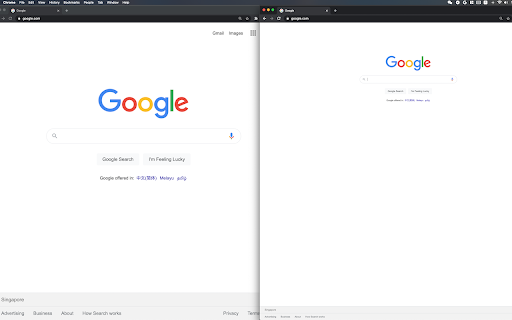
Zoom one tab without affecting other tabs of the same domain! Chrome doesn't let you adjust the zooming of different tabs under the same domain independently? Well you found the cure! I know there are a couple of similar extensions out there. At first, I wanted to just download one and save myself some time. I soon realized that existing extensions out there for this purpose are so bulky and complicated. Some of them even ask you to install a daemon process that's available on Windows only - this is real bad, and dangerous, but also real bad. This extension simply makes page zoom settings independent across tabs, regardless of whether they have the same origin. It's ultra-lightweight. It uses a built-in Chrome API, just a few lines of code, no configuration needed at all! You can unpack the extension to verify that it's not doing anything malicious. In fact I encourage everyone to read it because it's so simple. You could've written it yourself! A copy of the source code is at https://github.com/xinan/zoom-per-tab.

Window Zoom
Zoom all tabs on the window at once! Separate windows can have separate zoom levels If you need to zoom all the tabs on a specific browser window, this is the extension for you. The reason I created this extension is, I use multiple screens with different resolutions. Fractional Settings were using more GPU and causing other issues on my OS (using Linux). I started zooming the windows I have on a specific screen. It was effecting other windows & tabs and adjusting this tab per tab was just wasting time. I decided to create an extension where I can just set a zoom settings for a specific window and all the tabs within that window would be zoomed accordingly. * If you move a tab from zoomed window, it will reset itself back to 100% zoom. * If you add a tab from another, non-zoomed window to zoomed window, it will zoom automatically. * Zoomed window & its tabs are not per-origin. Meaning if you visit the same site on another window, it will have your default zoom settings (usually 100% / no - zoom).

Scroll Zoom
Zoom web pages with the left or right mouse button and the scroll wheel. Scroll Zoom is a browser extension which lets you zoom web pages by holding the left or right (default) mouse button and moving the scroll wheel. The mouse gestures can be configured from the extension's options, and the customization of zoom levels is also supported. The continued development of Scroll Zoom is made possible thanks to the support of awesome backers. If you'd like to join them, please check out https://armin.dev/go/patreon Due to browser restrictions the extension does not work on the Chrome Web Store website or local browser and extension pages, such as chrome://extensions. The "Allow access to file URLs" option must be enabled to zoom saved web pages opened in a tab. Visit the chrome://extensions page and open the extension's details to find the option. Relevant browser bugs: • On macOS and Linux the secondary (right) mouse button gesture does not zoom pages as expected, the context menu is shown The extension is also available for Edge and Firefox: https://github.com/dessant/scroll-zoom#readme Reviews are not monitored for bug reports, please use GitHub for issues and feature requests.

Auto Zoom from Width
Zoom to fit the screen width. Caution ・Zooming may not work well depending on the page structure.

Better Per-Tab Zoom
Zoom tabs from the same domain individually. Open Source, offline, and no downloads. Use Ctrl+scroll to zoom per-tab and Ctrl+shift+scroll to zoom per-domain. Ctrl+scroll is always intercepted so websites requiring it (most commonly zooming in Google Maps embeds) doesn't work right now.
