
phpinlgpecdaelknbfaenbljidcbhgbe
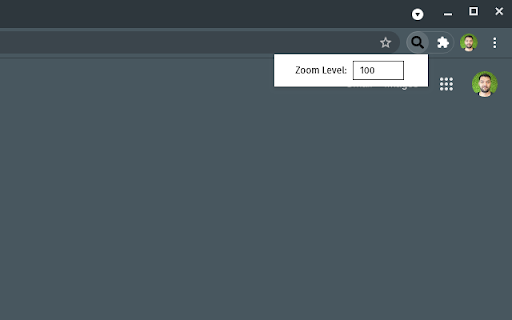
Zoom all tabs on the window at once! Separate windows can have separate zoom levels If you need to zoom all the tabs on a specific browser window, this is the extension for you. The reason I created this extension is, I use multiple screens with different resolutions. Fractional Settings were using more GPU and causing other issues on my OS (using Linux). I started zooming the windows I have on a specific screen. It was effecting other windows & tabs and adjusting this tab per tab was just wasting time. I decided to create an extension where I can just set a zoom settings for a specific window and all the tabs within that window would be zoomed accordingly. * If you move a tab from zoomed window, it will reset itself back to 100% zoom. * If you add a tab from another, non-zoomed window to zoomed window, it will zoom automatically. * Zoomed window & its tabs are not per-origin. Meaning if you visit the same site on another window, it will have your default zoom settings (usually 100% / no - zoom).

Zoom Per Tab
Zoom one tab without affecting other tabs of the same domain! Chrome doesn't let you adjust the zooming of different tabs under the same domain independently? Well you found the cure! I know there are a couple of similar extensions out there. At first, I wanted to just download one and save myself some time. I soon realized that existing extensions out there for this purpose are so bulky and complicated. Some of them even ask you to install a daemon process that's available on Windows only - this is real bad, and dangerous, but also real bad. This extension simply makes page zoom settings independent across tabs, regardless of whether they have the same origin. It's ultra-lightweight. It uses a built-in Chrome API, just a few lines of code, no configuration needed at all! You can unpack the extension to verify that it's not doing anything malicious. In fact I encourage everyone to read it because it's so simple. You could've written it yourself! A copy of the source code is at https://github.com/xinan/zoom-per-tab.

Merge Windows
Merge all browser windows into one Click to merge all currently opened windows into single one

Tab Resize - split screen layouts
The ORIGINAL Tab Resize. Split Screen made easy. Resize the CURRENT tab and tabs to the RIGHT into layouts on separate windows. For a more easily readable description please visit: ***** Version 3.0.0 -------------------------- Manifest V3 support added. Major extension overhaul to support manifest guidelines with minimum product changes. Version 2.3.0 -------------------------- Added default shortcut keys for: Ctrl + Shift + Z: Undo Last Resize Ctrl + Shift + 1: 1x1 Resize Ctrl + Shift + 2: 1x2 Resize Ctrl + Shift + 4: 2x2 Resize Can still be changed through shortcut key menu. Version 2.2.0 -------------------------- Added support for shortcut keys and scaled split screen layouts. Version 2.1.1 -------------------------- HIGHLIGHTED TABS NOW CAN BE RESIZED (not only tabs to the right) - when 2 or more tabs are highlighted, only these tabs will be considered for resize. In Chrome, you can select multiple tabs by clicking on tabs while holding down the Ctrl (Command for Mac) key or select a range of tabs by holding down the Shift key and clicking. Version 2.1 -------------------------- Added support for multiple monitors, left and right alignment, empty tab mode, drag and drop to rearrange layouts and highlighted tab mode. Fully supports Windows, Mac and Linux OS. ***** @everyone that's liked it, thanks a lot for the support! I'm really glad you guys found it useful. You're pretty much the motivation continuing to build and improve the extension. =) This extension will not resize within the same tab (multiple panes with only ONE url bar). Other Chrome extensions with multiple panes in one tab have security limitations (i.e. you can't see any https site like Gmail or Facebook). With these types of extensions you also won't be able to access any of your favorite extensions on the individual panes. Tab Resize has none of the limitations listed previously because it splits tabs into separate windows. Thanks for checking it out! =) If you like it please rate it and if you have any feature requests, questions or bugs you file it here: https://github.com/peterdotjs/tab-resize/issues?state=open What -------- ✓A simple extension designed to provide ease in resizing your tabs. A set of default layouts are provided but you can add and remove from the list of layouts to fit your needs. With multiple monitor support you can move windows from one screen to the next with ease. ✓Has the functionality of Tab Scissors and much much more! ✓You have a very large monitors and have more pixels than you know what do with. How it works ------------------- ✓The selected/highlighted tab along with all tabs to the right of it will be considered. Whether you have more or less tabs than are needed the extension will resize only the available tabs. ✓Undo button will undo the previous layout resize. You can only perform undo once at any time. ✓In 'single tab' mode, only the selected/highlighted tab will considered. Only the current window/tab will change in size, all other tabs to the right will be ignored. ✓In 'empty tab' mode, new windows with empty tabs will be created if there are not enough tabs to fill your selected layout. ✓You can select left or right alignment for your resize ✓You can create your own custom layouts within reason and reset to default configurations if desired. Layouts are sorted most recently created on top right. ✓Click and hold on any layout and drag to rearrange order to your liking ✓Highlighted tabs now can be resized - when 2 or more tabs are highlighted, only these tabs will be considered for resize. Credit goes to F.C. for the idea. In Chrome, you can select multiple tabs by clicking on tabs while holding down the Ctrl (Command for Mac) key or select a range of tabs by holding down the Shift key and clicking. Additional Notes ------------------------ Only tab/window id info is being used; browsing activity is not. Tabs and browsing activity access are bundled together. "tabs" permissions is one of the least invasive permissions that are available. Browsing activity you should note is NOT the same as Browsing History. "Browsing activity" means the current tabs that are open not your previously closed tabs. This permission is required because this extension needs to manipulate and move tabs around (an essential feature of this extension) If you feel uncomfortable with this basic permission please don't install it. Giving it a bad review because you don't understand or like the permissions doesn't do anything productive. All my code is open sourced on github (https://github.com/peterdotjs/tab-resize) so feel free to look at how I'm using this permission. It's good to be informed and understand the permissions of any extension you install. For more chrome permission information go here: https://developer.chrome.com/extensions/declare_permissions Anonymous usage tracking (# clicks on the different resize options) is used to improve the extension and user experience. You can opt out in the options menu.

Tab limit
Limit the number of tabs you can have open at a time The extension allows users to set the maximum number of tabs they want open across their chrome windows at a time. If a user tries to open a tab when he's already at his tab limit, the newly opened tab automatically closes. This extension will be useful to users who find themselves opening more tabs than they need to. It will also helps users get less distracted from the task at hand by finding themselves opening unnecessary tabs. It is kind of a nudge for them to remind themselves that, hey, they need to stay focused on the task at hand. The user can adjust the number of maximum tabs they want open at any point in time.
