
doeokejknjdlpgkkmlbcahojmnpdlebm


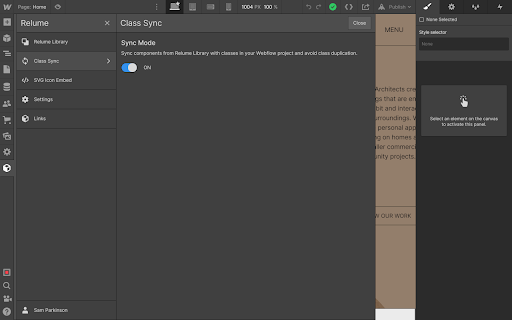

Boost your productivity in Webflow with the Relume Chrome Extension. ★ Access 1,000+ Webflow components from the Relume Library, right inside of Webflow designer. Copy components into your project with 1 click. ★ Class Sync enables you to sync Relume components with updated classes in the designer, preventing class duplication. When you turn on Class Sync and paste a component, the component will adapt to match the styles of your Webflow project. ★ Paste SVGs directly into your Webflow project, with Relume's free SVG to HTML embed converter. ★ Create and save components in your own private Relume Library. Share with with clients and your team. The Relume Library includes everything you need to start a Client-First Webflow project: ✓Navbars ✓Footers ✓Header sections ✓Feature sections ✓CTA sections ✓FAQ sections ✓Contact sections ✓Pricing sections ✓UI Elements (including Buttons, Accordions, Sliders, Dropdowns, Cards, Tabs & more) ✓Page Templates (including Home, About, Blog, Contact, Portfolio & more) Browse the full library online: https://library.relume.io/dashboard Don't waste time rebuilding layouts for every new project. Install the Relume Chrome Extension to access all of these components right inside Webflow. Some features require a Relume account or paid subscription. Find out more inside the extension or online: https://library.relume.io/pricing

Hotkeys for Webflow
Adds hotkeys and dashboard for Webflow. Hotkeys for Webflow offers two main functionalities. 1. Adds shortcuts for your most commonly used elements, like Div, Button, Heading, etc. 2. Your activity is visualized in the dashboard. When you create elements using shortcuts provided by this extension, your actions are recorded and contribute to your activity metrics. Here is a small overview of the most commonly used shortcuts: SHIFT + 'D': Insert a Div Block SHIFT + 'B': Add a Button SHIFT + 'U': Add a Paragraph (P is already used by Webflow) SHIFT + 'C': Create a Collection List SHIFT + 'T': Insert a Text Block SHIFT + 'H': Add a Heading SHIFT + 'I': Insert an Image SHIFT + 'L': Add a Text Link SHIFT + 'K': Create Rich Text SHIFT + 'F': Insert a Form SHIFT + 'Q': Add an HTML Embed SHIFT + ':': (colon) Finsweet Custom Code

html.to.design
Convert any website into fully editable Figma designs. Requires the associated Figma plugin! With html.to.design, convert any website into fully editable Figma layers. Leverage an existing website and import its HTML to Figma to start your own designs, without building each element from scratch. This Chrome extension is a companion to the html.to.design Figma plugin, which you’ll need to install for certain features. If you are using the “Copy to clipboard” option, you do not need to run the Figma plugin — simply paste (⌘+V) your captured webpage in your canvas! This extension also has built-in support for AI Tools like ChatGPT, Bolt and Lovable, and can directly capture their results without any extra steps. You can find the full list of AI tools supported here: https://html.to.design/docs/import-from-ai-tools 1. Install the html.to.design Chrome extension by clicking on [Add to Chrome] on this page. 2. Navigate to the page you would like to import into Figma. 3. Click on the html.to.design extension icon in your Chrome top bar. 4. Hit 'Capture' and the extension will automatically start capturing the page. Once your webpage has been captured, there are several ways to import it into Figma: a) Store it locally as an .h2d file that must be dropped into the html.to.design Figma plugin b) Send it directly to the Figma plugin d) Copy it to the clipboard to then directly paste the result in Figma --- Notes: In order to best map what you see in your browser to Figma, we need to access Chrome's debugging features.

Wizardry Technique Converter
Keyboard shortcuts for EM, REM, and Percentage conversions in Webflow PX TO EM / REM - SHORTCUT type in any px value without the px unit example: 967 space enter

Flowgiri - Webflow chrome extension
Just Copy & Paste Webflow components and start building your website easily, and effortlessly with Flowgiri Chrome Extension. Unleash your Webflow Development potential with the Flowgiri Chrome Extention. Simply copy and paste our pre-build Webflow template and components to begin your website development effortlessly with the Flowgiri Chrome Extension. Flowgiri- the best Webflow resources library with thousands of pre-made resources at your fingertips to make Webflow website designing faster than ever before. Save your time, and energy and make more with our pre-designed web templates, pages and sections. Just Copy & Paste components into your Webflow project and start building your website now. ✓ Best Webflow assets to design professional websites faster. ✓ Bunch of free components libraries. ✓ Copy & Paste components to create websites easily and quickly. ✓ Stunning web template libraries by many categories like Portfolio, Business consultant, SEO tools, etc. ✓ You can get all the web page libraries you need for your website, including landing pages, pricing, about us, and more. ✓ Crucial web section libraries including navigation, header, product, footer, and others. NOTE: Flowgiri offers Free and Paid components.
