
pkhcndpmkeaingajpeoiinkpiojibpmi

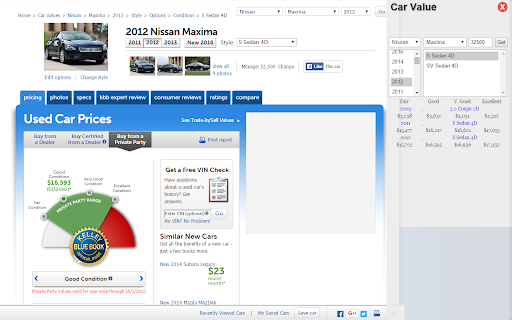
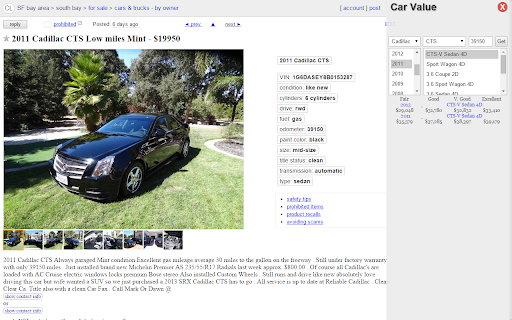
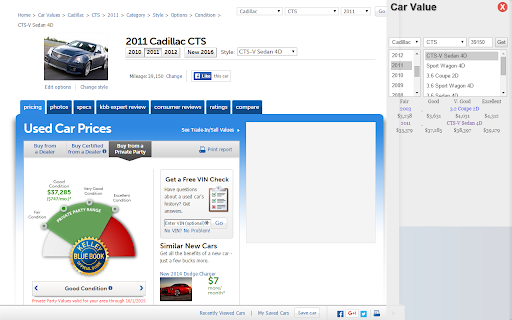

Features included... 1. In Popup a. Enable/Disable b. Auto Detect the car on page (This is experimental feature thus may not work accurately all the time) c. Enable on more sites matching given URLs using Regular Expression d. Show the Car Value in the page for which it is not automatically enabled 2. On Web Page a. Load all makes by default b. Load model, year and trim based on user selection c. Try to detect mileage d. Show KBB values of car ... A. Fair value B. Good Value C. Very Good Value D. Excellent Value e. Link to KBB page (No more search for car...get direct link to KBB page) Value: Saves time of looking up car value (KBB value) on search engines and sites. Makes car hunting little less painful! Steps 1. select year 2. select make 3. select mode 4. select trim 5. populate zipcode 6. populate mileage 7. click Get button to fetch and view the KBB private party values of the car Release History v1.5 (2023-07-13) - upgrade to latest kbb apis - refactored code to simplify some of the code - made it work again v1.3 (2018-09-01) - bux fix: updated the source api and price information is now loading v1.1 (2015-10-30) - using new KBB urls - removed trims with ", " in the name as these are not valid trims

MyAuto.ge chrome extension
The Myauto.ge extension for Google Chrome allows you to easily move certain lots from auto auctions (Copart.com, iaai.com). ◦ Install the extension in the Chrome browser. ◦ Go to Copart.com. ◦ Go to vehicle details page. ◦ Right-click on the vehicle details page. ◦ Select "გადავიტანოთ myauto.ge-ზე". All information, description and photos will be transferred to the page "Myauto.ge - new ad" (authorization required). This way you can easily move the auction items in Myauto to sell them there.

Carketa Vehicle Information
The Carketa Chrome Extension gives you simulcast access of our appraisal tool. View any vehicle's valuation on platforms that host their VIN numbers, such as websites, DMS software or auction sites. Take the shortcut around those tough integrations and expensive fees for manual integrations charged by a typical DMS system and appraise any vehicle, anywhere.

vindecode.app - Free VIN Decoder and Instant Car Report
👉 vindecode.app – Free VIN Decoder & Instant Car Report Unlock the full story of any car—right from your browser. vindecode.app is a free, lightweight Chrome Extension that instantly decodes Vehicle Identification Numbers (VINs) and delivers comprehensive car data in a clean, user-friendly interface. Whether you're shopping for a used car, researching a vehicle, or working in the auto industry, vindecode.app gives you fast access to the facts that matter—with no ads, no signups, and no distractions. 🔍 What Can You Decode? 1. Basic Vehicle Info Get the essentials at a glance: • Make & Model • Year of manufacture • Body style & vehicle type • Trim level & series • Number of doors 2. Technical Specifications Detailed specs straight from the VIN: • Engine size, cylinders & configuration • Displacement (CC/L) • Fuel type • Transmission style & speeds • Drive type (FWD, AWD, RWD, etc.) 3. Safety Features Know what's protecting you: • Anti-lock Braking System (ABS) • Electronic Stability Control (ESC) • Traction Control System • Airbag configurations 4. Manufacturing Details Understand where the car was built: • Manufacturer name • Assembly plant location • Country of origin 🤝 Partnership with carVertical vindecode.app is proudly partnered with carVertical, one of the largest vehicle history providers in the industry. Through this integration, users can seamlessly unlock full car history reports—including mileage verification, theft checks, accident history, and more—at a discounted price, directly from the extension. No need to manually search VINs—just decode, review, and if needed, upgrade to a full carVertical report in seconds. 🎯 Smart VIN Detection • Automatically finds and highlights VINs on any webpage • Blue underline makes VINs instantly recognizable • Badge counter shows how many VINs are on the current page ⚡ One-Click Decoding • Hover over any highlighted VIN to see quick info • Click to instantly decode with full vehicle details • Floating panel shows results without leaving the page 🖱️ Multiple Ways to Decode • Click highlighted VINs directly on pages • Use the popup to enter VINs manually • Right-click any text → "Decode VIN" • Type "vin" in address bar, then your VIN 🌙 Modern Interface • Clean, distraction-free design • Dark mode support • Responsive and fast 📋 Productivity Features • Recent VINs history for quick access • Export decoded data as CSV • Keyboard shortcut (Alt+V) to open decoder ✅ Instant & Seamless: Decode VINs from any page—just hover and click ✅ carVertical Integration: Upgrade to full reports with one click at a reduced rate ✅ No Ads. No Spam. Ever: Clean, focused, and distraction-free ✅ Privacy-First: We don't track you or sell your data ✅ Global Compatibility: Works with manufacturers worldwide ✅ Trusted Source: Powered by official NHTSA database ✅ Always Free: Core features are completely free, forever 1. Install the extension 2. Visit any webpage with VINs (car listings, auction sites, etc.) 3. VINs are automatically highlighted in blue 4. Hover to see quick info, or click to decode 5. View full specs and optionally get a carVertical history report 🛠️ Use Cases ✅ Used Car Shoppers: Verify vehicle details before buying ✅ Auto Dealers: Quickly decode VINs on listing sites ✅ Car Enthusiasts: Learn more about vehicles you encounter ✅ Insurance Agents: Verify specs and safety features ✅ Mechanics & Technicians: Get OEM specifications fast 🌍 Global Reach vindecode.app supports VINs from vehicles manufactured in North America, Europe, Asia, and more. Decode data for Toyota, Honda, Ford, Chevrolet, BMW, Mercedes-Benz, Audi, Volkswagen, Tesla, Hyundai, Kia, and hundreds of other manufacturers. 👑 Make smarter car decisions in seconds. Install vindecode.app – Free VIN Decoder & Instant Car Report now and decode your next vehicle with confidence.

Voyn Car Dealer Tool
Analyze cars from multiple marketplaces like Facebook Marketplace, Craigslist and get information about their profit potential. Searching for affordable used cars with the potential for profit? Look no further! Our advanced Chrome Extension is your ultimate tool for uncovering valuable car deals from popular platforms like Facebook Marketplace, eBay, and Craigslist. With the power of ChatGPT integration, our intelligent AI system provides you with estimated market values, average mileage, and calculates potential profit, empowering you to make informed decisions and find cheap cars that can yield significant returns. Why Choose Our Chrome Extension: Accurate Market Valuation: Our Chrome Extension utilizes cutting-edge AI algorithms to estimate the market value of used cars listed on Facebook Marketplace, eBay, and Craigslist. Get real-time insights into fair pricing to ensure you never overpay for a vehicle. Comprehensive Mileage Analysis: With our AI-powered system, you gain access to average mileage data for different car models, enabling you to assess a vehicle's condition and make a more informed buying decision. Profit Calculation: Our extension goes beyond estimation by calculating the potential profit margin for each listed car, taking into account its market value, mileage, and other key factors. Identify lucrative opportunities that can maximize your investment. Keywords: cheap cars, used car market, market value estimation, average mileage analysis, profit calculation, Facebook Marketplace, eBay, Craigslist, ChatGPT, AI integration, Chrome Extension, United States.
