
ckghkkfgljadklgemfelfckaiimbnjki

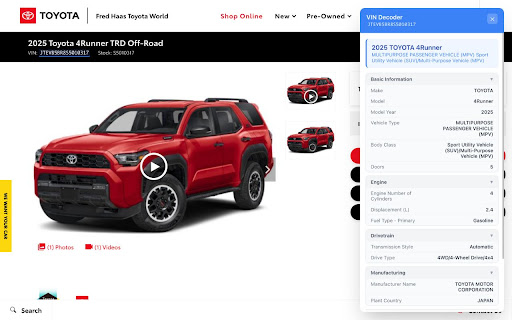

👉 vindecode.app – Free VIN Decoder & Instant Car Report Unlock the full story of any car—right from your browser. vindecode.app is a free, lightweight Chrome Extension that instantly decodes Vehicle Identification Numbers (VINs) and delivers comprehensive car data in a clean, user-friendly interface. Whether you're shopping for a used car, researching a vehicle, or working in the auto industry, vindecode.app gives you fast access to the facts that matter—with no ads, no signups, and no distractions. 🔍 What Can You Decode? 1. Basic Vehicle Info Get the essentials at a glance: • Make & Model • Year of manufacture • Body style & vehicle type • Trim level & series • Number of doors 2. Technical Specifications Detailed specs straight from the VIN: • Engine size, cylinders & configuration • Displacement (CC/L) • Fuel type • Transmission style & speeds • Drive type (FWD, AWD, RWD, etc.) 3. Safety Features Know what's protecting you: • Anti-lock Braking System (ABS) • Electronic Stability Control (ESC) • Traction Control System • Airbag configurations 4. Manufacturing Details Understand where the car was built: • Manufacturer name • Assembly plant location • Country of origin 🤝 Partnership with carVertical vindecode.app is proudly partnered with carVertical, one of the largest vehicle history providers in the industry. Through this integration, users can seamlessly unlock full car history reports—including mileage verification, theft checks, accident history, and more—at a discounted price, directly from the extension. No need to manually search VINs—just decode, review, and if needed, upgrade to a full carVertical report in seconds. 🎯 Smart VIN Detection • Automatically finds and highlights VINs on any webpage • Blue underline makes VINs instantly recognizable • Badge counter shows how many VINs are on the current page ⚡ One-Click Decoding • Hover over any highlighted VIN to see quick info • Click to instantly decode with full vehicle details • Floating panel shows results without leaving the page 🖱️ Multiple Ways to Decode • Click highlighted VINs directly on pages • Use the popup to enter VINs manually • Right-click any text → "Decode VIN" • Type "vin" in address bar, then your VIN 🌙 Modern Interface • Clean, distraction-free design • Dark mode support • Responsive and fast 📋 Productivity Features • Recent VINs history for quick access • Export decoded data as CSV • Keyboard shortcut (Alt+V) to open decoder ✅ Instant & Seamless: Decode VINs from any page—just hover and click ✅ carVertical Integration: Upgrade to full reports with one click at a reduced rate ✅ No Ads. No Spam. Ever: Clean, focused, and distraction-free ✅ Privacy-First: We don't track you or sell your data ✅ Global Compatibility: Works with manufacturers worldwide ✅ Trusted Source: Powered by official NHTSA database ✅ Always Free: Core features are completely free, forever 1. Install the extension 2. Visit any webpage with VINs (car listings, auction sites, etc.) 3. VINs are automatically highlighted in blue 4. Hover to see quick info, or click to decode 5. View full specs and optionally get a carVertical history report 🛠️ Use Cases ✅ Used Car Shoppers: Verify vehicle details before buying ✅ Auto Dealers: Quickly decode VINs on listing sites ✅ Car Enthusiasts: Learn more about vehicles you encounter ✅ Insurance Agents: Verify specs and safety features ✅ Mechanics & Technicians: Get OEM specifications fast 🌍 Global Reach vindecode.app supports VINs from vehicles manufactured in North America, Europe, Asia, and more. Decode data for Toyota, Honda, Ford, Chevrolet, BMW, Mercedes-Benz, Audi, Volkswagen, Tesla, Hyundai, Kia, and hundreds of other manufacturers. 👑 Make smarter car decisions in seconds. Install vindecode.app – Free VIN Decoder & Instant Car Report now and decode your next vehicle with confidence.

Michael's Upgrade for TrakED
Upgraded features for TrakED in the THS. (This extension is not an official product of the THS or Intersystems TrakCare software.) Upgraded features for Trak ED in the LGH. Features: - Re-enable spell check in the triage page - Use the enter key when logging in - Handover sheet for ED Main Floor and EMU - ED Main Floor filters and persistent sort - Triage Summary print out - Filter and count results of an enquiry - Count patients currently breaching length of stay targets -- This extension is not an official product of the LGH or InterSystems Trak software.

Loop8 Privacy Manager
Browser extension for Loop8 Privacy Manager. Loop8 Privacy Manager Chrome Extension is a seamless method for users to safely and securely store their login credential information.

vCar7.com
vcar7.com - это мощное расширение для Chrome, предназначенное для упрощения процесса поиска и мониторинга автомобилей в интернете.… vcar7.com - это мощное расширение для Chrome, предназначенное для упрощения процесса поиска и мониторинга автомобилей в интернете. Оно предоставляет ценную информацию о VIN-кодах автомобилей на посещаемых сайтах, облегчая процесс покупки и изучения автомобилей. Автоматическая проверка авто по VIN коду: Расширение сканирует веб-сайты на наличие VIN-кодов, предоставляя всестороннюю информацию о транспортном средстве. История авто по VIN коду и расшифровка VIN кода: В случае обнаружения VIN-кода, расширение отображает историю транспортного средства, включая регистрационные действия, участие в ДТП и фотографии авто из различных источников и подробную расшифровку VIN-кода. Сканирование страниц Copart.com: Расширение автоматически анализирует страницы на сайте Copart.com, идентифицируя номера лотов автомобилей. При обнаружении номера лота, расширение предоставляет детальную информацию об автомобиле, включая VIN-код. Это позволяет пользователям получить информацию об автомобиле, включая его историю, технические характеристики и прочие важные данные, непосредственно на странице аукциона. Удобный интерфейс: Информация отображается во всплывающем окне в правой верхней части экрана, которое можно свернуть или закрыть. Функционал закладок: Возможность сохранения страниц с автомобилями в закладки для удобного доступа в будущем. Бесплатное использование с простой регистрацией: Для использования расширения требуется регистрация с использованием электронной почты и пароля.

Agency Toolchest
The Agency Toolchest Chrome Extension is used to send information to the AgencyToolChest Web Application. The AgencyToolChest Chrome Extension is used to send information to the AgencyToolChest Web Application. Our tool allows you to easily input quote or policy information such as premium, quote type, and other fields from any page and at a click of a button, send this information to our web application and track your reports and visualize them with beautiful charts.
