
kdjgnikanogdoaglfmbfgidjnkomjabj
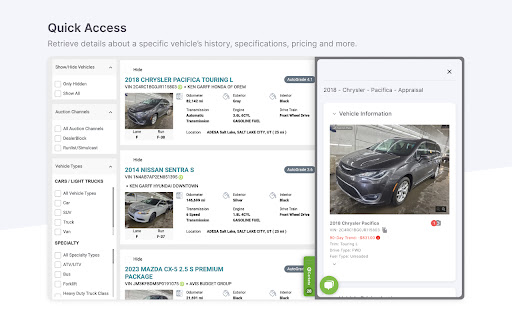


The Carketa Chrome Extension gives you simulcast access of our appraisal tool. View any vehicle's valuation on platforms that host their VIN numbers, such as websites, DMS software or auction sites. Take the shortcut around those tough integrations and expensive fees for manual integrations charged by a typical DMS system and appraise any vehicle, anywhere.

PromptSync
Ask ChatGPT, Bard AI, and Bing Chat with one single prompt! Unlock the power of four dynamic chat platforms with a single prompt! Introducing PromptSync, your all-in-one solution for chatting with ChatGPT, Bard AI, and Bing Chat, through a convenient Chrome extension. Multi-Platform Chat Engage in conversations effortlessly with ChatGPT, Bard AI, and Bing Chat from a single prompt. Get diverse perspectives and responses to your queries. Customizable Experience Tailor your chat experience to your liking! Enable or disable individual chat platforms according to your preferences through the settings menu. Efficient Workflow Streamline your workflow by accessing multiple chat services without switching tabs. Save time and stay productive as you harness the combined intelligence of four powerful chat systems.

Quick Image Saving via CSS Selector
This Chrome extension is designed to facilitate the quick and efficient saving of images from web pages using CSS selectors. Quick Image Saving via CSS Selector Streamline your image-saving process directly in Chrome. Ideal for professionals, developers, and hobbyists who work with large numbers of images, this official Chrome Extension simplifies the way you collect and manage visual assets from any web page. 🖼️ Multiple Image Management Download many images at once — great for creative projects, development tasks, or research. 📦 Bulk Download in ZIP Format Save all selected images in a single ZIP archive for better organization. 🧩 Customizable Order & Naming Choose how images are ordered (top-to-bottom or raw order) and keep their original filenames. 🧠 Smart Regex Pattern Cleaner Remove size suffixes like -1024x683 from filenames automatically using regex — perfect for accessing full-size images. 📊 Real-Time Progress Bar & Reset Stay informed with clear download status and a reset option if something goes wrong. 📂 History Management Reuse your recent selectors and remove old entries with one click. 👌 User-Friendly Interface Simple, fast, and intuitive — designed to make your workflow smoother. ⚡ Quick Installation Add the extension in seconds and start saving smarter immediately. 🔐 Trusted & Secure This is the official version of our Chrome Extension. Be cautious of imitations or similarly named tools — unofficial versions may pose security risks. ⚠️ Image Usage Notice Some images you retrieve may be subject to copyright. Always check licensing and usage rights before using images from websites. This extension does not bypass image protections. ✅ Get Started Today Enjoy a faster, smarter way to manage your visual content. 📍 Visit our website devraiks.com 🛠️ Extension by DevRaiks © 2025 – All Rights Reserved

Thymeline
Add events to your timeline the easy way Keep track of everything important about your projects all in one place. Meet Thymeline, the free Chrome extension that will magically transform your project chaos into an organized masterpiece. Created for Project Managers. Here is how Thymeline saves you time. No APIs. No integrations. As simple as copy & paste. Easily copy relevant information from any of your existing tools or apps without any hassle. Once you download the chrome extension... Step 1: Visit any website. Step 2: Highlight any text. Step 3: Click on the Thymeline Chrome extension Step 4: Add to existing Thymelines. That’s it! Thymeline can handle as many projects as you’re juggling. Create as many Thymelines as you need! Multiple projects, multiple Thymelines, we can handle it. Keep track of it all in a simple interface. Share with others Share your Thymelines with others on your team with view or edit privileges, keeping everyone on the same page. Want to keep it private? You can do that too.

vAuto VIN-Click
Finds VIN's on your pages and provides you with a simple way to open up a new vAuto Appraisal with that VIN. Detects valid VINs on a page and creates a VIN "Button" in place of the VIN Text. Clicking the VIN Button will allow you to sign in to the vAuto system and create an appraisal without ever having to leave the webpage you're on! If the extension doesn't auto-detect a VIN on a page, you can force it by highlighting the VIN text in your browser, right click, and then click on the "Appraise Vin" context menu option. NOTE: To take advantage of all of the features of this extension, like opening an appraisal window inside your current page, you will need a valid https://provision.vauto.app.coxautoinc.com account. Without an active account you will only benefit from the extension auto-detecting and creating a button/message from valid VINs on the pages you visit. UPDATES: V2.0.2 - Update vAuto Provision and QuickVIN url V2.0.0 - Open new browser window for Appraisal and QuickVIN - Enhancement and bug fixes V1.5.1 - Url changes for Stockwave QuickVIN V1.4.1 -Bug fixes and performance improvement V1.4 - Replace www2 with api for session API call V1.3 - Fix issues for www.cadillacofmahwah.com - Fix blank appraisal on KSL website - Manifest version update V1.2 - Changed name to vAuto VIN-Click - Added support for French - New button to copy VIN - Other improvements V1.0.1 - Remove multiple tutorial popup when multiple VIN found on page - Other improvements V1.0 - New feature for Stockwave QuickVIN Lookups - Update for improved compatibility with sites that contain VINs V0.0.12 - Prevents the appraisal window from being opened if you're not logged in. If not signed in, you will see a sign in button in the popover. After signing in, the popover will change to allow you to create an appraisal. This fixes the issue of opening an appraisal window only to receive authentication errors. - Better detection of VINs on sites - Numerous updates for improved compatibility with sites that contain VINs (e.g. Autotrader, Carvana, Cars.com, etc.) - Skips prompt for creating inventory when finalizing an appraisal - Improves window size compatibility for the inline appraisal window to better support a wider variety of screen resolutions - Removes Toast VIN Found Notification message as this was causing some rendering issues on certain sites. This is planned to be added back once the rendering issues are addressed V0.0.11 - NEW Context Menu option to appraise a VIN. Just select a VIN anywhere on the page, then right click, and choose "Appraise Vin". - This is intended to solve situations on the page where sites may have VINs formatted in a way that the general parser cannot interpret. e.g. Manheim, OVE, etc. V0.0.10 - Reduced the number of false positives on VINs that are found. Now, only valid VINs that match the checksum/checkdigit are displayed. - Changed the VIN Click button to create a popout action menu. Additional options are coming, such as Stockwave QuickVIN lookups v0.0.9 - Added the entity you're signed into VA on to the JsPanel. NOTE: This may take up to 60 seconds to reflect a change if you switch entities in VA. Know that the appraisal window will only SHOW the wrong entity during that time. The appraisal will always be created for the CORRECT entity that you switched to in VA. v0.0.8 - Renamed extension to Provision Appraise Anywhere - New icons to match provision icons - Includes location the URL the vehicle was found on in the Appraisal Nodes when creating a vehicle - No longer searches within element tags, this should prevent false positives for VINs from appearing on places like google search pages when you can't see them - Corrected a padding issue on the tutorial box for some sites that was hiding the tutorial text - Fixed a bug that prevented the "Build Vin Links" button from forcing a VIN search if the max search attempts had been reached - Cleaned up and organized the code to allow the extension to run faster v0.0.7 Many Significant UX improvements: - Toast/Snackbar message displayed when a VIN is found on the page - Appraisal loaded on the page is simpler and no longer has the navigation headers included - Button for the VIN instead of a link. There's no longer a way to open the VIN up in a new window, the tool only supports opening it up in your current window. - Color themes to match Cox Auto standards - Removed configurable fields for the refresh rates and intervals - Added a one-time tutorial to the system (which you can re-enable at any time in options). This tutorial is dismissed when you close the popup box and will not come back again. - Better VIN matching on pages, will no longer believe that there are VINs inside of words, will only search for single words that are VINs v0.0.6 - Removes JSONP calls from content script to comply with Chrome store policies v0.0.5 - Removes the requirement to check for all sites, this is now unnecessary - Options page is now smaller and inlined on the chrome extensions page v0.0.4 - Adds new button to the upper right of pages you visit that allows you to manually build VIN links in the event that the site had a delayed loading of the VIN text. - Adds several new options to the extension options page: - Toggle showing the button to build VIN links mentioned above on/off - Sets configurable auto-refresh attempts and interval times. - Additional performance improvements v0.0.3 - Adds an auto-refresh for 5 times every 3 seconds until it finds a VIN on a page, if no VIN is found, the refresh stops. This is to handle cases where the page is using frameworks that rely on shadow-dom creation scripts (like ReactJS) that are adding/removing elements to load the page. - Fixes performance issues when dealing with IFRAMEs and the script loading multiple times - Fixes other performance issues searching inside elements that shouldn't possibly contain VINs (like tags) v0.0.2 - Included a way to set a default for where the Appraisal is sourced from (Appraisal, Lease Return/Purchase, Stocking, etc.). You can find this on the Options page.
