
pkfhjockaolkjmhghjhpjjcafkfjcceh
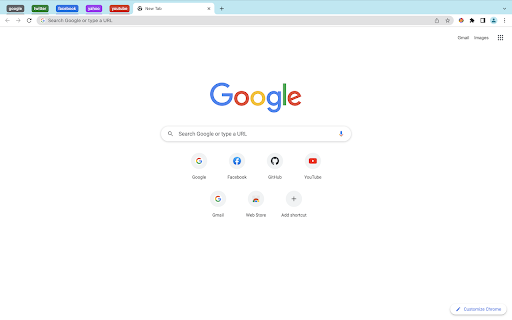
Groups your tabs on Chrome with a single click GroupEM is a simple yet powerful Chrome extension that helps you to organize your tabs by domain. With a single click, you can group all of your tabs that have the same domain and set the appropriate color. This makes it easy to quickly find the tabs that you are looking for and to keep your browser window organized. - Automatically groups tabs by domain - Assigns a unique color to each group - Lightweight and fast - Improves productivity by making it easy to find and organize tabs - Reduces clutter by grouping related tabs together - Makes your browser window look more organized - Install the GroupEM extension from the Chrome Web Store. - Pin GroupEM's icon to the Chrome taskbar by clicking on the Extensions icon and selecting GroupEM. - Click on GroupEM's icon in the Chrome taskbar. - All of your tabs will be grouped by domain. Download GroupEM today and start organizing your tabs like a pro!

Tab Grouper
Find and manage your tabs easier. Helps you with: Browse all tabs opened. Click to jump to a tab. Select and smart grouping all tabs by website. Bookmark selected tabs in a folder and close them.

Auto Tab Groups
Automatically Set Your Tab Groups! This extension allows you to set custom rules that then auto sort your tabs. IT does this using Google Tab Groups. It lets you set up as many rules as you want. To add a new rule click add group button and fill out the TITLE, Domain / URL and COLOR fields. When you open the open extension the TITLE column will be the tab group name. The DOMAIN/ URL column will be the value searched in the website URL field that extension uses to sort the active tab. The COLOR column will be a box that when drop down is clicked allows the user to pick a color for the tab group. These preferences will be saved to users google profile when either the save button is clicked or delete button is confirmed and work across multiple devices with extension under same profile. In order to change or delete a rule you must first check the checkbox for the row and click edit or delete. If deleting values confirm the delete in delete window. If editing values makes sure all fields in rows are checked are not blank, and that color box is not set to grey. Otherwise a warning message will display letting you know to set these fields. The extension works as follows, say you have the value Test1 in Name Column, test1 in URL column, and the box set to Blue. Any website URL you visit with test1 ex.(www.test1thisisatest.com) will be automatically sorted into a group named Test1. You can also specify multiple terms to search with by separating them with commas. For instance, if you assign a group with TITLE column of Colors, and DOMAIN/ URL of blue, yellow, and green; any url you load with those search terms will go in the Tab Group Named Color. The final column COLOR, is the color of this tab group that gets set. By default the following keyboard shortcuts are enabled. You can use Ctrl+Shift+Y, Ctrl+Shift+H, and Ctrl+Shift+U to close, open and toggle tab groups respectively. You can also change this by going to chrome://extensions/shortcuts as well. There is a settings / options page you can get to by clicking the gear in the top right corner. Here you can enable a zoomed in view for larger font size and window for the popup window, change grouping from other windows behavior, and save and load your files from a local file on your computer.

Tab Groups List
Lists all tab groups across all browser windows. On a click navigates to the selected group. A simple extension that shows a list of all open tab groups across all browser windows in a popup. Clicking the group activates the first tab in that group and focuses its browser window if needed. The purpose of the extension is to allow users to quickly find specific tab group and navigate to it - useful especially for tab hoarders with many groups across many windows. IMPORTANT NOTE: This extension can only display tab groups that are currently open in the browser windows. Tab groups saved or hidden via Chrome's native "Save group" feature are not accessible to extensions through Chrome's API and will not appear here. The extension tries to maximize the number of groups visible without scrolling (as extension popup window size is limited by the browser) by displaying them in 1 to 3 columns based on the number of groups to show. In a nutshell: ● Shows a list of all tab groups across all browser windows in a popup. ● On a click navigates to the selected group. ● Only groups are involved, no tabs get in the way. No group management either. ● Extension is for Chromium based browsers that support tab groups. Remember to pin the extension after installation so its icon is always visible and clickable. You can also set a keyboard shortcut to open the popup in the browser settings (usually Extensions -> Keyboard shortcuts). Browsers currently list all the groups (without their tabs) only in the "Add tab to group" context menu - not very useful when you just want to jump to the group without adding anything. And the search function often (depends on browser) only checks tabs and not group titles. There is no group management or messing with individual tabs in this extension, you can find nice ones for that already or have built-in support.

Focus Tab Groups
Too many tabs? Say hello to effortless organization and seamless multi-tasking. Focus Tab Group keeps your browser organized by automatically highlighting, grouping, and arranging your most active tabs—while quietly minimizing the rest. Keep your browser calm, your mind clear, and your tabs under control. With this tool, you can: 🧘♂️ Stay focused with automatic tab highlighting and minimization—only what matters stays in view 🧠 Jump back in instantly with automatic reactivation of your recently used tabs 🗂️ Organize ideas effortlessly by creating new tab groups with one click or a simple drag-and-drop 📌 Keep your workspace intuitive by automatically arranging your most active tabs exactly where you expect them 🚀 Why Focus Tab Group? Focus Tab Group isn’t just another tab manager—it’s a smarter way to multitask. While other tools slow you down with cluttered menus and extra buttons, Focus Tab Group stays invisible, enhancing your browser’s natural flow without adding any new interface. Whether you’re a developer, a student deep in research, or anyone juggling multiple tasks, this tool helps you stay organized, focused, and in control—all without breaking your rhythm. It just works—quietly, intelligently, and right where you need it. ✨ Try it free and experience what effortless browser organization feels like. ❣️ THANK YOU! We’d love to hear your feedback or feature ideas: - tidytabgroups.github.io - discord.gg/aBdAfNfGEv - x.com/FocusTabGroups
