
pjpodlfknhbbplpfehkigkekkjkihcdi

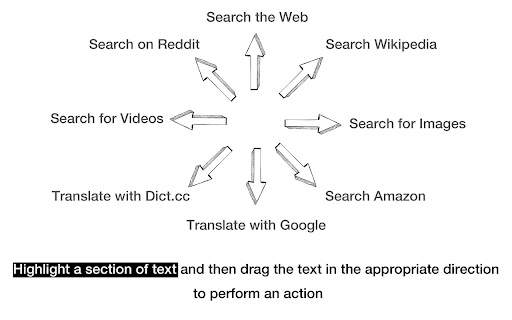
Mouse gestures for your browser: A lightweight and privacy-aware extension! Windrose is a productivity extension that allows you to trigger the most commonly used browser actions with simple gestures. For example: You can hold down the right mouse button and move the mouse in the top right direction to refresh the current tab. Alternatively you can highlight a section of text and drag it to the right to immediately get corresponding image search results. Windrose reduces wrist movements by up to 80% (doctors hate it!). It's also lightweight, respects your privacy and does not track you. Also note that you need to refresh all open tabs after installing the extension and that extensions do not work on Chrome's store and settings pages. --- Permission transparency: "Read and change all your data on the websites you visit" This is necessary because the extension works in the background on all pages. Of course, it doesn’t actually read or change your data. --- Update v3: Manifest version 3 conformance Update v1.4.4: Minor improvements Update v1.4.2: Significantly reduced extension size Update v1.4.0: Added browser history navigation

Mouse Gesture and Wheel Action
Mouse gestures, right-click + wheel and rocker gesture to control the browser. Control tabs, windows, bookmarks, mute, change zoom factor, full screen, custom URLs, and more. Functions that can be performed - Go back - Go forward - Scroll up - Scroll down - Scroll left - Scroll right - Scroll to top - Scroll to bottom - Scroll to the leftmost - Scroll to the rightmost - Add tab to group - Remove tab from group - New tab - New tab (leftmost) - New tab (rightmost) - Duplicate tab - Pin tab - Close tab - Close tabs to the left - Close tabs to the right - Close other tabs - Reopen closed tab - Reload - Hard reload - Reload all tabs - Go to left tab - Go to right tab - Go to left tab (or the other side if at the edge) - Go to right tab (or the other side if at the edge) - Go to the leftmost tab - Go to the rightmost tab - Go to previous tab - Go to previous tab (loop) - Go to next tab - Go to next tab (loop) - Add to bookmarks bar - Add bookmark - Delete bookmark - New window - Close window - Close all windows - Maximize window - Minimize window - Fullscreen - Copy url - Copy title - Mute - Unmute - Toggle mute - Mute all tabs - Unmute all tabs - Zoom in - Zoom out - Reset to default zoom level - Open link in new tab - Open link in new tab and activate - Open link in new window - Open link in new window and activate - Open link in new tab (leftmost) - Open link in new tab (rightmost) - Open link in new tab and activate (leftmost) - Open link in new tab and activate (rightmost) - Open image in new tab - Open image in new tab and activate - Open image in new window - Open image in new window and activate - Open image in new tab (leftmost) - Open image in new tab (rightmost) - Open image in new tab and activate (leftmost) - Open image in new tab and activate (rightmost) - Open options - Disable this extension on this tab - Open custom URL Version History 1.0.0: Initial version 1.1.0: Add bookmark function 1.1.1: Bug fixes 1.1.2: Bug fixes 1.2.0: Add tab grouping function. Changed full screen and window maximization to a toggle system. 1.3.0: Add functions such as opening links in a new tab. Add the ability to use clicks as mouse gesture actions. 1.4.0: Add "Reload all tabs" and "Open custom URL". Add export/import function. Add customizing color function. 1.4.1:Fixed a bug that "Close tabs on the right" and "Close other tabs" did not work on the leftmost tab. Add function that hide hint on the options page permanently. 1.5.0: Add "Go to previous/next tab" and "Open image in new tab/window". Add disable extension function by URL on the options page. Add "Change to open context menu on right double-click" for macOS/Linux. Add "Hide" to Mouse Gesture Color options. 1.6.0: Add Rocker Gesture. Modified to allow execution of 1.6.1: custom URLs without {} even if the text is not pre-selected. Fixed an issue where some functions did not work with wheel actions. Fixed an issue where extensions would not work correctly after a rocker gesture. 1.6.1: Fixed problem with some actions not working with wheel actions. Fixed an issue with extensions behaving erratically after a rocker gesture. 1.7.0: Improved behavior within IFRAME. Enhanced mouse gesture appearance customization options. Fixed mouse gesture “Click” not working. Enhancements to allow scrolling of elements as well as the parent window. Other minor bug fixes. 1.7.1: Fixed a problem with right double-click not opening the context menu. Fixed an issue that prevented scrolling on some web sites. Fixed Issue with moving tabs using rocker gestures. 1.8.0: Enhancement to not close pinned tabs with multiple tab close action. Add "Pin tab", "Go to previous/next tab (loop)". Changed rocker gesture to be performed when the mouse button is pressed instead of when it is released. 1.8.1: Fixed an issue where adding mouse gestures on the options page did not work. Fixed an issue where exporting on the options page did not work. 1.9.0: Add option to create a new tab when the last tab is closed. 1.10.0: Improved the options page. Fixed bookmark action. Improved 'close tab'. Fixed other minor details. 1.11.0: Add option to specify behavior on closing tabs. Other minor functionality improvements. 1.11.1: Fixed an issue where mouse gesture malfunction on certain websites. 1.11.2: Fixed an issue where mouse gestures are not executed occasionally. 1.12.0: Added a feature to embed page URLs in custom URLs. Added a feature to share settings information within an account. Added 'Arrows and Text Position' option. Added new actions for opening links and images in new tabs at leftmost and rightmost positions. Added “Go to selected URL” as a default option for Custom URL settings. 1.13.0: Improved handling so that the context menu is less likely to appear after moving to a new tab with a rocker gesture. Added an option to enable diagonal mouse gestures. 1.14.0: Add `New tab (leftmost)` and `New tab (rightmost)` 1.15.0: Fixed an issue where links did not mark as visited when opened via mouse gestures. 1.15.1: Fixed an issue where links opened via mouse gestures in Incognito Mode were added to history. Added Incognito Mode support for the “Open in New Window” feature. Fixed an issue where `Enabled mouse gesture` could not be turned OFF in the Options screen. 1.16.0: Supports Simplified Chinese.

KT Mouse Gestures
------------------------------------------ right button click and move ------------------------------------------ U = UP D = DOWN L = LEFT R = RIGHT 0.16.4.160 fix: Gesture is executed with the left button up

Our Mouse Gesture
This is Mouse Gesture Extension. This has 31 gesture functions and "Mouse wheel" action and "Rocker Gesture" function. 【Feature Description 】 This is an extension of mouse gestures. I tried various mouse gesture extensions, but none of them could minimize the window, so I created it myself. It implements the following actions. You can change the direction of the mouse gesture that triggers the action on the extension's options window. (08)New tab (up) (09)New tab on right side of current tab (-) (10)Close tab (-) (11)Close tab and Focus left adjacent tab (down,right) (12)Close right tab (-) (13)Close left tab (-) (14)Close all right tab (up,right,down) (15)Close all left tab (up,left,down) (16)Close all other tab (up,down,right) (17)Reload tab (up,down) (18)Reload tab bypass local chache (-) (19)Focus right tab (up,right) (20)Focus left tab (up,left) (21)Focus rightmost tab (up,right,up) (22)Focus leftmost tab (up,left,up) (23)Duplicate current tab (up,down,up) (24)Open link in new tab (-) (25)Open link in new tab and focus it (-) (26)Page back history (left) (27)Page forward history (right) (28)Scroll to the page top (right,up) (29)Scroll to the page bottom (right,down) (30)Scroll up one page (right,up,right) (31)Scroll down one page (right,down,right) *The values in parentheses are the default settings for mouse gestures. You can also set the action when scrolling the mouse wheel up and down while right-clicking. By default, left and right tab movement is set. You can also change the settings on the extension option window. Implemented FireFox's feature "When you open a link in a new tab, switch to it immediately". (* Default Settings : Disabled) 【User data handling and privacy 】 ・This extension does not handle personal or confidential information. In addition, no information is sent to the outside. 【Limitations】 ・This extension doesn't work on Chrome's built-in pages such as "New Tab Page" and chrome related pages such as "Chrome Web Store" because of Google's security restrictions. ・It may not work properly for an OS that has not been verified for operation. 【Copyright】 ・The copyright of this extension belongs to me. The copyright provisions shall be governed by the laws of Japan. 【Disclaimer】 ・I am not responsible for any problems or damages caused by using this extension, regardless of their predictability. Please use at your own risk. 【Revision history】 ・v1.0.15 - Feb 23, 2026 Implemented the following features requested by user reviews: - Add an “Instant Scrolling” option to the scrolling behavior settings for [Scroll to Top] and [Scroll to Bottom]. ・v1.0.14 - Jan 3, 2026 Implemented the following features requested by user reviews: - Added a setting to change the scroll behavior of [Scroll to Top], [Scroll to Bottom] to Home/End key style - Added a setting to change the scroll behavior of [Page Up], [Page Down] to PageUp/PageDown key style - Added a setting to change the minimum movement distance required to trigger a gesture ・v1.0.13 - Aug 11, 2025 Implemented the following features requested by user reviews: - Open link in new tab - Open link in new tab and focus it ・v1.0.12 - Aug 8, 2025 Implemented the following features requested by user reviews: - Close tab and Focus left adjacent tab ・v1.0.11 - May 31, 2025 Implemented the following features requested by user reviews: - New tab on right side of current tab Fixed the following behavior based on user feedback: - Fixed an issue where the context menu would not appear after releasing the right-click button if a page up/down was performed using "Wheel Action". ・v1.0.10 - May 11, 2025 Fixed the following issues pointed out by users: - Fixed an issue where settings were cleared when OurMouseGesture is updated. ・v1.0.9 - May 5, 2025 Implemented the following features requested by user reviews: - Rocker Gesture: Executes a gesture action when the left click is pressed while holding the right click. (※ Default: Disabled) Settings Screen Updates: - Added a new "Rocker Gesture" tab for configuring the newly introduced Rocker Gesture feature. - Minor UI and behavior improvements. ・v1.0.8 - Aug 26, 2024 Fixed the following issues pointed out by users: - Fixed the bug where "Page back history" and "Page forward history" functions would move more than one step at a time. ・v1.0.7 - Aug 17, 2024 Implemented the following features requested by user reviews: - Implemented FireFox's feature "When you open a link in a new tab, switch to it immediately". Changes to the Settings Screen - The tabs previously located at the top of the screen have been moved to the left side. - Added a new settings tab "Link new tab display behavior" which allows you to enable the feature "When you open a link in a new tab, switch to it immediately". ・v1.0.6 - July 21, 2024 Implemented the following features requested by user reviews: - Duplicate current tab - Scroll up one page - Scroll down one page Fixed an issue where lines could not be drawn over images on the webpage. Fixed an issue where mouse gestures did not work on web pages structured with "frame" tags or within "iframe" tags. ・v1.0.5 - April 03, 2024 Implemented the following features requested by user reviews: ・Focus rightmost tab ・Focus leftmost tab Changed the display of release notes during updates from a new tab to a new window. ・v1.0.4 - May 13, 2023 Implemented the following features requested by user reviews: ・Restore last close window or tab ・v1.0.3 - May 05, 2023 Implemented the following features requested by user reviews: ・Close all right tab ・Close all left tab ・Close all other tab Display release notes when a new version is installed. Added a menu to display release notes in the "Others" tab of the options screen. ・v1.0.2 - Apr 16, 2023 Fixed the problem that export settings error. Added button to clear mouse gesture settings. ・v1.0.1 - Oct 10, 2022 Fixed the problem that settings are cleared when Chrome is updated. ・v1.0.0 - July 23, 2022 Supports Chrome Extension Manifest file v3. ・v0.4.5 - May 01, 2022 Implemented the following functions requested by user reviews. ・Disable mouse wheel action. ・Close right tab, Close left tab ・v0.4.4 - May 04, 2021 Minor renovation. ・v0.4.3 - Mar 18, 2021 Fixed mouse gestures to work even before the page load is complete.

Simple Mouse Gestures
Extension that provides the ability to define mouse gestures that will run specific actions in your Google Chrome browser Google Chrome extension that provides the ability to define mouse gestures that will run specific actions in your browser. A mouse gesture can be drawn by moving your mouse cursor with the right mouse button pressed inside your browse window. In settings you can attach a mouse gesture with the specific action. The list of actions possible to attach to mouse gestures: - Go Back - Go Forward - Open New Tab - Close Current Tab - Reload Current Tab - Switch to Left Tab - Switch to Right Tab - Close Window - Minimize Window - Scroll to Top - Scroll to Bottom - Reopen Tab - Duplicate Tab - Open New Window - Search Highlighted Text - Close Tabs to the Right
