
niailegbonoknccjigjjaijppileoilm
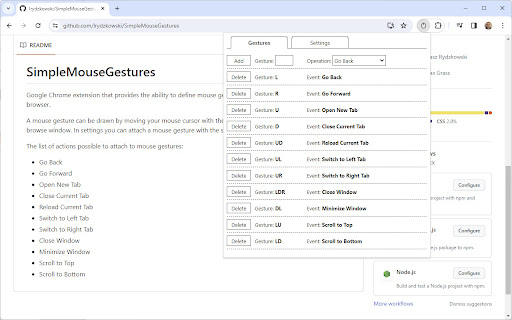

Extension that provides the ability to define mouse gestures that will run specific actions in your Google Chrome browser Google Chrome extension that provides the ability to define mouse gestures that will run specific actions in your browser. A mouse gesture can be drawn by moving your mouse cursor with the right mouse button pressed inside your browse window. In settings you can attach a mouse gesture with the specific action. The list of actions possible to attach to mouse gestures: - Go Back - Go Forward - Open New Tab - Close Current Tab - Reload Current Tab - Switch to Left Tab - Switch to Right Tab - Close Window - Minimize Window - Scroll to Top - Scroll to Bottom - Reopen Tab - Duplicate Tab - Open New Window - Search Highlighted Text - Close Tabs to the Right

CrxMouse: Mouse Gestures
Boost browsing productivity with mouse gestures! Super Drag, Wheel & more for effortless navigation. Take control of your browsing with intuitive mouse gestures! CrxMouse supercharges your web experience with powerful mouse shortcuts. Effortlessly navigate, search, and open tabs with simple hand movements, saving you clicks and boosting your browsing efficiency. 🏎️ Faster: Navigate webpages and open links in a flash with customizable mouse gestures. 🖱️ Simpler: Ditch the keyboard shortcuts! Intuitive mouse movements take the effort out of browsing. 🕒 More Productive: Spend less time clicking and more time getting things done. ⚙️ Easy-to-use mouse gestures: Get started quickly with pre-built options or create your own custom shortcuts. 🔎 Super drag: Drag links to open new tabs, copy text and URLs, and search in new tabs. 👆 Cursor Customization: Make browsing yours! Upload your own mouse cursor image for a unique and personalized touch. Take your browsing to the next level with CrxMouse! **Our service is free. No paid edition or account and no advertisements. Please note: Mouse gesture navigation doesn't work on Chrome's built-in pages because of Google's security restrictions. Mouse Gesture Built-in Actions: Press + Hold Right Button (anywhere on the screen) and Drag to perform the following: ↓→ : close current tab ↓→↑ : open a new window ← : back ←↑ : reopen closed tabs → : forward →↓ : scroll to bottom →↑ : scroll to top ↑ : scroll up one page ↑↓ : refresh ↑↓↑ : force a refresh ↑← : move to the left tab ↑→ : move to the right tab ↓→↓ : close current window -------------------------------- Super Drag Built-in Actions: Press + Hold Left Button and drag links to perform the following actions: → : open link in a new tab ← : open link in a new tab (background) ←↓→ : copy text →↓← : copy URL Press + Hold Left Button and drag text to perform the following actions: ← : search in new tab (background) → : search in a new tab -------------------------------- Wheel Gestures Built-in Actions: Press + Hold Right Button and scroll to perform the following actions: ↑: scroll to top Press + Hold Left Button and Scroll to perform the following actions: ↓: scroll to bottom Try these mouse gestures on our game - The Mouse Chase! 🐭 https://crxmouse.com/the-mouse-chase-1/ -------------------------------- We care greatly about your privacy. For more information, please read our privacy policy: https://crxmouse.com/privacy/

Cesturefy: Navigate, operate, and browse faster with mouse gestures
The acclaimed mouse gesture extension Gesturefy, now available for Chromium-based browsers. Still your favorite gesture extension, now on Chromium-based browsers Cesturefy is a Chromium adaptation of the popular Robbendebiene/Gesturefy mouse gesture extension originally for Firefox, bringing the same smooth gesture control to Chrome, Edge, and other Chromium-based browsers. - Mouse gestures (moving the mouse while holding the left, middle, or right button) - Rocker gestures (left-click while holding the right mouse button and vice versa) - Wheel gestures (scroll wheel while holding the left, middle, or right button) - 79 different predefined commands - Provides special commands like popup, multi purpose and cross add-on command - Customizable gesture trace and status information style - Light, dark and highcontrast theme - Cesturefy does not work on Chrome internal pages like chrome://extensions or other restricted pages. This is due to browser security restrictions. - The page must be partially loaded to perform gestures. - Gestures cannot be properly performed inside iframe pages, because Chrome does not provide the mozInnerScreenX/Y API. - On Linux and macOS, right-click menu gestures require a double click to trigger. Chrome does not support the browserSettings.contextMenuShowEvent API.

Mouse Gestures – Right-Click Gestures & Drag Actions
Mouse Gestures extension for Chrome. Control your browser with right-click mouse gestures and drag-and-drop actions. 🚀 Mouse Gestures for Chrome Mouse Gestures is a powerful Chrome extension that lets you control your browser using simple right-click mouse gestures and drag-and-drop actions. With intuitive mouse movements, you can browse faster, reduce clicks, and stay focused. Hold the right mouse button and draw gestures to perform common browsing actions: Go back / forward Close or refresh tabs Scroll pages quickly 🔀 Drag-and-Drop Actions Drag page elements to trigger actions: Drag links to open in new tabs Drag selected text to search Drag images to open or save Create your own mouse gestures Assign different actions to each gesture Sync your mouse gesture settings securely with Google Drive: Backup your configuration to your own Google Drive Restore settings across devices Manual sync, fully controlled by the user Your data is stored only in your own Google Drive and is never accessed or used for any other purpose. Google Drive sync is optional and only used for configuration backup and restore. 🌍 Designed for Productivity This Mouse Gestures Chrome extension is ideal for users who want: Faster navigation Fewer keyboard shortcuts A cleaner browsing workflow Right-click context menus may conflict with gestures on Mac and Linux. When this extension is enabled, double-click the right mouse button to open the context menu. This extension is independently developed and maintained. No ads. No paid features. Free to use. If you find it helpful, please consider leaving a review ⭐⭐⭐⭐⭐ — it really helps improve visibility on the Chrome Web Store.

FlowMouse - Mouse Gestures
A privacy-focused, open-source mouse gesture extension for seamless browsing. Enjoy responsive gestures and super drag support. FlowMouse -- An open-source Chrome mouse gesture extension designed for ultimate smoothness and privacy protection. Seamlessly control your browser with natural mouse swipes and enter a state of focused, efficient "flow". ✨ Core Features - Fully Local, Privacy First: All operations are performed locally (except for Chrome's built-in sync). Zero network requests, zero data collection, and zero data uploads ensure complete privacy protection. - Custom Gestures: Includes 16 default gestures with support for adding unlimited custom gestures. - Super Drag for Efficiency: - Drag Text → Search selected text with custom engines, copy text, and more. - Drag Image → Open in new tab, save image, copy image URL, reverse image search, or perform custom searches. - Drag Link → Open links, copy link URLs, and more. - Intuitive Customization: A clear, visual settings page allows you to customize gesture trail color, width, and action tooltips. - Multi-language Support: Fully localized for Simplified Chinese, English, and other major languages. - New User Guide: An interactive tutorial launches automatically after installation to help you master mouse gestures instantly. 📖 Default Gestures All gestures can be modified or customized in the Options page. ← : Back → : Forward ↑ : Scroll Up ↓ : Scroll Down ↓→ : Close Current Tab ←↑ : Reopen Closed Tab →↑ : New Tab →↓ : Reload Current Page ↑← : Switch to Left Tab ↑→ : Switch to Right Tab ↓← : Stop Loading ←↓ : Close All Tabs ↑↓ : Scroll to Bottom ↓↑ : Scroll to Top ←→ : Close Current Tab →← : Reopen Closed Tab 🔒 Privacy Commitment FlowMouse is committed to your privacy: - Open Source: The code is hosted on GitHub. Reviews and contributions are welcome. - No Tracking: We do not collect your browsing history, bookmarks, or usage habits. - No Uploads: No local data is sent to third-party servers (uses Chrome Sync only). - No Ads/Analytics: We do not embed any third-party analytics or advertising code. Your settings are synced across devices using Chrome's built-in encrypted sync service. This process is entirely controlled by the browser and adheres to your browser's privacy settings. 👨💻 Author Info - Authors: Hmily [LCG] & Coxxs - Website: https://www.52pojie.cn/thread-2080303-1-1.html - GitHub: https://github.com/Hmily-LCG/FlowMouse - Email: Service@52pojie.cn - Feedback and suggestions are welcome via email.
