
mgonafaalkhlmjjelcgikignigmjhmjj

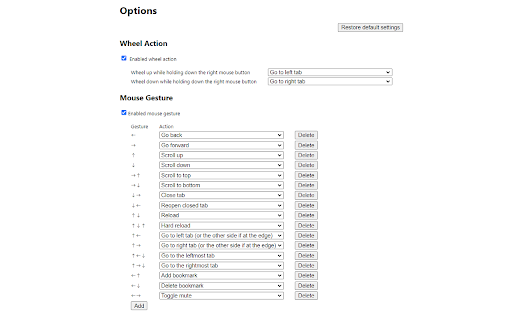
Mouse gestures, right-click + wheel and rocker gesture to control the browser. Control tabs, windows, bookmarks, mute, change zoom factor, full screen, custom URLs, and more. Functions that can be performed - Go back - Go forward - Scroll up - Scroll down - Scroll left - Scroll right - Scroll to top - Scroll to bottom - Scroll to the leftmost - Scroll to the rightmost - Add tab to group - Remove tab from group - New tab - New tab (leftmost) - New tab (rightmost) - Duplicate tab - Pin tab - Close tab - Close tabs to the left - Close tabs to the right - Close other tabs - Reopen closed tab - Reload - Hard reload - Reload all tabs - Go to left tab - Go to right tab - Go to left tab (or the other side if at the edge) - Go to right tab (or the other side if at the edge) - Go to the leftmost tab - Go to the rightmost tab - Go to previous tab - Go to previous tab (loop) - Go to next tab - Go to next tab (loop) - Add to bookmarks bar - Add bookmark - Delete bookmark - New window - Close window - Close all windows - Maximize window - Minimize window - Fullscreen - Copy url - Copy title - Mute - Unmute - Toggle mute - Mute all tabs - Unmute all tabs - Zoom in - Zoom out - Reset to default zoom level - Open link in new tab - Open link in new tab and activate - Open link in new window - Open link in new window and activate - Open link in new tab (leftmost) - Open link in new tab (rightmost) - Open link in new tab and activate (leftmost) - Open link in new tab and activate (rightmost) - Open image in new tab - Open image in new tab and activate - Open image in new window - Open image in new window and activate - Open image in new tab (leftmost) - Open image in new tab (rightmost) - Open image in new tab and activate (leftmost) - Open image in new tab and activate (rightmost) - Open options - Disable this extension on this tab - Open custom URL Version History 1.0.0: Initial version 1.1.0: Add bookmark function 1.1.1: Bug fixes 1.1.2: Bug fixes 1.2.0: Add tab grouping function. Changed full screen and window maximization to a toggle system. 1.3.0: Add functions such as opening links in a new tab. Add the ability to use clicks as mouse gesture actions. 1.4.0: Add "Reload all tabs" and "Open custom URL". Add export/import function. Add customizing color function. 1.4.1:Fixed a bug that "Close tabs on the right" and "Close other tabs" did not work on the leftmost tab. Add function that hide hint on the options page permanently. 1.5.0: Add "Go to previous/next tab" and "Open image in new tab/window". Add disable extension function by URL on the options page. Add "Change to open context menu on right double-click" for macOS/Linux. Add "Hide" to Mouse Gesture Color options. 1.6.0: Add Rocker Gesture. Modified to allow execution of 1.6.1: custom URLs without {} even if the text is not pre-selected. Fixed an issue where some functions did not work with wheel actions. Fixed an issue where extensions would not work correctly after a rocker gesture. 1.6.1: Fixed problem with some actions not working with wheel actions. Fixed an issue with extensions behaving erratically after a rocker gesture. 1.7.0: Improved behavior within IFRAME. Enhanced mouse gesture appearance customization options. Fixed mouse gesture “Click” not working. Enhancements to allow scrolling of elements as well as the parent window. Other minor bug fixes. 1.7.1: Fixed a problem with right double-click not opening the context menu. Fixed an issue that prevented scrolling on some web sites. Fixed Issue with moving tabs using rocker gestures. 1.8.0: Enhancement to not close pinned tabs with multiple tab close action. Add "Pin tab", "Go to previous/next tab (loop)". Changed rocker gesture to be performed when the mouse button is pressed instead of when it is released. 1.8.1: Fixed an issue where adding mouse gestures on the options page did not work. Fixed an issue where exporting on the options page did not work. 1.9.0: Add option to create a new tab when the last tab is closed. 1.10.0: Improved the options page. Fixed bookmark action. Improved 'close tab'. Fixed other minor details. 1.11.0: Add option to specify behavior on closing tabs. Other minor functionality improvements. 1.11.1: Fixed an issue where mouse gesture malfunction on certain websites. 1.11.2: Fixed an issue where mouse gestures are not executed occasionally. 1.12.0: Added a feature to embed page URLs in custom URLs. Added a feature to share settings information within an account. Added 'Arrows and Text Position' option. Added new actions for opening links and images in new tabs at leftmost and rightmost positions. Added “Go to selected URL” as a default option for Custom URL settings. 1.13.0: Improved handling so that the context menu is less likely to appear after moving to a new tab with a rocker gesture. Added an option to enable diagonal mouse gestures. 1.14.0: Add `New tab (leftmost)` and `New tab (rightmost)` 1.15.0: Fixed an issue where links did not mark as visited when opened via mouse gestures. 1.15.1: Fixed an issue where links opened via mouse gestures in Incognito Mode were added to history. Added Incognito Mode support for the “Open in New Window” feature. Fixed an issue where `Enabled mouse gesture` could not be turned OFF in the Options screen. 1.16.0: Supports Simplified Chinese.

CrxMouse: Mouse Gestures
Boost browsing productivity with mouse gestures! Super Drag, Wheel & more for effortless navigation. Take control of your browsing with intuitive mouse gestures! CrxMouse supercharges your web experience with powerful mouse shortcuts. Effortlessly navigate, search, and open tabs with simple hand movements, saving you clicks and boosting your browsing efficiency. 🏎️ Faster: Navigate webpages and open links in a flash with customizable mouse gestures. 🖱️ Simpler: Ditch the keyboard shortcuts! Intuitive mouse movements take the effort out of browsing. 🕒 More Productive: Spend less time clicking and more time getting things done. ⚙️ Easy-to-use mouse gestures: Get started quickly with pre-built options or create your own custom shortcuts. 🔎 Super drag: Drag links to open new tabs, copy text and URLs, and search in new tabs. 👆 Cursor Customization: Make browsing yours! Upload your own mouse cursor image for a unique and personalized touch. Take your browsing to the next level with CrxMouse! **Our service is free. No paid edition or account and no advertisements. Please note: Mouse gesture navigation doesn't work on Chrome's built-in pages because of Google's security restrictions. Mouse Gesture Built-in Actions: Press + Hold Right Button (anywhere on the screen) and Drag to perform the following: ↓→ : close current tab ↓→↑ : open a new window ← : back ←↑ : reopen closed tabs → : forward →↓ : scroll to bottom →↑ : scroll to top ↑ : scroll up one page ↑↓ : refresh ↑↓↑ : force a refresh ↑← : move to the left tab ↑→ : move to the right tab ↓→↓ : close current window -------------------------------- Super Drag Built-in Actions: Press + Hold Left Button and drag links to perform the following actions: → : open link in a new tab ← : open link in a new tab (background) ←↓→ : copy text →↓← : copy URL Press + Hold Left Button and drag text to perform the following actions: ← : search in new tab (background) → : search in a new tab -------------------------------- Wheel Gestures Built-in Actions: Press + Hold Right Button and scroll to perform the following actions: ↑: scroll to top Press + Hold Left Button and Scroll to perform the following actions: ↓: scroll to bottom Try these mouse gestures on our game - The Mouse Chase! 🐭 https://crxmouse.com/the-mouse-chase-1/ -------------------------------- We care greatly about your privacy. For more information, please read our privacy policy: https://crxmouse.com/privacy/

Mouse Gestures – Right-Click Gestures & Drag Actions
Mouse Gestures extension for Chrome. Control your browser with right-click mouse gestures and drag-and-drop actions. 🚀 Mouse Gestures for Chrome Mouse Gestures is a powerful Chrome extension that lets you control your browser using simple right-click mouse gestures and drag-and-drop actions. With intuitive mouse movements, you can browse faster, reduce clicks, and stay focused. Hold the right mouse button and draw gestures to perform common browsing actions: Go back / forward Close or refresh tabs Scroll pages quickly 🔀 Drag-and-Drop Actions Drag page elements to trigger actions: Drag links to open in new tabs Drag selected text to search Drag images to open or save Create your own mouse gestures Assign different actions to each gesture Sync your mouse gesture settings securely with Google Drive: Backup your configuration to your own Google Drive Restore settings across devices Manual sync, fully controlled by the user Your data is stored only in your own Google Drive and is never accessed or used for any other purpose. Google Drive sync is optional and only used for configuration backup and restore. 🌍 Designed for Productivity This Mouse Gestures Chrome extension is ideal for users who want: Faster navigation Fewer keyboard shortcuts A cleaner browsing workflow Right-click context menus may conflict with gestures on Mac and Linux. When this extension is enabled, double-click the right mouse button to open the context menu. This extension is independently developed and maintained. No ads. No paid features. Free to use. If you find it helpful, please consider leaving a review ⭐⭐⭐⭐⭐ — it really helps improve visibility on the Chrome Web Store.

Mouse Gesture Events
Control your browser faster and easier with gestures using mouse movement. 1) Open any page. 2) Hold down Right Mouse button, Move the mouse in any direction, then Release button. 3) Movement transformed into event, for example, upward movement will open a new tab. ↑ - Open new tab. ↓ - Close current tab. → - Move to the Right tab. ← - Move to the Left tab. ↗ - Refresh page. ↙ - Restore reopen the last closed tab. ↘ - Go to the Next page in history. ↖ - Go to the Previous page in history. ⇡ - Scroll to the Top of the page. ⇣ - Scroll to the Bottom of the page. • Closes all tabs except the current • Pin / Unpin current tab • Minimize browser window • Close browser window • Duplicate Tab ✔ Diagonal movement support. ✔ Absolutly free and forever be free. ✔ Clear, no jquery, no ads, no statistic, no analytic, no malware. ✔ Tiny and elegant mouse movement gestures extension. Contain most frequently used commands for best performance. Security policy of browser does not allow to run extensions on internal pages (chrome://about/), and on webstore page (https://chrome.google.com/webstore/).

CORE Mouse Companion — Gestures & Click/Select Unlock
Maximize your web browsing efficiency with this multi-functional mouse utility. A simple yet powerful extension that puts complete browser control at your fingertips through intuitive mouse actions. 🌟 Key Features Mouse Gestures: Perform actions like "Back," "Forward," and "Close Tab" with simple mouse movements. Quick Screenshots: Capture your screen instantly using gesture-based shortcuts. Unlock Right-Click & Selection: Re-enable right-click menus and text selection on restricted websites. ■ Detailed Features Advanced Mouse Gestures Perform actions effortlessly by moving the mouse while holding the right-click button. Basic Actions: Back/Forward, Scroll, Refresh, Close/Restore Tab, and more. Fully Customizable: Assign your own gesture shapes and preferred actions. Visual Feedback: Displays trails and action names on-screen to ensure precise operation. Rocker Gestures: Combine left and right clicks for even faster navigation. Wheel Gestures: Switch tabs or zoom instantly by scrolling the wheel while holding the right button. Smart Detection: Automatically disables the unlocker on web apps like Google Docs or YouTube to avoid interfering with native controls. (Note: May not work on all websites.) Whitelist: Easily disable the unlocker for specific, trusted websites. Full Page: Capture the entire visible area with a single click. Area Selection: Select and crop specific parts of the screen. Supports trimming before saving. For Power Users: Open custom URLs and simulate shortcut key inputs. Comfortable UI: Full Dark Mode and multi-language support. Seamless Setup: Export and import your settings to sync across different environments easily. Fixed: Resolved an issue where right-clicking did not function on Google Maps when mouse gestures were enabled. Fixed: Ensured that Rocker and Wheel gestures are properly disabled when the "Enable Mouse Gestures" toggle is turned off in the settings. Improvement: Optimized gesture drawing and cancellation logic for enhanced stability. Fix: Resolved an issue where gestures could remain "stuck" (frozen) on the screen under specific conditions. Maintenance: Removed redundant internal code and optimized overall processing. Improvement: Optimized gesture cancellation logic to align with the maximum action step settings. Fixed: Resolved a conflict with mouse gestures that prevented the "Unlock Right-Click" feature from functioning on the first operation. New: Added "Down -> Left" and "Left -> Down" mouse gesture actions. Improvement: Optimized UI display and layout. New Features: Added Rocker and Wheel Gesture support. Optimization: Implemented "Smart Detection" to prevent conflicts with web applications. Expansion: Added actions for Custom URLs and Shortcut Key simulation. Improvement: Refined UI and implemented security patches. Stability: Integrated OffscreenCanvas for improved screenshot performance. Security: Enhanced sanitization for file name processing. UX: Improved clarity of the settings menu.
