
phpllnjdcoiijcpgcbhlocjgcegjfnhb
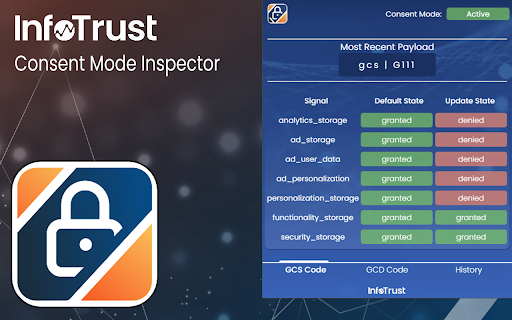
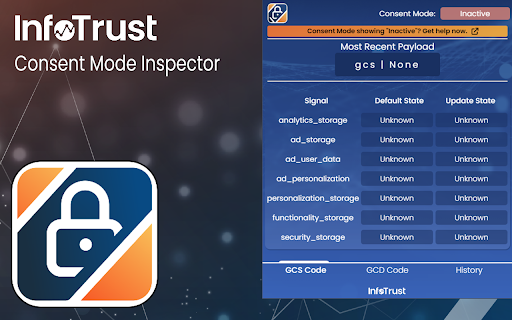
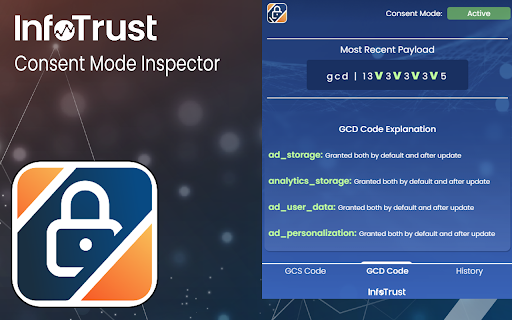
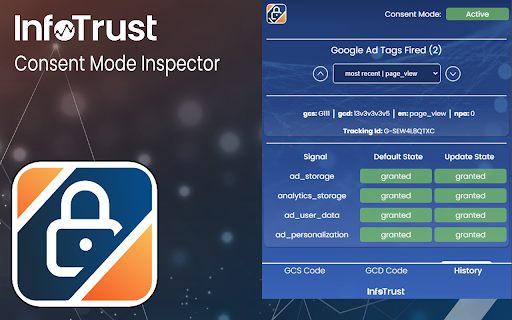
Check the status of Consent Mode, display gcs & gcd parameters, and view real time consent signals.🔐 Consent Mode Inspector is a lightweight Chrome Extension designed to monitor Google Consent Mode, providing real-time insights into gcs and gcd parameters sent with Google Tags, alongside current signal states found under google_tag_data.ics.entries. ● Real-Time GCS Code Display ↳Instantly view the latest GCS code being sent with a Google Tag. ● Detailed GCD Code Insights ↳Understand the latest GCD code with comprehensive explanations of each value. ● Dynamic Table View ↳Explore the google_tag_data.ics.entries object directly from the DOM for in- depth analysis. If ad_user_data or ad_personalization are granted or denied, then you have v2 setup. ● Consent History Tracking ↳Keep a history of tags fired, including GCS codes and their consent states at the point of firing. ● One-Click Screenshots ↳Easily screenshot the extension's display to share the current consent results with your team or for your records. ─────────── Update Notes ─────────── ● GCD parameter calculator ↳Edit the gcd parameter and view what different values may mean. Copy paste in a whole gcd parameter or update single characters to quickly view what it may mean. ● Bug Fixes ↳Fix various bugs and add improvements ─────────── Feedback and Support ─────────── Your input is invaluable to us! For questions, comments, concerns, feature requests, or bug reports, please feel free to reach out to ✉️ ryan.bulcher@infotrustllc.com. or visit 🔗 https://infotrust.com/google-consent-mode-inspector We're here to assist and look forward to enhancing your experience with Consent Mode Inspector. ⚠️ Please Note ⚠️ This extension serves as a tool for a Google product that is continuously evolving. As such, both Google's product and this extension are subject to changes. We advise not to rely solely on this extension for consent or compliance verification.

Analytics Debugger
Your Single Source of Truth (SSOT) for debugging analytics implementations Formerly known as "GTM/GA Debugger," our tool is your ultimate Single Source of Truth (SSOT) for debugging analytics implementations! Are you a developer, analyst, or marketer committed to achieving top-tier web analytics and tracking results? Look no further! Our powerful debug tool is meticulously crafted to simplify your life. Analytics Debugger streamlines your daily debugging tasks, boasting user-friendliness for all while delivering in-depth insights to advanced users. v2.4.6 - Adds support for Chartbeat - Fixed Amplitude Regional Collection Endpoints 🛠️ Wide Compatibility: Our tool seamlessly supports a variety of analytics and tracking tools, including: - Google Tag Manager - Google Analytics - Tealium - Piwik Pro / Matomo - Adobe tools - and most commonly used Marketing Pixels. to mention some of them (Check the full list here) 🔒 Privacy Enhancement: Rest assured, our tool injects code only after DevTools has loaded, with no background monitoring. 🚀 Tools: Supercharge your tracking implementation with a rich toolkit including - GTM Preview Enhancer: USe this tool to bypass all the limitations from the original Preview Mode - Google Analytics Debug Libraries Loader - Block GA3/GA4 Hits: Prevent your - Export Features - Real-Time Data - Enhanced Ecommerce Reports - Data Filtering for Focused Insights - Clicks Blocker: Prevent being redirected to next page - and much more! Get started today and elevate your analytics debugging and optimization process effortlessly. Unlock the full potential of your analytics and tracking endeavors – streamline your workflow, enhance privacy, and gain profound insights seamlessly. Download now and experience the transformation! Changelog: You can check out our latest updates on our GitHub repository. https://github.com/analytics-debugger/analytics-debugger-browser-extension Support / Feedback: Offered via the Store or using the Github Repository Official Documentation: For detailed guidance, visit our official documentation at https://www.analytics-debugger.com/tools/browser-extension Don't miss out on this game-changing tool. Elevate your analytics game today!

Stape GTM Helper
Enhance your Google Tag Manager debugging. Stape GTM Helper is a free Google Tag Manager Chrome extension designed to speed up and simplify GTM debugging. This GTM tool helps you bring order to containers packed with tags and improves your workflow in Google Tag Manager preview mode. ➤ Google Tag Manager tools and features for a cleaner GTM preview - Tag Type Coloring – add color and platform logos for Meta, GA4, Google Ads, Microsoft, and more for easier navigation in preview mode. - Entities Filter – focus only on the tags or variables you’re testing for cleaner, faster debugging. - JSON Formatter – make incoming and outgoing JSON requests easy to read. - Consent Status in sGTM – view consent states (granted or denied) directly in your server GTM preview. ➤ Clarity through a tag assistant extension that organizes the GTM preview mode - Debug Google Tag Manager for both web and server containers - Get a structured, color-coded view of all your GTM tags - Improve your Google Tag Manager debugging and testing experience ➤ Perfect For - Developers and analysts working with GTM tools - Anyone who uses Google Tag Manager preview and debug mode daily

Google Ads Match Type Helper™
Mass update the match type before adding keywords in Google Ads. Bulk-update match types on the keywords you add in Google Ads and now Microsoft Ads (Bing Ads). Google increasingly defaults new keywords to Broad match, whether you're adding new keywords, promoting matched search terms, or applying negatives. This slows down workflow and increases the chance of syntax errors. Microsoft Ads often defaults to Phrase match and has a cumbersome, multi-step selector to change the keyword match type. This extension brings back the bulk match type selector — and now works across Google Ads and Microsoft Ads. Follow these 4 steps: → Install our Match Type Helper Chrome extension. → Review matched search terms in Google Ads. → Choose your desired match type: exact, phrase, or broad. → Bulk change match types for all matched terms before adding. Google Ads ⦾ Adding Keywords from Insights and reports → Search terms ⦾ Adding Negative Keywords from Insights and reports → Search terms ⦾ Adding search keywords from Campaigns → Ad Groups ⦾ Adding Negative keywords from Campaigns → Ad Groups ░░░ Details: ░░░ Previously, Google Ads let you choose whether a new keyword should be "Exact," "Phrase," or "Broad" match directly when adding it from the matched search terms. Now, Google automatically sets new keywords as "Broad" match, and if you want "Exact" or "Phrase" match, you have to add extra symbols manually each time, which can be time-consuming and error-prone. Our Google Ads extension addresses this issue. It allows you to: → Choose the match type for each keyword individually when adding matched search terms. → Change the match type for all matched terms in bulk before adding them. This makes the process faster and reduces the likelihood of mistakes. Our extension works on your device and does not send your data to external servers or third parties. v1.0.13 • Minor bug fix to address multiple " and [ syntax which could occur v1.0.12 • Extension name change to better represent the broader capabilities recently added • Adjustments to improve activation of extension under different conditions v1.0.11 • Minor UI fixes • Changed extension activation method to address issue reported by some users v1.0.10 • Extended match type switcher from "matched terms" screens to core "add keyword/negative keyword" screens to enable quick match type switching everywhere • Revised UI with buttons for improved UX • Added links to Privacy Policy, Support Center, Reviews and Social Sharing

EC Assist
Enhanced Conversions validation and troubleshooting assistant. EC Assist helps you implement, validate and troubleshoot Google Ads Enhanced Conversions for Web, Enhanced Conversions for Leads, GA4 User-Provided data setup and SA360 Enhanced Conversions on your website. Once you navigate to your website and complete a test user-journey, EC Assist will conduct a diagnosis of your Google Ads & Floodlight conversions, lead forms and GA4 events. It will detect any issues with the first party data measurement setup and provide implementation or troubleshooting steps relevant to your website's tagging setup. Enhanced Conversions is a feature that can improve the accuracy of your conversion measurement and unlock more powerful bidding. It supplements your existing conversion tags by sending hashed first-party conversion data from your website to Google in a privacy-safe way. EC Assist is meant to be used by advertisers who want to validate or troubleshoot their existing first-party data measurement or require assistance in setting up first-party data measurement through Google Tag Manager or gTag. It is not meant for advertisers setting up Enhanced Conversions via server-side Tag Manager or via the API method.
