
ilnpmccnfdjdjjikgkefkcegefikecdc
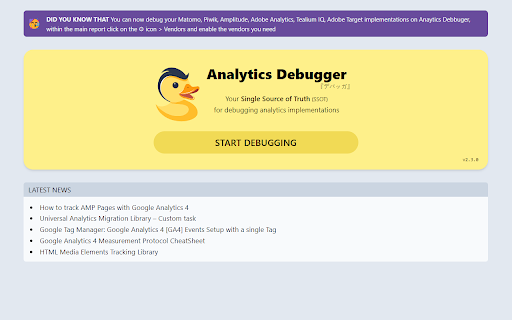
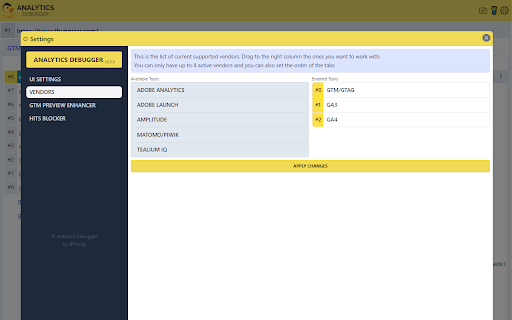
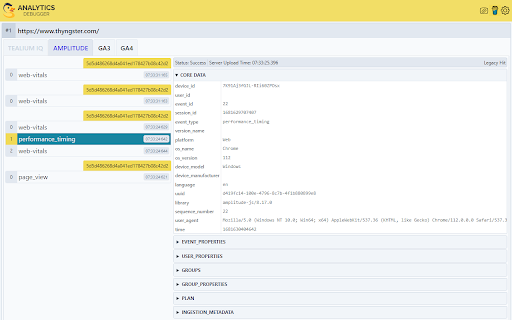

Your Single Source of Truth (SSOT) for debugging analytics implementations Formerly known as "GTM/GA Debugger," our tool is your ultimate Single Source of Truth (SSOT) for debugging analytics implementations! Are you a developer, analyst, or marketer committed to achieving top-tier web analytics and tracking results? Look no further! Our powerful debug tool is meticulously crafted to simplify your life. Analytics Debugger streamlines your daily debugging tasks, boasting user-friendliness for all while delivering in-depth insights to advanced users. v2.4.6 - Adds support for Chartbeat - Fixed Amplitude Regional Collection Endpoints 🛠️ Wide Compatibility: Our tool seamlessly supports a variety of analytics and tracking tools, including: - Google Tag Manager - Google Analytics - Tealium - Piwik Pro / Matomo - Adobe tools - and most commonly used Marketing Pixels. to mention some of them (Check the full list here) 🔒 Privacy Enhancement: Rest assured, our tool injects code only after DevTools has loaded, with no background monitoring. 🚀 Tools: Supercharge your tracking implementation with a rich toolkit including - GTM Preview Enhancer: USe this tool to bypass all the limitations from the original Preview Mode - Google Analytics Debug Libraries Loader - Block GA3/GA4 Hits: Prevent your - Export Features - Real-Time Data - Enhanced Ecommerce Reports - Data Filtering for Focused Insights - Clicks Blocker: Prevent being redirected to next page - and much more! Get started today and elevate your analytics debugging and optimization process effortlessly. Unlock the full potential of your analytics and tracking endeavors – streamline your workflow, enhance privacy, and gain profound insights seamlessly. Download now and experience the transformation! Changelog: You can check out our latest updates on our GitHub repository. https://github.com/analytics-debugger/analytics-debugger-browser-extension Support / Feedback: Offered via the Store or using the Github Repository Official Documentation: For detailed guidance, visit our official documentation at https://www.analytics-debugger.com/tools/browser-extension Don't miss out on this game-changing tool. Elevate your analytics game today!

GA4 Fixer
Patch holes in GA4 for better reporting. Adds '% of Total' in reports, 'Click to Copy' values, one-click report building and more. Pain, anguish and uncertainty lurk around every corner in GA4 land and there is only one vigilante who can stop it…GA4 Fixer! Bringing back features like '% of total and copy/paste (yes copy/paste is nostalgic now) and a one-click custom dimension builder for GTM. GA4 Fixer will save your day, or at least make you a little less frustrated which is all that we can ask for in this marketing.

Stape GTM Helper
Enhance your Google Tag Manager debugging. Stape GTM Helper is a free Google Tag Manager Chrome extension designed to speed up and simplify GTM debugging. This GTM tool helps you bring order to containers packed with tags and improves your workflow in Google Tag Manager preview mode. ➤ Google Tag Manager tools and features for a cleaner GTM preview - Tag Type Coloring – add color and platform logos for Meta, GA4, Google Ads, Microsoft, and more for easier navigation in preview mode. - Entities Filter – focus only on the tags or variables you’re testing for cleaner, faster debugging. - JSON Formatter – make incoming and outgoing JSON requests easy to read. - Consent Status in sGTM – view consent states (granted or denied) directly in your server GTM preview. ➤ Clarity through a tag assistant extension that organizes the GTM preview mode - Debug Google Tag Manager for both web and server containers - Get a structured, color-coded view of all your GTM tags - Improve your Google Tag Manager debugging and testing experience ➤ Perfect For - Developers and analysts working with GTM tools - Anyone who uses Google Tag Manager preview and debug mode daily

GTM Copy Paste
Copy your Tags, Triggers and Variables and Paste them into any other account Easily Copy and Paste your Tags, Triggers, and Variables from one Google Tag Manager account to the next. Simply add them to the extension and then paste them into your intended account. Your items will be uploaded through the GTM API. You can put together your own menu of Tags, Triggers and Variables that you want to copy to another account. No more Container exports and reimports through the GTM Admin interface. Notes: - The relationship between Tags and Triggers will remain intact as long as they are part of the same "paste". - If an asset (Tag, Trigger or Variables) under the same name already exists, the extension will upload the asset with "(#)" attached to the end of the name. - Completely re-written the extension (March 2025): - newly improved "copy" experience - new UI for the clipboard - dependency check feature to add all dependancy to the clipboard - the oauth scope now ask for less permissions - now supports templates, tag sequencing, built-in variables and dependency rewrites Known issues: - If you edit an item right before you copy it to the clipboard, it might not have the changes in the paste. That’s because the extension is working with a cached version of the container. - If you copy a tag connected to a template, the upload might fail because it can’t find the reference - If you delete a dependant item from the clipboard, the upload might fail as it doesn’t have the right items to connect back while pasting

GTM Variable Builder
🚀 Build Custom JS Variables with Ease! Highlight any text on a webpage, click the extension, and instantly generate the JavaScript needed to extract your highlighted content. Perfect for creating custom JavaScript variables in Google Tag Manager (GTM) or any other platform that requires variables from a page (e.g., ID, title, value, phone, email, etc.)!
