
feeboihdgpananoagfmbohoogoncndba
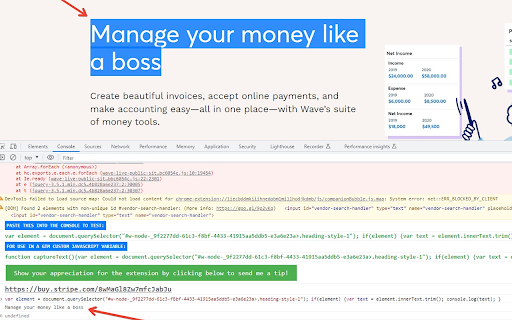
🚀 Build Custom JS Variables with Ease! Highlight any text on a webpage, click the extension, and instantly generate the JavaScript needed to extract your highlighted content. Perfect for creating custom JavaScript variables in Google Tag Manager (GTM) or any other platform that requires variables from a page (e.g., ID, title, value, phone, email, etc.)!

Tag Assistant Companion
The Tag Assistant Companion extension works with Tag Assistant to help troubleshoot installation of gtag.js and Google Tag Manager. We’re grateful for your feedback—we've listened and are moving the functionality of Tag Assistant Companion into the original Tag Assistant extension and are retiring this extension. The original Tag Assistant extension now supports features from both the original and companion extensions, including in-page debugging and advanced functionality on tagassistant.google.com. Please install the Tag Assistant extension. If you have both the original and companion extensions installed, the companion extension will be automatically uninstalled in the coming months.

LeoMeasure - DataLayer Checker & GTM Injector
Preview GTM dataLayer, debug with GTM inject, and fix Shopify Custom Pixel preview issues. LeoMeasure DataLayer Checker is a powerful Chrome Extension for GTM dataLayer preview real time. It helps you preview and debug dataLayer events and data without relying on GTM’s built-in preview mode or the browser console for Shopify Custom Pixel. DataLayer Checker: Easily preview and debug the dataLayer on any website — even when GTM's native preview mode is not available. Copy DataLayer Path: Instantly copy the path of any object inside the dataLayer to create GTM variables quickly and accurately in Google Tag Manager. DataLayer Checker for Shopify Custom Pixel: Shopify Custom Pixel events don’t appear in GTM preview mode by default. This extension lets you view those dataLayer events directly, without opening the browser console. Simulate GTM Preview for Shopify: Enable GTM-like preview behavior for Shopify Custom Pixel integrations with a single toggle.

GA4BQ™ - GA4 BigQuery SQL Generator
GA4BQ™ - SQL generator for Google Analytics 4 on Google BigQuery, without SQL knowledge using simple visual query builder. Introducing GA4BQ™ (BETA): The Google Analytics 4 BigQuery SQL Generator Extension for Chrome. This easy-to-use extension allows you to quickly and easily generate SQL queries for Google Analytics 4 on BigQuery without the need for any prior knowledge of SQL. With just a few clicks, you can access your Google Analytics 4 data in BigQuery and start analyzing it in no time. Installation instructions =================== 1. Install the extension 2. Refresh the BigQuery tab (if it's open, and one time only) 3. Click the extension icon or open a new query tab and click the GA4BQ button. The extension is simple to use and requires no special setup. Simply install it on your Chrome browser, go to your Google Analytics 4 table in BigQuery, open a "Query" tab and click on the extension icon. You will be presented with a user-friendly interface where you can select the metrics and dimensions you want to include in your query, as well as any filters or time ranges you want to apply. To simplify, GA4BQ already includes built-in calculated dimensions and metrics so you won't have to deal with it. Once you have made your selections, the extension will automatically generate the SQL query for you. You can then copy and paste the query into the BigQuery web UI and run it to retrieve your Google Analytics 4 data. The extension is perfect for data analysts, marketers, and anyone else who needs to quickly and easily access their Google Analytics 4 data in BigQuery. With its user-friendly interface and powerful functionality, it makes it easy to get the insights you need to make data-driven decisions. The Google Analytics 4 BigQuery SQL Generator Extension is a must-have tool for anyone who needs to access their Google Analytics 4 data in BigQuery. It makes it easy to get the insights you need to make data-driven decisions, without the need for any prior knowledge of SQL. So go ahead and download the extension today and start exploring your data! Release notes for public versions of GA4BQ: ================================== 0.4.50 - Add the ability to choose a Google account instead of using the default Chrome login. 0.4.49 - Added the ability to change order of fields 0.4.48 - Fixing Sort bug for stored queries. 0.4.47 - Adding BigQuery for Google Search Console! 0.4.35 - Adding query builder for funnels! 0.4.32 - Removing auto table name fetch. Users will enter it manually. 0.4.25/6 - Adding items level dimensions and metrics 0.4.24 - Adding quick search on SQL filters 0.4.23 - Changing extension name 0.4.22 - Updating built-in queries module 0.4.20 - Improving date picker. 0.1.01 - Initial version

DataLayer Checker Plus
The simplest way to debug and verify dataLayer implementations without using the browser console Growth Academy is excited to announce the release of DataLayer Checker Plus , featuring several features . NEW FEATURES: - Inspect DataLayer on any website - Auto colouring for different data types - Inspect dataLayer in a Shopify Store if dataLayer is enabled through customer events or theme. - UI Improvements - Connect GTM in any website - Bug Fix All messages pushed to the dataLayer will be listed in the extension tab, whether they occur on page load, through events, or are manually pushed. Simply install the extension, visit any website, and click on the extension icon to display the dataLayer content. The basic setup is compatible with the default dataLayer in Google Tag Manager. This extension also assists you in inspecting the dataLayer enabled through Customer Events on a Shopify store. To enable this feature, navigate to the settings page of the extension and activate the “Shopify Custom Pixel DataLayer Checker”. If you have not enabled the dataLayer through Customer Events, there is no need to make any changes—the default settings will function correctly. You found a bug ? Please contact us on contact@growthacademy.io Thank you for your help and your support!
