
phimncbfdaljjdgkoinjolnbjgonkina



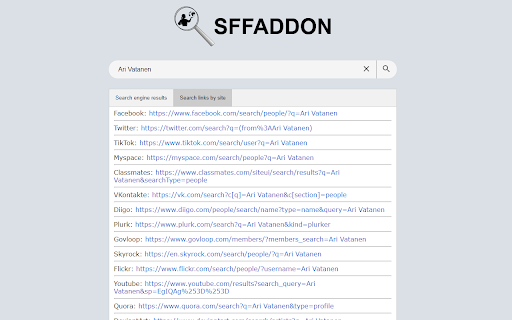
Search for names in multiple social networking sites at once. Social Friend Finder (SFF) add-on makes concurrent search of names and usernames on 32 social networking sites possible with just 2 clicks, including major ones like Facebook, Instagram, Twitter, TikTok and LinkedIn! Just highlight the name or the username you have encountered on the web and use the tooltip button or the context menu button to perform a search for it instantly. You can anytime choose which of the 2 buttons will be active through the add-on's options menu in order to customize the search experience to your own preferences. Results will be presented on a new tab in a variety of ways: As direct links to social media profiles, as images and as search links pointing directly to many social networks. There is also the ability to filter the results by website.

Search Engine AI Chat Web Video Image Social
NEED HELP? Learn More.. https://www.searchall.net/chrome-extension/ -------------------------------------------------------------- *** New search engines added

Social Profile Info - User Info Lookup From URLs & IDs
Instantly reveal Facebook user details from any fb profile URL or ID. View Name, location & more profile data with one click. Effortlessly fetch detailed Facebook profile information and export to CSV with one click. Export detailed information about users, such as location, language with Ease Using FB Profile Info. Easily fetch detailed Facebook profile information with FB Profile Info. Designed for efficiency, this tool lets you fetch user details in bulk using either profile URLs or user IDs. Perfect for marketers, researchers, or businesses looking to streamline data collection from Facebook. 🚀 Key Features: ✓ Bulk User Details Fetching: Quickly extract detailed profile information for multiple Facebook users at once. ✓ Profile-Based Export: Use user IDs or profile URLs for targeted exports ✓ Flexible Input Options: Add users manually or upload CSV/Excel files for streamlined batch processing. ✓ Customizable Requests: Ensure smooth, safe request sending # Why Choose FB Profile Info: 🚀 Boost Efficiency: No more manual lookups—fetch detailed user information in seconds. 💡 User-Friendly: Intuitive design ensures smooth operation for all skill levels. ⚙️ Customizable Requests: Adapt settings to extract the exact data you need. 🔐 Data Security: All data remains local, ensuring 100% privacy and safety. 📊 Perfect for Professionals: Streamline research, marketing, and analysis with ease. # How to Get Started: 1. Click the extension icon and click the 'Open the APP' button 2. Input Facebook user IDs or profile URLs, or upload a CSV/Excel file. 3. Start your request and export detailed profile datas instantly! 📬 FAQ: Having trouble? Describe the issue and send a screenshot to our support team for troubleshooting assistance. Instagram Permission Description: This extension utilizes the GraphQL API to fetch data for each provided user ID, including details like name, profile picture, and profile link. To enable seamless operation of the GraphQL API, the extension requires authorization from https://instagram.com to process GraphQL interface requests. In the popup, we offer these extra features: Relevant-Ext: Brief recommendations and introductions to related extensions. 🔐 Data Privacy: Your privacy is our priority. All data is securely stored locally on your device, ensuring complete confidentiality. ⭐ About Pro: FB Profile Info offers basic features for free, including a free quota. Upgrade to Pro for unlimited requests and maximize your productivity!

Who Am I
A chrome extension for doing username enumeration across multiple sites Who Am I is an Open Source Intelligence tool for enumerating a username across multiple websites and social media sites quickly. "Who Am I" is a powerful and user-friendly Chrome extension designed to simplify the process of verifying the existence of users across various websites. Whether you're managing user accounts, conducting research, or simply curious, this extension streamlines the task, providing a seamless experience for users. 1. **Multi-Site Compatibility:** "Who Am I" works across a wide range of websites and platforms, making it suitable for diverse use cases. 2. **Efficient User Enumeration:** This extension automates the user enumeration process, saving you time and effort. It checks the presence of users with precision and speed. 3. **Customizable Search Parameters:** Tailor your search by specifying search parameters such as categories and free text 4. **Instant Feedback:** Receive real-time feedback on user existence. "Who Am I" notifies you when a user is found. 5. **Privacy-Focused:** User privacy is a top priority. The extension respects privacy settings and ensures that user data remains confidential. 6. **User-Friendly Interface:** With an intuitive and user-friendly interface, you can initiate and manage searches effortlessly. 7. **Secure and Reliable:** Built with security in mind, "Who Am I" is reliable and ensures data integrity throughout the enumeration process. 1. Install the "Who Am I" extension from the Chrome Web Store. 3. Open "Who Am I" and input the username and optionally the website category. 4. Initiate the search and receive real-time feedback. 5. Review the results. "Who Am I" empowers users to efficiently verify the presence of users on multiple websites, enhancing user management, research, and investigative tasks. It is a valuable tool for individuals and professionals seeking to streamline user enumeration processes while maintaining privacy and data security. * Added feature “Entwined”. Entwined lets you quickly cross compare multiple users across multiple web sites * Implemented a better storage scaling algorithm, can now store hundreds to thousands of username searches, all within your browser. * Username search now displays usernames you have already searched for. * Improved the “Preview” option for viewing a web site’s content where a user is registered * Pressing “enter” after typing the username now initiates a search request in Who Am I * You can now delete username searches * Improved integration feature with “Your Rapport” chrome extension [0.15.0] * Limit concurrent requests so the computer doesn't run of out of resources when requesting sites * Fixed integration bug with "Your Rapport" chrome extension * Auto focus on username search field by default [0.14.0] * Removed open tab request when chrome was updated [0.13.0] * Big speed up in scanning all the sites * Show a percentage sign to indicate percent of sites scanned * Improved reset state algorithm [0.12.0] * Improved responsiveness on the UI * Number of sites searched appears * Quick collect and autoscroll collect features implemented by using “Your Rapport” chrome extension [0.10.0] * added Maigret dataset * results are now streamed [0.9.0] * bug fixes [0.8.1] * Fixed issue with Sherlock dataset not loading. [0.8.0] * Added new data set Mine Sight to the username lookup. [0.7.0] * Add context menu item for making look ups easier. * Improved search accuracy [0.6.0] * Added ability to set timeout value per site request (default is now 10 seconds), improves the number of results returned * Removed duplicate requests that were being generated due to naming differences in WhatsMayName and Sherlock * Added experimental Proxy settings to further improve returned results. * Fixed issue with filtering spaces issue [0.5.0] * Added Support for Sherlock data set [0.4.0] * By default exclude NSFW sites * Columns in the table can be sorted * Can pre-emptively search for a username using anchor tags or links like this chrome-extension://hbgmdndjlejkdekjhfenkojihbcmpcfl/search.html?username=yourUserName [0.3.0] * Initial Release * Supports WhatsMyName data set

Vortimo OSINT-tool
OSINT Swiss army knife:bookmark/record pages, store screenshots, scrape and enrich entities. Finds text on every page + highlight. NB: All data stored locally and does not leave your computer. As seen on the desktops of researchers, investigators, journalists and intelligence analysts. If you do real investigative work using a browser you will understand why the features of this extension is SUPER helpful for investigations. We use this tool ourselves every day for investigations too. Comprehensive manual for this extension here: https://www.vortimo.com/osint-tool-extension/ Main features of this extension (if you're still reading): ============================================ Keeps track of every site you visit: > Easily (one button) saves current webpage as MHTML file locally on your computer - exactly how it appeared. > Automatically saves URL + screenshot of every page you visit. > Allows you to capture any part of the screen, save it and find it later. > You can bookmark sites for easy retrieval later. > You can search for pages you've been to using title / URL or bookmark. We have this feature so you don't lose pages you've been to - you can easily mark pages or areas in pages for further investigation / research. Generically extracts objects from pages: > Names, email addresses, phone, hashtag, alias, GPS coordinates, IP address and others. > Filter on type, value of object, see where it occurred in pages you've been to. > Can copy list of objects to clipboard to easily paste into reports, databases, other tools. > Allows you to search for any of the extracted objects. We have this feature so you can easily feed extracted information into other tools of your choice. Enrich objects / images / pages: > Using a list of OSINT tools you can enrich any of the objects extracted (like Dehashed, Epieos, Domaintools etc. etc). > In the page itself, no need to switch to other tool. > Reverse image search on images using Yandex/Google/Bing/TinEye. > Exif on images using Vortimo's own online Exif viewer (yay). > Find old instance of the pages you're on using WayBack machine and other tools. > Find pages that use same tracking codes using BuiltWith and other tools. We have this feature so you can easily and without switching tools/pages learn if there is interesting information on the Internet about an item of interest. Graphs. We have them: > Show a graph of how you navigated from one site to another. Keeps track of your journey. > Show graph of how extracted objects (email, phone, alias, hashtag, blah) are related to each other, via sites that you've visited. We have this feature because you can never remember how you got to a page, and now you can go look see. We show the object graph so you can see which names or any other extracted object is more relevant than others. Also, because it's cool. Thumbnail view: > See every site you've been to as a small picture. Bird's eye view of your investigation. > Instagram, but for sites you've been to ;) We do this because we want to make it easy for you to find a single site in a list of 400 sites. And you are probably better at pattern recognition than you are at reading text. Find ++ / Advanced search: > You give a list of names (or any other text) and we highlight it in ALL pages you go to in future. > This also works on infinite scrollers (like IG/FB) where new content is loaded dynamically. > When text is seen on page, a visual 'bell' sound on the left of the screen. > Can have lists of text to highlight and in 4 different colors (customizable) and bells. We have this feature because it is very useful when you immediately need to know if a POI appears in sea of text while you've browsing many, many pages. Import / export: > You can import and export you graphs, sites... everything you've collected > You can share the files with your collogues! We do this because - we use this tool ourselves and you need to save and share you work. The tool does a LOT! Best you check out the documentation. Enjoy the software. And thanks for reading all of this text!
