
mnakbpdnkedaegeiaoakkjafhoidklnf


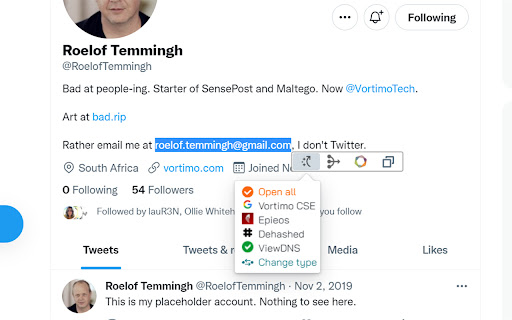

OSINT Swiss army knife:bookmark/record pages, store screenshots, scrape and enrich entities. Finds text on every page + highlight. NB: All data stored locally and does not leave your computer. As seen on the desktops of researchers, investigators, journalists and intelligence analysts. If you do real investigative work using a browser you will understand why the features of this extension is SUPER helpful for investigations. We use this tool ourselves every day for investigations too. Comprehensive manual for this extension here: https://www.vortimo.com/osint-tool-extension/ Main features of this extension (if you're still reading): ============================================ Keeps track of every site you visit: > Easily (one button) saves current webpage as MHTML file locally on your computer - exactly how it appeared. > Automatically saves URL + screenshot of every page you visit. > Allows you to capture any part of the screen, save it and find it later. > You can bookmark sites for easy retrieval later. > You can search for pages you've been to using title / URL or bookmark. We have this feature so you don't lose pages you've been to - you can easily mark pages or areas in pages for further investigation / research. Generically extracts objects from pages: > Names, email addresses, phone, hashtag, alias, GPS coordinates, IP address and others. > Filter on type, value of object, see where it occurred in pages you've been to. > Can copy list of objects to clipboard to easily paste into reports, databases, other tools. > Allows you to search for any of the extracted objects. We have this feature so you can easily feed extracted information into other tools of your choice. Enrich objects / images / pages: > Using a list of OSINT tools you can enrich any of the objects extracted (like Dehashed, Epieos, Domaintools etc. etc). > In the page itself, no need to switch to other tool. > Reverse image search on images using Yandex/Google/Bing/TinEye. > Exif on images using Vortimo's own online Exif viewer (yay). > Find old instance of the pages you're on using WayBack machine and other tools. > Find pages that use same tracking codes using BuiltWith and other tools. We have this feature so you can easily and without switching tools/pages learn if there is interesting information on the Internet about an item of interest. Graphs. We have them: > Show a graph of how you navigated from one site to another. Keeps track of your journey. > Show graph of how extracted objects (email, phone, alias, hashtag, blah) are related to each other, via sites that you've visited. We have this feature because you can never remember how you got to a page, and now you can go look see. We show the object graph so you can see which names or any other extracted object is more relevant than others. Also, because it's cool. Thumbnail view: > See every site you've been to as a small picture. Bird's eye view of your investigation. > Instagram, but for sites you've been to ;) We do this because we want to make it easy for you to find a single site in a list of 400 sites. And you are probably better at pattern recognition than you are at reading text. Find ++ / Advanced search: > You give a list of names (or any other text) and we highlight it in ALL pages you go to in future. > This also works on infinite scrollers (like IG/FB) where new content is loaded dynamically. > When text is seen on page, a visual 'bell' sound on the left of the screen. > Can have lists of text to highlight and in 4 different colors (customizable) and bells. We have this feature because it is very useful when you immediately need to know if a POI appears in sea of text while you've browsing many, many pages. Import / export: > You can import and export you graphs, sites... everything you've collected > You can share the files with your collogues! We do this because - we use this tool ourselves and you need to save and share you work. The tool does a LOT! Best you check out the documentation. Enjoy the software. And thanks for reading all of this text!

OSINT Username Search
OSINT Username Checker collects a dossier on a person by username only, checking for accounts on a huge number of sites and gathering all the available information from web pages. This tool gives you access to advanced search and information analysis that helps uncover additional details about a user’s identity and purpose. OSINT Username Checker uses smart algorithms and powerful analytics to review various data sources, including social networks, profiles, forums and other public sources. This allows you to find valuable information about the user’s interests, activities and behavior, which is important for understanding their needs and motivations. Whether you’re a marketer, researcher, product developer, or just interested in analytics, OSINT Username Checker helps you enrich your data and take meaningful action. You will be able to use the information you receive to refine your strategies, personalize your content, establish better connections with your audience, and much more. Introduce a new level of analysis and understanding of your audience with OSINT Username Checker. Find targets by username and connect more deeply with your audience, making informed decisions and achieving your business goals. OSINT Username Checker: Find targets by username with a powerful online tool. Unlock new opportunities to analyze and understand your audience by finding valuable information about users based on their username. Improve strategies, personalize content and connect more deeply with your audience with OSINT Username Checker. Maigret is an easy-to-use and powerful fork of Sherlock. ✨Features ✨ ➤Profile pages parsing, extraction of personal info, links to other profiles, etc. ➤Recursive search by new usernames and other ids found ➤Search by tags (site categories, countries) ➤Censorship and captcha detection ➤Requests retries OSINT Username Checker is suitable for a variety of scenarios: ➤Social media research: for researchers, Maigret can help quickly gather data about the presence of individuals or organizations on different social platforms. ➤Cybersecurity: Security experts can use it to examine potentially public personal information and identify fake or malicious accounts. ➤Brand Monitoring: Marketing teams can use Maigret to track brand mentions globally. ➤Privacy Audit: Ordinary users can also use it to view their online footprint and assess privacy risks. By design, your data stays at all times on your Google account, never saved in our database. Your data aren’t shared with anyone, including the add-on owner. We complies with privacy laws (especially GDPR & California Privacy Act) to protect your data. All data you upload are automatically deleted every day.

OSINT Angel
OSINT Angel is a browser extension that aids in gathering and analyzing OSINT data from various sources. OSINT Angel is a powerful cybersecurity tool designed to bring Open Source Intelligence (OSINT) capabilities directly to your browser. The world of the internet is teeming with potential threats and hazards. Understanding these risks is crucial for cybersecurity analysts, researchers, and enthusiasts alike. This is where OSINT Angel comes into play, serving as your personal guardian in the vast cyber realm. Through integrating multiple threat intelligence APIs, the OSINT Angel extension provides real-time, in-depth data on IPs, URLs, and hashes directly from your browser. The extension will fetch data from reputable sources like VirusTotal, IBM X-Force, AbuseIPDB, IPQualityScore, and ThreatJammer, allowing you to perform comprehensive and efficient cyber threat intelligence operations. Once you've installed the OSINT Angel, you can simply right-click on any IP address, URL, or hash within your browser and select 'Perform OSINT.' The extension will quickly evaluate the selected data point against multiple threat databases. The process includes checking IPs for malicious activity, assessing URLs for potential threats, and verifying hashes against known malware databases. This comprehensive analysis is then neatly formatted and copied to your clipboard. This reduces the time-consuming process of manual threat hunting and analysis, freeing you to focus on more strategic aspects of your cybersecurity work. The extension also provides a notification once the OSINT is complete, ensuring you don't miss any crucial information. Beyond the technical, OSINT Angel also respects your privacy. All analysis is done on-demand and no personal data is stored or shared with any third parties. This ensures that your cybersecurity research doesn't compromise your own personal security. OSINT Angel is not just a tool, it's a companion for anyone interested in cybersecurity. Whether you're a seasoned analyst, a cybersecurity student, or just a curious mind, OSINT Angel provides invaluable insights in a fast and user-friendly manner. Utilizing OSINT Angel can significantly enhance your understanding of the cyber threat landscape, making the internet a safer place for everyone. Upgrade your browser today with OSINT Angel, and let it guide you through the intricate world of cybersecurity and threat intelligence. Requires your own APIKEYS for VirusTotal, IBM X-Force, AbuseIPDB, IPQualityScore, and ThreatJammer all free and available once registered.

Ubikron
Browser-based OSINT tool for tracking, tagging, and saving web investigations. Extracts entities and enriches content. UBIKRON is a structured OSINT ASSISTANT designed for investigators, analysts, and researchers who conduct web-based intelligence work, supporting the full investigative lifecycle: from planning and collection through processing, analysis, and reporting. Planning --------------- - Create investigation projects - Define tags to classify and correlate collected material - Draft investigation plans and task lists using the built-in editor Collection ------------------ - Record visited web pages with full text and screenshots - One-click pause to disable recording at any time - Save selected pages as PDF or MHTML - Capture and preserve infinite-scroll feeds Processing ------------------ - Extract entities from web pages, including emails, names, phone numbers, aliases, domains, flight numbers, and any pattern definable via regular expressions - Enrich extracted entities using external intelligence sources (e.g. email enrichments such as Epieos, IntelX, Unavatar) - Create image clippings and analyze them using AI and reverse image search Analysis --------------- - Search across collected pages and clippings by title, body text, and OCR content - Generate insights using the built-in AI assistant Dissemination ------------------------ - Write and export investigation reports - Share projects securely with collaborators Ubikron is built for investigators, analysts, and researchers who need reliable evidence capture, traceability, and structured analysis in real-world OSINT workflows. A full walkthrough of all features is available in the YouTube tutorial.

Mitaka
A browser extension for searching IP, domain, URL, hash, etc. via the context menu. Mitaka is a browser extension for searching IP, domain, URL, hash, etc. via the context menu. This extension can: - Extract & refang IoC from a selected block of text. -- e.g. example[.]com to example.com, test[at]example.com to test@example.com, hxxp://example.com to http://example.com, etc. - Search / scan it on various engines. -- e.g. VirusTotal, urlscan.io, Censys, Shodan, etc. See https://github.com/ninoseki/mitaka for more details.
