
gdnhlhadhgnhaenfcphpeakdghkccfoo
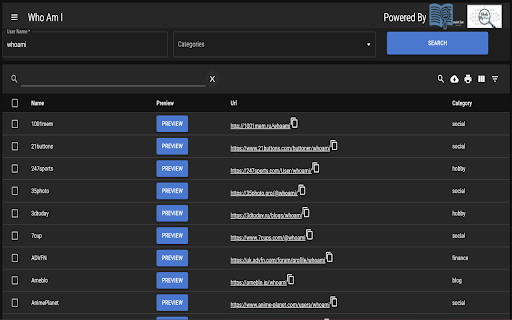
A chrome extension for doing username enumeration across multiple sites Who Am I is an Open Source Intelligence tool for enumerating a username across multiple websites and social media sites quickly. "Who Am I" is a powerful and user-friendly Chrome extension designed to simplify the process of verifying the existence of users across various websites. Whether you're managing user accounts, conducting research, or simply curious, this extension streamlines the task, providing a seamless experience for users. 1. **Multi-Site Compatibility:** "Who Am I" works across a wide range of websites and platforms, making it suitable for diverse use cases. 2. **Efficient User Enumeration:** This extension automates the user enumeration process, saving you time and effort. It checks the presence of users with precision and speed. 3. **Customizable Search Parameters:** Tailor your search by specifying search parameters such as categories and free text 4. **Instant Feedback:** Receive real-time feedback on user existence. "Who Am I" notifies you when a user is found. 5. **Privacy-Focused:** User privacy is a top priority. The extension respects privacy settings and ensures that user data remains confidential. 6. **User-Friendly Interface:** With an intuitive and user-friendly interface, you can initiate and manage searches effortlessly. 7. **Secure and Reliable:** Built with security in mind, "Who Am I" is reliable and ensures data integrity throughout the enumeration process. 1. Install the "Who Am I" extension from the Chrome Web Store. 3. Open "Who Am I" and input the username and optionally the website category. 4. Initiate the search and receive real-time feedback. 5. Review the results. "Who Am I" empowers users to efficiently verify the presence of users on multiple websites, enhancing user management, research, and investigative tasks. It is a valuable tool for individuals and professionals seeking to streamline user enumeration processes while maintaining privacy and data security. * Added feature “Entwined”. Entwined lets you quickly cross compare multiple users across multiple web sites * Implemented a better storage scaling algorithm, can now store hundreds to thousands of username searches, all within your browser. * Username search now displays usernames you have already searched for. * Improved the “Preview” option for viewing a web site’s content where a user is registered * Pressing “enter” after typing the username now initiates a search request in Who Am I * You can now delete username searches * Improved integration feature with “Your Rapport” chrome extension [0.15.0] * Limit concurrent requests so the computer doesn't run of out of resources when requesting sites * Fixed integration bug with "Your Rapport" chrome extension * Auto focus on username search field by default [0.14.0] * Removed open tab request when chrome was updated [0.13.0] * Big speed up in scanning all the sites * Show a percentage sign to indicate percent of sites scanned * Improved reset state algorithm [0.12.0] * Improved responsiveness on the UI * Number of sites searched appears * Quick collect and autoscroll collect features implemented by using “Your Rapport” chrome extension [0.10.0] * added Maigret dataset * results are now streamed [0.9.0] * bug fixes [0.8.1] * Fixed issue with Sherlock dataset not loading. [0.8.0] * Added new data set Mine Sight to the username lookup. [0.7.0] * Add context menu item for making look ups easier. * Improved search accuracy [0.6.0] * Added ability to set timeout value per site request (default is now 10 seconds), improves the number of results returned * Removed duplicate requests that were being generated due to naming differences in WhatsMayName and Sherlock * Added experimental Proxy settings to further improve returned results. * Fixed issue with filtering spaces issue [0.5.0] * Added Support for Sherlock data set [0.4.0] * By default exclude NSFW sites * Columns in the table can be sorted * Can pre-emptively search for a username using anchor tags or links like this chrome-extension://hbgmdndjlejkdekjhfenkojihbcmpcfl/search.html?username=yourUserName [0.3.0] * Initial Release * Supports WhatsMyName data set

Sound Booster Max
A Chrome extension to increase and boost the volume on web pages. Boost 6X your audio up to 500% with Sound Booster Max – the best volume booster extension for Chrome! Whether you're watching videos on YouTube, listening to music on Spotify, or in a video call, get louder, clearer, and distortion-free sound with just a few clicks. 🚀 🔊 Sound Booster Max: Volume Booster Extension for Chrome 🔊 Why Choose Sound Booster Max? 🔊 Boost Audio by 6X upto 500% – Get the maximum volume without any distortion! 🎥 Works on YouTube, Netflix, Spotify, and more – Perfect for all your favorite platforms. 🧑💻 Simple and Lightweight – The extension is super easy to use and won’t slow down your browser. ⚡ Seamless Experience – Enjoy louder sound across all tabs with no lag or performance drop. 🔧 User-Friendly Interface – Adjust the volume quickly with a simple slider. Sound Booster Max is a lightweight, high-performance sound booster that works on every website, enhancing your audio experience instantly. Whether it’s for movies, music, or video calls, this volume booster Chrome extension is your go-to tool for clear, powerful sound. Key Features 📈 6X Volume Boost upto 500% increase in volume – Get loud, crisp sound even on low-volume devices. 🎧 Perfect for streaming videos, music, and calls on platforms like YouTube, Netflix, Spotify, and more. 🖥️ Lightweight Extension – Enjoy boosted sound without slowing down your browser. 🌍 Works on all websites – Get great sound everywhere you browse. ⚙️ No distortion – Clear, clean audio at all volume levels. Install Sound Booster Max now for free and enjoy the ultimate sound experience on Chrome! 🎶 FAQ Q: How much can I boost the sound? A: You can boost the volume 6X up to 500% for loud and clear audio. 🔊 Q: Does it work on all websites? A: Yes! It works on YouTube, Netflix, Spotify, Amazon, and many more platforms. 🌍 Q: Is it free to use? A: Yes! Sound Booster Max is completely free to install and use. 🎉 Q: Will it slow down my browser? A: No, this extension is lightweight and won’t affect your browser’s speed. ⚡ At Sound Booster Max, we may collect the URLs of websites you visit. This allows us to ensure that the extension functions properly across different sites and continues to deliver the best possible experience for you. You can find the full details of our privacy practices in our policies below: https://volumeboostermax.com/privacy-policy 🔒 Rest assured, any data we collect is used only to improve your experience and will never be sold to third parties.

XML Sitemap
A Chrome extension to view the sitemap of any website. This Chrome extension XML Sitemap allows you to easily view the sitemap of any website you visit. Simply click the extension icon, and it will attempt to fetch and display the sitemap from the current website's domain. This tool is particularly useful for web developers, SEO specialists, and anyone interested in exploring the structure of a website. Key Features: Automatic Sitemap Detection: The extension checks for the presence of a sitemap at the standard location (/sitemap.xml) for the current website. User-Friendly Interface: The sitemap is displayed in a clean and readable format, making it easy to navigate and find specific URLs. Cross-Domain Compatibility: Works with most websites, regardless of their domain or protocol. How to Use: Install the Extension: Add the Sitemap Viewer to your Chrome browser. Visit a Website: Go to any website you want to explore. Click the Extension Icon: Click the Sitemap Viewer icon in your toolbar to view the sitemap. This extension simplifies the process of accessing and viewing sitemaps, making it a valuable tool for anyone working with websites.

Poster
A Chrome Extension for sharing your online surfing with your friends Reddit without the website. Browser-native Pinterest. A completely different way to share the sites you love. Poster is a social network that sits on top of the web as a browser extension, allowing you to share sites with your followers in a single click. Your home feed stays up-to-date with pages your friends and family are interested in, and when you stumble on a link that a followee has liked, we send you an unobtrusive notification letting you know. We never spam your email, blast you with ads or track your browsing activity. It’s completely free to use. The days of copying and pasting URLs into messaging applications are over. Poster is here. Poster is a product of Loomis Technologies, Inc., a St. Louis, Missouri based development studio. If you have feature requests and/or bug alerts, send a note to hello@loomistechnologies.com. We are actively working on Poster and would love to get your feedback.

URLColors
A chrome extension that adds a colored border around websites that match user inputted preferences. This extension allows you to flag specified websites by highlighting the website with a custom colored border. This is especially useful for developers who run their web applications on many different environments and who are constantly switching between a dev, test, and production version of an app or database. Because the application may look the same on all environments, it's easy to accidentally do something on the production environment that shouldn't have been done. With URL Colors, you can easily have the browser flag important websites for you by specifying a the keyword to match against the tab url, the border color, width, opacity, whether or not the border should blink, and the interval of blinking. The wildcard character (*) is now supported. It also has a demo mode, or snooze mode, so you can shut if off while presenting for a specified period of time, without worrying about reactivating it later. It automatically turns back on for you! Thanks to @dzoba for developing this with me!
