
phafnnacanbkdnkemiomjpaamomdgjhm

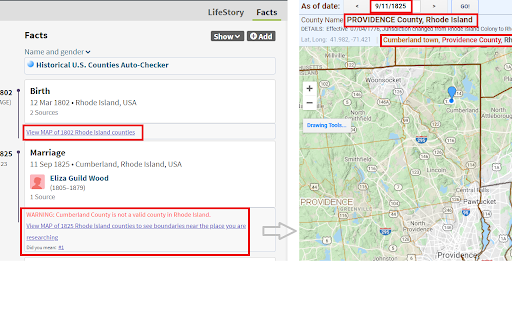
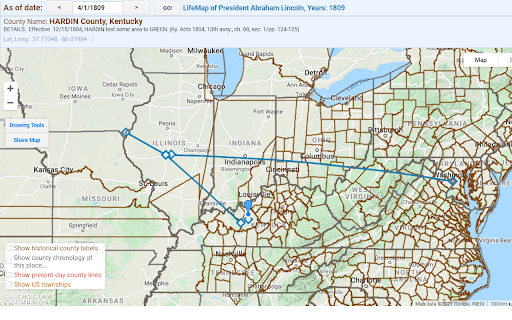
While searching Ancestry & FamilySearch, auto-checks county and place, notes boundary changes, shows historical county maps Let this tool do the location work for you as you search on Ancestry.com or FamilySearch.org. Optional upgrade for Ancestry.com users: Tree Fact-Checking and LifeMap! U.S. county boundaries have changed over 17,600 times since America was settled in colonial times. Don’t sabotage your search for ancestors by not knowing the correct county for the historical years you are researching. While searching on Ancestry or FamilySearch, this Historical U.S. Counties Auto-Checker extension for Google Chrome automatically checks that the county existed in the year you are searching, checks for valid places, warns of boundary changes, and links to historical county lines on Google Maps for the place and years you are searching! Install today and never let an ancestor fall off the map again! The Historical U.S. Counties Auto-Checker Chrome extension makes use of the award-winning RandyMajors.org’s Historical U.S. Counties on Google Maps tool, underpinned with the complete dataset of the authoritative Newberry Atlas of Historical County Boundaries. 1. Install the Historical U.S. Counties Auto-Checker Chrome extension by clicking the "Add to Chrome" button in the upper right corner of this page. 2. Go to any search form on Ancestry.com or FamilySearch.org and start typing a place and a year. As you finish typing in each box, the Historical U.S. Counties Auto-Checker Chrome extension will update information in a box as shown in the screenshots. Note that the information shown is updated based on the last year box and place box you were interacting with. 3. Read the Note and Warning messages that appear about some counties, and click the MAP link to view historical county boundaries for the place/county/state and historical year you are researching. The Auto-Checker first tries to center the map on the city/place/township you are searching for, and if it cannot find an exact match, it centers on the county you are searching for, and as a final fallback centers on the state you are searching for. 4. Using the map, when you find the correct county name for the year you are researching, put that county name in the place search box on Ancestry or FamilySearch in the form "City, County, State, USA" ENABLE TREE FACT-CHECKING & LIFEMAP FUNCTIONALITY: If you are a RandyMajors.org Monthly Contributor, the Auto-Checker will also check all U.S. location facts on Person profile pages on Ancestry trees, plus create a link to an interactive LifeMap for each ancestor! And your MAP links will open into ad-free fullscreen map windows any time you click a MAP link! LEARN MORE HERE: https://www.randymajors.org/access-ad-free-fullscreen-tools#compare That's all there is to it. Hope the tool helps you discover some "hidden" records! (When you install the Auto-Checker, you may see a standard confirmation window that states that the extension can “Read and change your data on www.ancestry.com or www.familysearch.org or www.google-analytics.com”. Rest assured that the Historical U.S. Counties Auto-Checker Chrome extension ONLY reads the place and year fields and shows the county information as shown in the screenshots above; it absolutely DOES NOT make any changes to your data whatsoever. No logins or email addresses are required to use the extension!)

WikiTree BEE
Enhance your WikiTree experience with WikiTree Browser Extension Extras: WikiTree BEE WikiTree BEE (Browser Extension Extras)... - Wiki tables and new profiles from Ancestry, FamilySearch, and Find a Grave records (and others) - Cemetery Category creation from Find a Grave - Category creation from Wikipedia + Some more features

OpenTranscribe
Transcribe historical handwritten documents using local and open public AI models! **Transform handwritten documents into searchable text transcriptions using local and open public AI models** OpenTranscribe is a free browser extension that helps genealogists, historians, and researchers transcribe large collections of historical documents using local and open public AI models. Simply drag and drop a folder of images, select your AI model, and let OpenTranscribe get to work. **Here's why OpenTranscribe is a great choice for handwriting transcription:** • Choose from 100+ ranked AI models via OpenRouter, Google Gemini, OpenAI, or Anthropic with rankings to help pick the best one. • Use any model running locally on your computer with one-click support for Ollama, LM Studio, llama.cpp and vLLM. • Enable Smart Adjust with one click to automatically optimize your images, so AI models can read them more accurately. • Search your entire transcription library by keyword at lightning speed, with live highlighting and keyboard navigation. • Use the handy built-in editor to correct or reprocess your transcriptions in a side by side view with the original image. • Drag and drop entire folders into OpenTranscribe, enabling you to process thousands of images within a single batch. • Process multiple transcriptions simultaneously with our configurable agents, helping to maximize efficiency and save time. • Export as PDFs with or without the source images, plain text, CSV, or XML files for seamless integration with your workflow. Researchers love OpenTranscribe because it's open, affordable and customizable. Transcribe hundreds of pages for less than one dollar (USD) using accurate, budget-friendly models like Gemini 2.5 Flash, with prompts and parameters that can be easily modified. **OpenTranscribe is designed for:** • Genealogists transcribing historical documents. • Historians working with archival collections. • Researchers processing large document sets. • Anyone with handwritten documents they need to read. **Using this extension is easy!** 1. Select a folder of images to transcribe and choose a model. 2. Optionally preprocess your images for clarity with Smart Adjust. 2. Click "Start Transcription" and your results will appear. 3. Search, edit, and export your results in multiple formats. Transcribe: JPG, PNG, and PDF files. Multi-page PDFs will be split into individual files. Export: PDFs (with or without images), merged or individual TXT files, CSV, and XML. OpenTranscribe supports free models running locally on your computer. Some built-in model options, like Google's Gemini 2.5 Flash, can transcribe 100 images with a high degree of accuracy for less than 25 cents (USD). OpenTranscribe requires an API key from your chosen AI provider and costs are paid directly to them based on the model you select. View our AI model recommendations and benchmark rankings online at https://genea.ca/rankings Yes! OpenTranscribe runs entirely on your computer. Your documents and API keys never leave your machine except when they are sent directly to the AI provider of your choice. All transcription batches are saved as local files in your working directory. You control where this data lives and can back it up, move it or delete it at any time. OpenTranscribe does not collect, store, or have access to your documents, transcriptions or API keys. • Click the "Help" button at the top of any page for support and frequently asked questions. • If you are experiencing a bug in OpenTranscribe, click "Report a bug" on the Help page. • Send support or feedback emails to hello@genea.ca Latest update: Saturday April 4th, 2026 v0.2.3: Improvements for model list updates.

WikiTree AGC
The WikiTree AGC (Automatic GEDCOM Cleanup) extension allows users of wikitree.com to automatically reformat biographies created by GEDCOMpare. It adds a button to the wikitree profile edit page when the profile looks like one created by GEDCOMpare. Pressing the button will reformat the biography into a chronological narrative that provides a good starting point for a typical WikiTree biography.

RootsFinder Web Clipper
Copy records from genealogy websites and save them to your RootsFinder tree. When you install this extension, you will be able to easily copy records from major genealogy websites into your RootsFinder tree.
