
jbmjbhgjjademhplejlndlbolmodingj


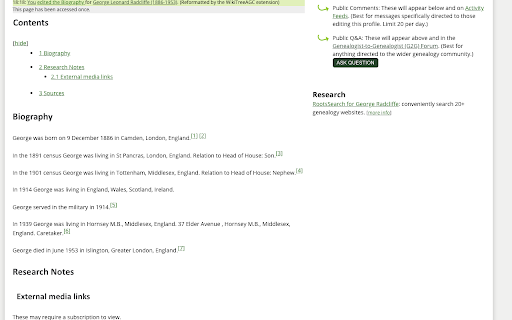
The WikiTree AGC (Automatic GEDCOM Cleanup) extension allows users of wikitree.com to automatically reformat biographies created by GEDCOMpare. It adds a button to the wikitree profile edit page when the profile looks like one created by GEDCOMpare. Pressing the button will reformat the biography into a chronological narrative that provides a good starting point for a typical WikiTree biography.

mitoYDNA File
Creates a file for uploading to mitoYDNA. This extension creates a CSV file while on the FT-DNA site for uploading Mitochondrial DNA (mtDNA) data to mitoYDNA. It will also create a .CSV file for Mitochondrial data from YSEQ for upload to mitoYDNA.

YFull.com Helper
Set of tools for genealogists, to facilitate analysis of YTree at https://www.yfull.com YFull Helper is a browser extension designed for genetic genealogists, providing enhanced functionality when browsing and analyzing the phylogenetic tree of humankind on the platform YFull.com. The extension is a toolkit that enhances the YFull.com functionality by providing filtering of samples, additional information about samples on the YFull tree, as well as statistical and visualization tools that facilitate analysis of male and female lines, their geographic distributions and regional diversities. The extension allows genetic genealogists to see and analyze: 1) Ancestral information about tested person directly in the YFull tree instead of plain ID 2) Haplogroup notes and remarks (such as named genetic lieneages/clans) 3) Bare tree branches, without samples (results) 4) First level branches, without samples (results) 5) Haplogroup frequency report per country, with visualisation 6) Haplogroup diversity per country, with visualisation

Family Tree Validator
Ensure your family's information on FamilySearch is correct and complete. Validator makes this quick and easy. The purpose of the Family Tree Validator is to find inconsistencies, errors, missing data in your family's tree on FamilySearch. Because these errors are under the surface, you may not even be aware that anything is wrong. It will make suggestions that may help FamilySearch find additional matches. It will find simple cleanup items like date and location inconsistencies. Best of all, it makes fixing these simple issues fast and easy! Validator checks that the information currently in FamilySearch about your family is 'reasonable'. That means common sense tests are applied EVERYWHERE (and if I've missed some, please let me know). It checks all of the information currently available, comparing husband and wife, children, parents and siblings. The extension further checks, for each attached source record, the information was fully added into FamilySearch. This saves you massive time in doing this review yourself! TO BEGIN: Install the extension and it will walk you through a few simple steps. Then return to FamilySearch and login. As you access a person's page, click on the Validator icon in the upper right of your browser. (If you don't see the icon, click on the extension icon - looks like a puzzle piece - and then on the 'pin' next to Family Tree Validator.) The person's name will appear on a small popup window. To validate them, simply click on the "Validate This Person" button. During Validation, the person and their family will be displayed on a separate Progress page, along with any information about them that needs to be reviewed. IMPORTANT: the first time, the amount of information can be concerning. Do not worry, we'll make the cleanup easy! To help you with your use of Validator, full help and suggestions are located on our website FindMyRoots.tech/help. The Options page gives you full control of Family Tree Validator's behavior. Validation should be viewed as a process rather than an event. As items are corrected and added, FamilySearch may find more items to be added to your tree. Lastly, we appreciate your use of the Family Tree Validator as it continues to grow and be enhanced. Despite best our efforts to make everything work as expected, you may find issues in its use. Please report any errors, items missed, things that could be checked, or new suggestions to FindMyRoots.tech@gmail.com or on our website FindMyRoots.tech/support. Enjoy!!!

Goldie May
Goldie May is genealogy research software to accelerate your research, sort out tangles in your family tree, and keep you more organized. It won't replace your current family tree software, but it might replace your spreadsheet, your word processing program, the papers on your desk, and the sticky notes on your monitor. 🏅 One of the 101 best genealogy websites of 2025 according to Family Tree Magazine: "Though named for two female ancestors, [Goldie May] is anything but old-fashioned...." 🏅 Authorized training partner of The Family History Guide ✅ Projects Organize your research into projects, each with an objective, subjects, and research plan. Great for client work or all your family lines. ✅ Research Log Mark each item in your log as a positive or negative result. Write abstracts and comments. Search your log. Export it to a spreadsheet. ✅ Automatic Research Log Turn it on, then start researching. Goldie May keeps a list of all the sites you visit, rabbit holes and all. ✅ Screenshots Take screenshots and save them directly to your research log. ✅ Citations On known websites, citations are created for you. ✅ Snapshots of your windows & tabs Too many browser tabs open? Take a snapshot and save them for later. Let's call it rabbit-hole insurance. ✅ Accessible from anywhere Your data is stored in the cloud. Access your projects from the library, an archive, or your nearest FamilySearch center. ✅ Subway Map See where your ancestor lived over time with this unique timeline tool. See census and newspaper hints in context. See county and state boundary changes in context. ✅ Newspaper coverage tool See which newspapers ran when and where your ancestor lived and open them on the provider's website. ✅ Canvas Sort out tricky situations like pre-1850 U.S. censuses with this visual tool, as if you were sorting papers on your kitchen table. ✅ Catalog of catalogs See what collections the big genealogy and newspaper sites have for a given time and place and quickly go there. ✅ Auto-search Launch searches into census records, and quickly jump to the next and previous census for that location.
