
ohbnmfhafhiimebngkhbhbdimhnpfcgl
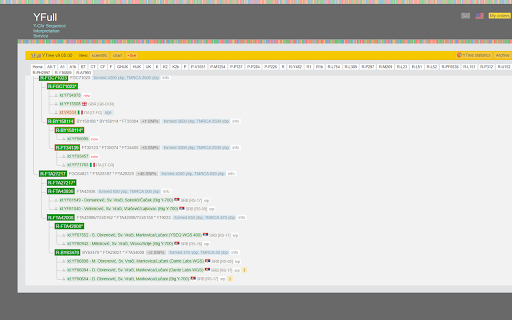
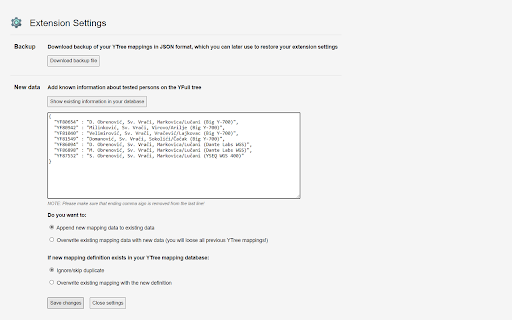


Set of tools for genealogists, to facilitate analysis of YTree at https://www.yfull.com YFull Helper is a browser extension designed for genetic genealogists, providing enhanced functionality when browsing and analyzing the phylogenetic tree of humankind on the platform YFull.com. The extension is a toolkit that enhances the YFull.com functionality by providing filtering of samples, additional information about samples on the YFull tree, as well as statistical and visualization tools that facilitate analysis of male and female lines, their geographic distributions and regional diversities. The extension allows genetic genealogists to see and analyze: 1) Ancestral information about tested person directly in the YFull tree instead of plain ID 2) Haplogroup notes and remarks (such as named genetic lieneages/clans) 3) Bare tree branches, without samples (results) 4) First level branches, without samples (results) 5) Haplogroup frequency report per country, with visualisation 6) Haplogroup diversity per country, with visualisation

mitoYDNA File
Creates a file for uploading to mitoYDNA. This extension creates a CSV file while on the FT-DNA site for uploading Mitochondrial DNA (mtDNA) data to mitoYDNA. It will also create a .CSV file for Mitochondrial data from YSEQ for upload to mitoYDNA.

Genealogist Essentials
The Go-To Place for genealogists wanting to grow their business. Extension is completely free to download and take advantage of! Feel free to share with your friends in the industry if you find it useful 😊 After working with hundreds of people in the industry, I have found a ton of commonalities between people that are successful and I decided to put them in one go-to place that people can easily refer to! :) Here you'll find extremely useful resources that will help with your business. 🥳 There are 3 sections to the extension: 1. NECESSARY resources are super popular and used across the industry by most successful salons. 🤩 2. RECOMMENDED tools are the best choices (as of today) for their own respective use cases. 🔥 3. FREE BOOKS & GIFTS are amazing stuff that I've found through talking with other people and my experience in the industry. 🎁 Hope you find this helpful and feel free to share with your friends in the industry if you find it useful 😊 Note: If the extension shows a blank white box, try turning off Adblock and turn it on again for it to work!

One2Tree
Views the pedigree tree in an interactive ahnentafel list and pedigree chart. It works on Ancestry, MyHeritage and FamilyTreeDNA. Features: • Interactive ahnentafel list that lets you find persons (and all corresponding ancestors and descendants) in the tree in a quick and easy way. • Expandable/contractible pedigree chart. • Ability to save list as a CSV, HTML, text or GEDCOM file. How it works: • Click the One2Tree icon to activate it when you have loaded the tree and it's showing on Ancestry, MyHeritage or FamilyTreeDNA. • On MyHeritage and FamilyTreeDNA you must be in the pedigree view. • Choose max generation and then press the Go!-button. • If One2Tree can read the tree a new tab will open where the list is being loaded and displayed when finished. • If another tree than what you had on your active browser tab comes up (e.g. a previously loaded tree), reload the page and try again. • Note that loading large trees may take some time. The free trial version is limited to 4 generations.

Family Tree Validator
Ensure your family's information on FamilySearch is correct and complete. Validator makes this quick and easy. The purpose of the Family Tree Validator is to find inconsistencies, errors, missing data in your family's tree on FamilySearch. Because these errors are under the surface, you may not even be aware that anything is wrong. It will make suggestions that may help FamilySearch find additional matches. It will find simple cleanup items like date and location inconsistencies. Best of all, it makes fixing these simple issues fast and easy! Validator checks that the information currently in FamilySearch about your family is 'reasonable'. That means common sense tests are applied EVERYWHERE (and if I've missed some, please let me know). It checks all of the information currently available, comparing husband and wife, children, parents and siblings. The extension further checks, for each attached source record, the information was fully added into FamilySearch. This saves you massive time in doing this review yourself! TO BEGIN: Install the extension and it will walk you through a few simple steps. Then return to FamilySearch and login. As you access a person's page, click on the Validator icon in the upper right of your browser. (If you don't see the icon, click on the extension icon - looks like a puzzle piece - and then on the 'pin' next to Family Tree Validator.) The person's name will appear on a small popup window. To validate them, simply click on the "Validate This Person" button. During Validation, the person and their family will be displayed on a separate Progress page, along with any information about them that needs to be reviewed. IMPORTANT: the first time, the amount of information can be concerning. Do not worry, we'll make the cleanup easy! To help you with your use of Validator, full help and suggestions are located on our website FindMyRoots.tech/help. The Options page gives you full control of Family Tree Validator's behavior. Validation should be viewed as a process rather than an event. As items are corrected and added, FamilySearch may find more items to be added to your tree. Lastly, we appreciate your use of the Family Tree Validator as it continues to grow and be enhanced. Despite best our efforts to make everything work as expected, you may find issues in its use. Please report any errors, items missed, things that could be checked, or new suggestions to FindMyRoots.tech@gmail.com or on our website FindMyRoots.tech/support. Enjoy!!!
