
pblapjjhibfmcfhpoapcmfdnjbnfifdp
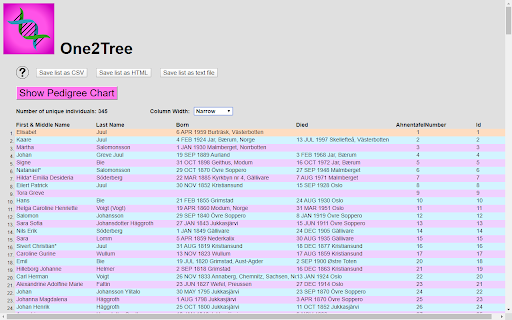
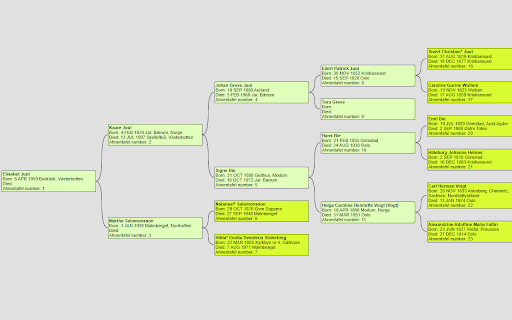
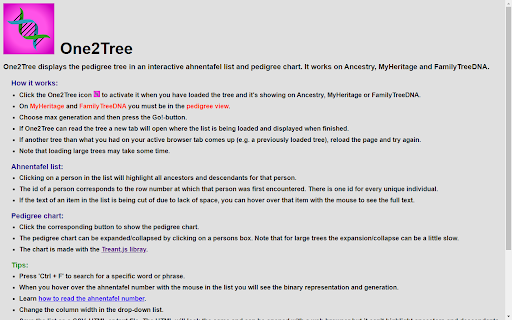
Views the pedigree tree in an interactive ahnentafel list and pedigree chart. It works on Ancestry, MyHeritage and FamilyTreeDNA. Features: • Interactive ahnentafel list that lets you find persons (and all corresponding ancestors and descendants) in the tree in a quick and easy way. • Expandable/contractible pedigree chart. • Ability to save list as a CSV, HTML, text or GEDCOM file. How it works: • Click the One2Tree icon to activate it when you have loaded the tree and it's showing on Ancestry, MyHeritage or FamilyTreeDNA. • On MyHeritage and FamilyTreeDNA you must be in the pedigree view. • Choose max generation and then press the Go!-button. • If One2Tree can read the tree a new tab will open where the list is being loaded and displayed when finished. • If another tree than what you had on your active browser tab comes up (e.g. a previously loaded tree), reload the page and try again. • Note that loading large trees may take some time. The free trial version is limited to 4 generations.

Genealogy Assistant
Adds custom features to popular genealogy websites like Ancestry, MyHeritage, 23andMe and more! **Get ready to supercharge your family history research!** Genealogy Assistant adds 100+ custom features to popular genealogy websites like Ancestry, MyHeritage, 23andMe, FamilySearch, FamilyTreeDNA and more. This extension helps you save time and research more efficiently by connecting these individual websites into one powerful, unified platform. Designed with both traditional and genetic genealogy in mind, we provide you with the tools to break down brick walls in record time. Genealogy Assistant helps you focus on what matters most: uncovering the connections that reveal our fascinating family histories. **Transform your genealogy workflow with powerful tools designed for serious researchers:** • Download DNA matches to CSV files for advanced analysis • Highlight high-value DNA connections with customizable thresholds • Research faster using handy custom keyboard shortcuts • Run cross-platform searches and open record collections directly from any page • Skip through hundreds of record images in seconds with advanced paging tools • Easily organize matches into groups using bulk selection tools • Add groups to your 23andMe DNA matches and shared matches …and much more. View the full list of features at https://www.genea.ca/genealogy-assistant/ Enjoy a free 30-day trial of Genealogy Assistant, then unlock the full version for just $2.95 per month or a one-time payment of $34.95. Get access to all of our tools with an easy to use, one-click install. Features are automatically updated and new tools are added regularly. Join thousands of genealogists who have already discovered Genealogy Assistant and start saving time today! Use the "Report a bug" link at the top of the Genealogy Assistant window to report any issues you encounter. Latest update: Thursday June 4th, 2026 v3.5.5: Continuing updates for AncestryDNA match list pages.

529renew
Stores your 23andMe DNA Matches in a local database. Allows you to export to other analysis software such as GDAT and Gephi. It stores summary match data and lists matches in common. For those with access to the chromosome browser it also lists shared segments and has a graphical display of overlapping segments shared and not shared between two people. This is a reworking of the "529 and You" extension that is no longer available. This extension has a different database layout, but it can import csv files that were exported from 529 and You (provided that they included the unique ID code for each person).

mitoYDNA File
Creates a file for uploading to mitoYDNA. This extension creates a CSV file while on the FT-DNA site for uploading Mitochondrial DNA (mtDNA) data to mitoYDNA. It will also create a .CSV file for Mitochondrial data from YSEQ for upload to mitoYDNA.

Goldie May
Goldie May is genealogy research software to accelerate your research, sort out tangles in your family tree, and keep you more organized. It won't replace your current family tree software, but it might replace your spreadsheet, your word processing program, the papers on your desk, and the sticky notes on your monitor. 🏅 One of the 101 best genealogy websites of 2025 according to Family Tree Magazine: "Though named for two female ancestors, [Goldie May] is anything but old-fashioned...." 🏅 Authorized training partner of The Family History Guide ✅ Projects Organize your research into projects, each with an objective, subjects, and research plan. Great for client work or all your family lines. ✅ Research Log Mark each item in your log as a positive or negative result. Write abstracts and comments. Search your log. Export it to a spreadsheet. ✅ Automatic Research Log Turn it on, then start researching. Goldie May keeps a list of all the sites you visit, rabbit holes and all. ✅ Screenshots Take screenshots and save them directly to your research log. ✅ Citations On known websites, citations are created for you. ✅ Snapshots of your windows & tabs Too many browser tabs open? Take a snapshot and save them for later. Let's call it rabbit-hole insurance. ✅ Accessible from anywhere Your data is stored in the cloud. Access your projects from the library, an archive, or your nearest FamilySearch center. ✅ Subway Map See where your ancestor lived over time with this unique timeline tool. See census and newspaper hints in context. See county and state boundary changes in context. ✅ Newspaper coverage tool See which newspapers ran when and where your ancestor lived and open them on the provider's website. ✅ Canvas Sort out tricky situations like pre-1850 U.S. censuses with this visual tool, as if you were sorting papers on your kitchen table. ✅ Catalog of catalogs See what collections the big genealogy and newspaper sites have for a given time and place and quickly go there. ✅ Auto-search Launch searches into census records, and quickly jump to the next and previous census for that location.
