
bldfdpnmijncfmaokfjgdmcjdhafihoh

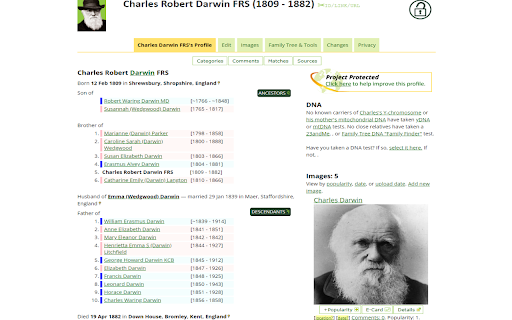
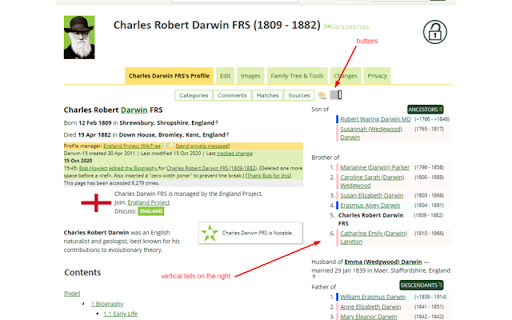
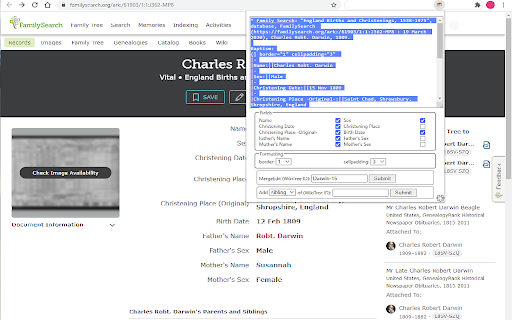
Enhance your WikiTree experience with WikiTree Browser Extension Extras: WikiTree BEE WikiTree BEE (Browser Extension Extras)... - Wiki tables and new profiles from Ancestry, FamilySearch, and Find a Grave records (and others) - Cemetery Category creation from Find a Grave - Category creation from Wikipedia + Some more features

529renew
Stores your 23andMe DNA Matches in a local database. Allows you to export to other analysis software such as GDAT and Gephi. It stores summary match data and lists matches in common. For those with access to the chromosome browser it also lists shared segments and has a graphical display of overlapping segments shared and not shared between two people. This is a reworking of the "529 and You" extension that is no longer available. This extension has a different database layout, but it can import csv files that were exported from 529 and You (provided that they included the unique ID code for each person).

Genealogy Blurring Tool
Automatically blurs sensitive elements on genealogy websites for privacy-minded screenshots and screencasts. Genealogy Blurring Tool is a free extension that automatically blurs sensitive details like DNA match names and names of living people on popular genealogy websites. This tool works seamlessly when navigating between pages and can be enabled/disabled with a single click. Focus on sharing your discoveries without worrying about complicated editing software. Whether you're hosting an online presentation, collaborating with fellow researchers, or posting screenshots online, Genealogy Blurring Tool works instantly on every page you load to blur any sensitive personal information. The blurring effect is applied instantly, allowing you to effortlessly capture and share secure screenshots or screen recordings of personal genealogy pages. This extension ensures you adhere to genealogical privacy standards by protecting the sensitive information of your DNA matches and any living individuals. Genealogy Blurring Tool works with Ancestry, MyHeritage, 23andMe FamilySearch and FamilyTreeDNA. If you notice any place that is not being blurred, please click the button titled "Missing a spot? Let us know!" located at the bottom of the Genealogy Blurring Tool pop-up panel. Install the Extension: Download and install Genealogy Blurring Tool directly from the Chrome Web Store. Access the Extension: Click the puzzle piece icon on the right hand side of the Chrome toolbar to locate Genealogy Blurring Tool. To keep it handy, click the pushpin icon next to its name to pin it to your Chrome toolbar. Activate Blurring: Enable the blurring effect by clicking the Genealogy Blurring Tool icon in the Chrome toolbar and selecting the green "Enable Blurring" button in the pop-up panel. Once activated, the icon in the toolbar will change from an open eye to a closed eye, signaling that the blurring is active. Disable Blurring: To turn off the blurring effect, click the Genealogy Blurring Tool icon in the Chrome toolbar and select the red "Disable Blurring" button in the pop-up panel. This will instantly reveal all text on the page. Use DNA Match Initials: You can choose to have names in your DNA match list on Ancestry, MyHeritage, 23andMe and FamilyTreeDNA replaced with the persons initials. Blur Your Personal Information: Choose whether to blur your own name, or the name of the test you manage by toggling the "Blur Your Personal Information" option in the Genealogy Blurring Tool pop-up panel. Blur DNA Match Profile Photos: Choose whether to blur DNA match profile photos by toggling the "Blur DNA Match Profile Photos" option in the Genealogy Blurring Tool pop-up panel. Blur DNA Match Notes Section: Choose whether to blur notes attached to DNA matches by toggling the "Blur DNA Match Notes Section" option in the Genealogy Blurring Tool pop-up panel. Check out our other Chrome extension, Genealogy Assistant! It adds 100+ custom features to popular genealogy websites like Ancestry, MyHeritage, 23andMe, FamilySearch, FamilyTreeDNA and more. Search for "Genealogy Assistant" in the Chrome Web Store. Latest update: Friday May 1st, 2026 v1.5.8: Updates for AncestryDNA and FamilyTreeDNA blurring locations.

Family Tree Validator
Ensure your family's information on FamilySearch is correct and complete. Validator makes this quick and easy. The purpose of the Family Tree Validator is to find inconsistencies, errors, missing data in your family's tree on FamilySearch. Because these errors are under the surface, you may not even be aware that anything is wrong. It will make suggestions that may help FamilySearch find additional matches. It will find simple cleanup items like date and location inconsistencies. Best of all, it makes fixing these simple issues fast and easy! Validator checks that the information currently in FamilySearch about your family is 'reasonable'. That means common sense tests are applied EVERYWHERE (and if I've missed some, please let me know). It checks all of the information currently available, comparing husband and wife, children, parents and siblings. The extension further checks, for each attached source record, the information was fully added into FamilySearch. This saves you massive time in doing this review yourself! TO BEGIN: Install the extension and it will walk you through a few simple steps. Then return to FamilySearch and login. As you access a person's page, click on the Validator icon in the upper right of your browser. (If you don't see the icon, click on the extension icon - looks like a puzzle piece - and then on the 'pin' next to Family Tree Validator.) The person's name will appear on a small popup window. To validate them, simply click on the "Validate This Person" button. During Validation, the person and their family will be displayed on a separate Progress page, along with any information about them that needs to be reviewed. IMPORTANT: the first time, the amount of information can be concerning. Do not worry, we'll make the cleanup easy! To help you with your use of Validator, full help and suggestions are located on our website FindMyRoots.tech/help. The Options page gives you full control of Family Tree Validator's behavior. Validation should be viewed as a process rather than an event. As items are corrected and added, FamilySearch may find more items to be added to your tree. Lastly, we appreciate your use of the Family Tree Validator as it continues to grow and be enhanced. Despite best our efforts to make everything work as expected, you may find issues in its use. Please report any errors, items missed, things that could be checked, or new suggestions to FindMyRoots.tech@gmail.com or on our website FindMyRoots.tech/support. Enjoy!!!

YFull.com Helper
Set of tools for genealogists, to facilitate analysis of YTree at https://www.yfull.com YFull Helper is a browser extension designed for genetic genealogists, providing enhanced functionality when browsing and analyzing the phylogenetic tree of humankind on the platform YFull.com. The extension is a toolkit that enhances the YFull.com functionality by providing filtering of samples, additional information about samples on the YFull tree, as well as statistical and visualization tools that facilitate analysis of male and female lines, their geographic distributions and regional diversities. The extension allows genetic genealogists to see and analyze: 1) Ancestral information about tested person directly in the YFull tree instead of plain ID 2) Haplogroup notes and remarks (such as named genetic lieneages/clans) 3) Bare tree branches, without samples (results) 4) First level branches, without samples (results) 5) Haplogroup frequency report per country, with visualisation 6) Haplogroup diversity per country, with visualisation
