
pglahbfamjiifnafcicdibiiabpakkkb
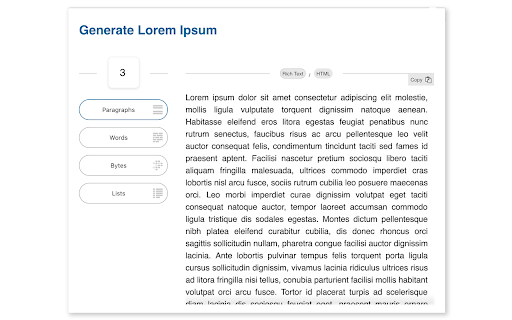
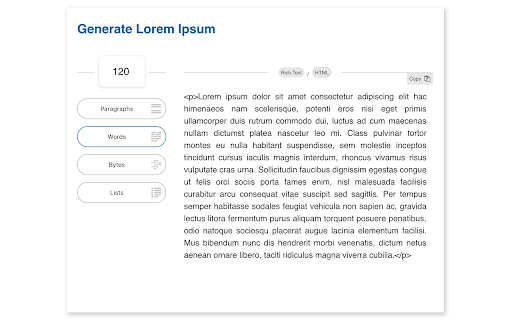
Quickly generate Lorem Ipsum placeholder text. Select a desired length and choose between paragraphs, words, bytes or lists. Elegantly designed and easy to use. The values you enter are stored so that your preferred option will always be immediately available.

Lorem Ipsum Generator
🚀 Generate Lorem Ipsum Effortlessly with Chrome Extension Are you tired of manually creating lorem ipsum dummy text for projects? Introducing our Lorem Ipsum Generator extension developed specifically to spawn filler text seamlessly. Whether you're a developer, designer, or content creator, our extension is the perfect tool to save you time and effort. 🔑 Key Features of our Lorem Ipsum Generator Our extension offers a variety of features to meet your needs: ♦️ Create filler text in seconds With just a few clicks, you can produce high-quality content tailored to specifications. This speed provides an opportunity to move from concept to creation without delays. ♦️ Customizable length and format Whether you need a short snippet or a lengthy paragraph, our tool allows you to adjust the length and format of dummy text. This flexibility makes it perfect for a wide range of uses ♦️ Variety of styles Choose from different styles of placeholder text, including various templates. This variety ensures that you can find the perfect fit for specific project requirements. ♦️ Easy-to-use interface Our tool is designed with ease of use in mind. You can effortlessly navigate the interface to generate the exact mock content you need without any hassle. ♦️ One-click copy feature Once you have created the desired fragment, it can be copied with a single click. This feature saves time and eliminates the need for manual copying and pasting. 👉 Why Use a Lorem Ipsum Generator? Using a this tool can enhance your workflow in several ways: Save time on content creation Maintain design consistency Easily visualize layout with sample material Ensure client presentations focus on design, not content 🛠 Customization Options Our generator lorem ipsum extension provides numerous customization options: ➤ Produce paragraphs, sentences, words, or characters ➤ Set specific volume of generating fragment ➤ Include or exclude HTML tags ➤ Choose from different template 👨💻 Ideal for Our lorem ipsum generator is ideal for various professionals and applications, including: 1️⃣ Web Designers: use dummy text to test layout and design elements. 2️⃣ Marketing Teams: create compelling sample text for brochures and ads. 3️⃣ App Developers: fill screens with realistic filler text during the development phase. 4️⃣ Content Creators: quickly draft and prototype stand-in content for various projects. ❤️ User-Friendly Interface The lorem ipsum text generator is incredibly easy to use. With a clean interface, you can generate random fragment with just a few clicks: 💠 Select template: classic lorem ipsum or one of the themed alternatives 💠 Select format (paragraphs, sentences, words, or characters) of fragment 💠 Set count of choosing format 💠 Click "Generate" than copy fragment to clipboard ♾️ Versatile Applications Our lipsum generator is not limited to web development. It is also useful for: 🔺 Print design 🔺 Content creation 🔺 UI/UX testing 🔺 Marketing materials 📈 Enhance Your Workflow Using a lorem ipsum placeholder text tool can streamline the design process. It allows you to focus on the aesthetics and functionality of your project without getting bogged down by actual content. 📌 How to generate lorem ipsum? 💡 Simply open the extension, select preferences, click "Generate". 📌 Can I customize the generating fragment? 💡 Yes, our Lorem Ipsum Generator allows you: 🔹 choose template of fragment 🔹 specify the number of characters, words, sentences, or paragraphs. ⚙️ Advanced Features For those needing more control, our lorem ipsum generator characters feature allows you to create fragment based on character count: ➣ Set specific character limits ➣ Ensure perfect fit for design ➣ Maintain consistency across projects 🔍 Multiple Formats The lorem ipsum generator supports various formats, includes lipsum alternatives: ✓ Classic latin filler text; ✓ Marketing template; ✓ Scientific template; ✓ Literary template ⚡ Reliable and Efficient Our lorem ipsum generator is designed to be reliable and efficient, ensuring you always have access to high-quality placeholder text lorem ipsum when you need it. ✨ Final Thoughts Our extension is an essential tool for anyone needing dummy writing. With its comprehensive features and user-friendly interface, it simplifies the process of generating nonsense content, making work more efficient and enjoyable. Download our ipsum lorem generator now and take design projects to the next level with effortlessly generated placeholder wording.

Page Ruler
Measure page elements size in pixel with an easy-to-use ruler. Page Ruler is an extension that lets you measure distances (in pixels) on a webpage. It draws a rectangular ruler when you move your mouse on the page. The ruler has width, height, start and end all labeled with corresponding metrics in pixels. When you move your mouse, the rectangle changes its size and all the numerics are updated. To activate the addon please press the toolbar button once. Likewise, to disable the addon please press the toolbar button again. This addon works with mouse clicks in desktop machines. For touch-enabled devices, you can work with touch to draw the rectangle within the page. If you have a feature request in mind or found a bug to report, please fill the bug report form on the addon's homepage (https://mybrowseraddon.com/page-ruler.html).

WhatFont
The easiest way to identify fonts on web pages. Say goodbye to the complexity of developer tools for identifying fonts. With WhatFont, discovering the fonts used on websites becomes as effortless as hovering over text. Want more details? A simple click on any element reveals the styles applied, making it easier than ever to uncover the secrets behind beautiful typography. Recommended by Wired WebMonkey, Lifehacker, and SwissMiss. History: • 3.2.0 - Improved toolbar icon compatibility • 3.1.1 - Removed unnecessary developer logging • 3.1.0 - Added multiple color format support • 3.0.1 - Restored escape key to exit • 3.0.0 - Completely Rewritten: The entire extension has been rebuilt for better performance and usability. - Updated Permission Model: We've revised permissions to better respect user privacy while maintaining functionalities. - Refreshed Appearance: The look has been updated for a more modern feel. - Isolation from Host Website Styling: Ensures WhatFont's appearance is unaffected by the website it's used on. - Adaptive Toolbar Icon: The toolbar icon now changes based on the system's appearance settings. - Support for New CSS Color Values: Enhanced support for the latest CSS color values. • 2.1.0 - A new design thanks to Siddharth Mate • 2.0.3 - Retina toolbar icon • 2.0.2 - Fix option page for button styles • 2.0.1 - Use native screen capturer • 2.0 - Improved sharing • 1.7 - Added font services detection for FontDeck (Thanks to Mark Perkins) - Improved font detecting algorithm - Improved overall performance • 1.6.1 - Added color detection for text • 1.6 - Added a tweet button for instant sharing through Twitter - Improved style reseting • 1.5 - Overall restyling • 1.4.4 - Supported light icon for dark themes • 1.4.3 - Fixed a bug related to Typekit service detection • 1.4.2 - Reduced loading time - Supported HTTPS protocol • 1.4.1 - Fixed stylesheet bug • 1.4 - Restructured source code - Supported font services detection for Typekit and Google Font API - Fixed toolbar button bug. Second click is now "Exit WhatFont"

Stylebot
Change the appearance of the web instantly You pick an element and choose any changes you want to make from the editor. You can change the font, color, margins, visibility and a lot more. You can also code CSS manually. ★ Easy to use: Pick and style elements using UI actions ★ Simple & Quick: Changes are saved instantly ★ Code editor - Write your own CSS ★ Readability Mode - Make articles on any site readable by hiding non-essential page elements like sidebars, footers and ads. ★ Grayscale Mode - Turn on grayscale to reduce strain from websites Homepage: https://stylebot.dev/ Twitter: http://twitter.com/ahujaankit Bug reports and feature requests: https://github.com/ankit/stylebot/issues Stylebot has never collected and will never collect any personal data, browsing history etc. The permission to access websites is to only let you customize the CSS for any webpage and automatically apply your CSS when you visit the webpage in the future. In the future, Stylebot may collect browser version, platform name, user's settings (except website list or any other data which can help identify user). This information is needed for decision on implementing new features, removing unused features or suggesting default settings for new users. It will happen only with your permission.
