
pgklmbjeooblkfcgbibhkjpbbhoabbbo
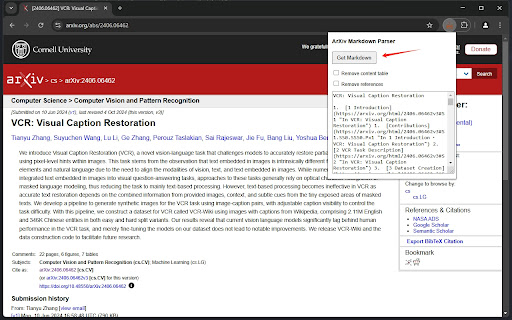

Fetches arXiv paper in HTML and converts it to Markdown with LaTeX inlined. Turn ArXiv Papers into Markdown with One Click Are you tired of wrestling with PDFs when you want to analyze or excerpt research papers? Especially in the age of LLMs, sharing and processing text-rich documents quickly is more vital than ever. This extension is built precisely for that. With a single click, you can seamlessly convert any arXiv paper into clean, readable Markdown—perfect for swift copying, downstream analysis, or use in LLM-powered workflows. Why Markdown matters? * LLM Integration: Markdown text is much easier to feed into LLMs like ChatGPT. You’ll save time by bypassing messy PDF extraction, ensuring the model gets the cleanest possible text for summary, translation, or analysis tasks. * Fast Table & Equation Copying: Research papers often contain complex tables and equations. Converting to Markdown makes it simple to copy these elements directly into your notes or into an LLM prompt without fighting garbled formatting. * Seamless Collaboration: Markdown is one of the most popular formats for academic and technical documentation. It’s version-control friendly, easy to annotate, and quick to share in group research settings (e.g., GitHub repositories or collaborative wikis). Why use this extension in your research / study workflow? * Speed Up Literature Reviews: Quickly grab the body text, references, or equations and drop them into an LLM. Get concise summaries or generate annotated bibliographies in minutes. * Accelerate Knowledge Extraction: Large Language Models excel at extracting facts, highlighting key results, or making comparisons, but the simpler and cleaner the input, the better. By converting arXiv papers to Markdown, you reduce the friction in extracting the content you need. * Enhance Learning: Instead of navigating a long PDF, you can structure the text for personal study. Add headings, highlight key points, or insert your own notes without struggling with traditional PDF editing tools. * Better Equation Handling: Ever tried copying and pasting LaTeX from a PDF? It’s a hassle. Now, you can quickly get the LaTeX or Markdown version of any equation, ready to be pasted into your notes, slides, or LLM prompts for further exploration. * One-Click Simplicity: Installing our extension takes seconds, and using it is even simpler: Open any arXiv paper you want to read or analyze (in abs/pdf/html pages) Click on the extension icon in your browser. Choose whether you want the output Markdown to include table of contents and references. Voilà! Instantly get clean Markdown text of the entire paper, including equations, tables, figures and inner references (as links). No more elaborate conversions, no more copy-paste nightmares—just frictionless research and learning. Powered by LaTeXML and Turndown.

Markie – One-Click Webpage to Markdown
Convert the current page to Markdown and copy it to your clipboard with one click. Markie is a lightweight Chrome extension that simplifies the process of converting any webpage into Markdown format. With just one click, Markie copies the entire content of the current page as Markdown to your clipboard, perfect for working with Large Language Models (LLMs). How to Use: 1. Navigate to any webpage you wish to convert. 2. Click on the Markie extension icon in your Chrome toolbar. 3. A toast notification will appear, confirming that the Markdown has been copied to your clipboard. 4. Paste the content wherever you need it!

Sidenote2Obsidian
Sidenote2Obsidian Extension This Chrome extension allows you to quickly capture ideas from any webpage and sync them to your Obsidian notes using the Chrome Side Panel. It seamlessly integrates with your browsing workflow, allowing you to manage drafts and customize note formats before syncing. It relies on the community plugin Obsidian Local REST API for secure communication. 1. Side Panel Integration: Conveniently write notes alongside your web content without switching windows. 2. Draft Management: Save multiple ideas locally as drafts and sync them individually or in bulk when you’re ready. 3. Customizable Templates: Define how your notes are formatted and named using flexible templates (supports placeholders like {{title}}, {{url}}). 4. Efficient Workflow: Support for custom keyboard shortcuts to open the panel or create notes quickly. 5. Secure Sync: Automatically sends notes to Obsidian via the Local REST API. Usage Instructions: 1. In Obsidian, install and enable the Local REST API plugin. 2. Install this extension and open the Chrome Side Panel (usually by clicking the “Side Panel” icon in the Chrome toolbar and selecting Sidenote2Obsidian). 3. Go to the extension’s Settings, and enter the API Key from the Local REST API plugin in Obsidian. (Optional) Configure your note save path, templates, and shortcuts. 4. Start capturing ideas! You can save them as drafts or click sync to send them to Obsidian immediately.

Kimi Copilot - 网页总结助手
用Kimi AI一键总结网页内容 安装后,在浏览网络文章时点击插件图标,或使用快捷键 Ctrl/Cmd+Shift+K,即可一键召唤Kimi.ai总结网页内容 特点: 1. 免费,登录Kimi账号即可无限使用 2. 得益于Kimi的长文本大模型,总结更全面 3. 极简,除了一键总结没有其它花里胡哨的功能 4. Kimi无法访问的网站也能总结 5. 支持总结YouTube和B站视频 6. 支持总结PDF页面(试试arXiv论文吧!) 7. 支持暗黑模式 8. 支持自定义总结时使用的prompt 注意: 1. 本插件为第三方爱好者开发,不是Kimi.ai或月之暗面官方产品 2. 由于技术限制,本插件无法在Arc等非原生Chrome浏览器使用

pdf+mathjax
PDF viewer for chrome, with ability to render LaTeX in text annotations. It can add text annotations when the ꕯ button is pressed,… PDF viewer for chrome, with ability to render LaTeX in text annotations. It can add text annotations when the ꕯ button is pressed, and instantly render it as LaTeX when exiting editor (click somewhere else, or press Esc to exit editor). You can drag the text box to move it. You can cut the text box then paste it to other pages of the document. If you don't like the editor, you can just use it as a PDF viewer. After adding text annotations through other software, then the viewer can render LaTeX contained in your annotation. Since LaTeX is saved as string rathar than image, it can be edited after saving and reopening. It contains PDF.js version 3.11.174 [ce8716743] and MathJax version 4.0.0-beta.3 so it doesn't need remote hosted code, so it can be used offline.
