
flohnmomnafamkgbjonnjcjggkhiokkn
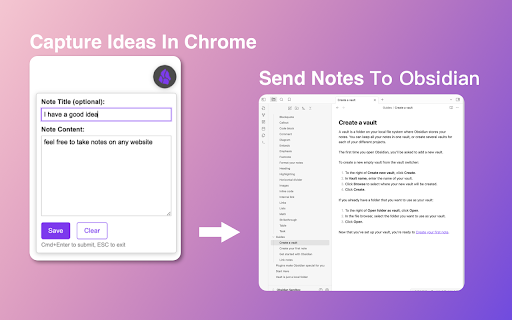
Sidenote2Obsidian Extension This Chrome extension allows you to quickly capture ideas from any webpage and sync them to your Obsidian notes using the Chrome Side Panel. It seamlessly integrates with your browsing workflow, allowing you to manage drafts and customize note formats before syncing. It relies on the community plugin Obsidian Local REST API for secure communication. 1. Side Panel Integration: Conveniently write notes alongside your web content without switching windows. 2. Draft Management: Save multiple ideas locally as drafts and sync them individually or in bulk when you’re ready. 3. Customizable Templates: Define how your notes are formatted and named using flexible templates (supports placeholders like {{title}}, {{url}}). 4. Efficient Workflow: Support for custom keyboard shortcuts to open the panel or create notes quickly. 5. Secure Sync: Automatically sends notes to Obsidian via the Local REST API. Usage Instructions: 1. In Obsidian, install and enable the Local REST API plugin. 2. Install this extension and open the Chrome Side Panel (usually by clicking the “Side Panel” icon in the Chrome toolbar and selecting Sidenote2Obsidian). 3. Go to the extension’s Settings, and enter the API Key from the Local REST API plugin in Obsidian. (Optional) Configure your note save path, templates, and shortcuts. 4. Start capturing ideas! You can save them as drafts or click sync to send them to Obsidian immediately.

Browser Interface
A browser interface for saving windows to the local filesystem. A chrome extension that optionally pairs with a obsidian plugin to manage your tabs. This extension allows you to save all the tabs in a chrome window in markdown to a folder of your choice. The markdown is designed to be compatible with the Obsidian Browser Interface Plugin and other Obsidian plugins to display the tabs and reopen or delete them. Additional features include the ability to view the saved data in the extension, open or delete windows directly, and backup the currently open windows on your computer. Browser Compatibility Brave: go to `brave://flags` and manually enable the following flags: 1. `#file-system-access-api` 2. `#file-system-access-persistant-permission-updated-page-info` 3. `#file-system-observer` Also, if you would like to enable pinned tabs showing up in all windows, enable the following flag: - `#brave-shared-pinned-tabs` Chrome / Chromium: go to `chrome://flags` and manually enable the following flags: 1. `#file-system-access-persistant-permission-updated-page-info` 2. `#file-system-observer`

Obsidian Web
Connect your browser with your notes in Obsidian. Obsidian Web is a customizable web clipper for Obsidian with advanced features. This is a Chrome extension for Obsidian* that allows you to more tightly integrate your browser with your notes in Obsidian. Obsidian Web makes clipping content from the web into your notes seamless, but that's just the basic part -- it also has advanced features that help you to find out when you already have notes before you take the time to add them again, and to remind you about what your thoughts were last time you were there. Features: - Templates: Configure how your content will appear in your notes by editing simple templates. Want to add information that isn't the page title, URL, or the text you've selected? You can change the content you are about to send to your notes on a case-by-case basis by clicking on the "Entry Details" dropdown from the pop-up menu. - Note Recall: Have you been to this page before? Maybe you already have notes about it? Obsidian Web can search your notes to see if you've mentioned this page before, and if so, let you open that note in Obsidian or update it with new content. - Periodic Notes: Want to append or patch your daily, weekly, monthly, or yearly notes? This gives you an "Append to current daily note" option out-of-the-box, but maybe you want to use a different interval or insert your content in a specific section of your daily note? Just modify the template and you can. Note that this requires the Obsidian Periodic Notes plugin: https://obsidian.md/plugins?id=periodic-notes 1. Install this extension from the Chrome Web Store 2. Install & enable the "Local REST API" plugin from the Community Plugins section in Obsidian. 3. Click on the "Obsidian Web" icon in your toolbar and follow the instructions. *Please note that the authors of this extension have no affiliation with the makers of Obsidian. Want to have a say in the future of Obsidian Web? Schedule a one-on-one call with me today by going to https://calendar.app.google/2nxkhy5yYvEddBK5A or by clicking the "Schedule a one-on-one" button from the upper-right corner of the extension options page. New in version 3.5.0: - Table Support: Tables will now be properly included in your markdown output if they were present in the page content or what you selected. Thanks @dscherdi for figuring out how to make this a reality via integrating https://github.com/mixmark-io/turndown-plugin-gfm ! - No Lost Changes: If you make changes to the content of the popup modal (e.g. adding notes to the content template) and accidentally do something that would cause you to lose those changes (e.g. closing the modal or changing the preset), we'll warn you that you're about to do that, and give you the option of changing your mind. This came about because I apparently have a tendency to double-click randomly, and I lost quite a bit of work today :laugh:. - Adds support for connecting to Obsidian on ports other than the standard ports of 27123 and 27124; now folks who are juggling multiple vaults have better options! - Fixes a common bug that would cause Obsidian Web to erroneously decide to use a secure connection to Obsidian even when one's certificate was not properly trusted. If folks were historically seeing the green shield icon when in settings, but found that they weren't able to actually use Obsidian Web when they tried, they should now see a reasonable error message on the extension options page. - Adds slightly improved bug reporting information when exporting a bug report. - Adds better warning messages when your version of Obsidian Local REST API is out-of-date. - Distinguishes between local HTTP and remote HTTP connections, and only warns you to use HTTPs if your HTTP connection isn't local. - Do you write notes about a page and want to be reminded of them when you browse to that page again? You can now configure Obsidian Web to automatically open the extension menu and show you a notice when you navigate to a URL you've already written notes about. This is particularly useful if you need to remind yourself about why you might not want to buy a particular thing on Amazon or listen to a particular book on Audible. Read more here: https://github.com/coddingtonbear/obsidian-web/wiki/Automatic-Match-Display - Do you want to remind yourself of notes you have about a page *before* you click on a link to that page? Now you can configure Obsidian Web to show you when you have notes about a page just by hovering over a link to it. You can even set a custom message for it to show you when you hover over a link to that particular page, too. You can find out more about this feature here: https://github.com/coddingtonbear/obsidian-web/wiki/Hover-Messages - Added a new bug report export feature making it easier for issues to be troubleshot. You can find this via the "bug" shaped icon in the upper-right corner of the options panel. - A completely new Pop-Up that's a lot easier to use and understand. - It's now shown inside your page content and allows you to leave the pop-up open while you collect whatever content you want to gather from the page without needing to close and re-open the pop-up every time you realize you need to copy something from your page. You can drag the pop-up around, too, if it's in the way! - Templates are shown and rendered on-the-fly in the interface so you can better understand how your templates are used for generating your notes. - It's now launchable by a keyboard shortcut -- by default Alt+Shift+O. You can find instructions for how to change the keyboard shortcut in Options. Closing the pop-up is also doable from the keyboard now, too -- just press your Esc key. - There's now support for connecting to Obsidian instances other than the one running on localhost for those of you who are using Docker images or have Obsidian running on another machine in your network. - Extra context is provided from Readability (https://github.com/mozilla/readability) in addition to your page content. Now the title, length, excerpt, byline, etc. information that Readability extracts from the document are available as context variables. - Automatic Drafting: You can now open and modify the content in the pop-up menu multiple times without losing what you had previously entered. - Markdown Selections: Selection is provided as Markdown text instead of a plain-text string. - Import/Export: Settings can be exported and imported as a JSON file. - Note Recall (optionally-enabled) - When opening the extension pop-up, the extension will search your notes to see if you've mentioned this URL before and provide you options for opening or editing that existing note if so. - Optionally, will search your notes in the background while browsing the web and let you know (by showing a badge on the extension icon) if you've mentioned this page before or if you have a dedicated note for it without requiring you to open the extension pop-up to find out. - Improved page content snapshots. Since version 2.0.0, page content has been available via the {{page.content}} template variable -- now that content has been trimmed down to include only what matters using Readability.js. - New {{uuid}} template function allowing you to randomly generate IDs for your notes. - Several new template helpers are available including: - {{date}}: Displays a timestamp. Can also receive a second argument for declaring format. - {{filename FIELD}}: Removes filename-unsafe characters from FIELD. Useful when creating a new document from, for example, a page title. - {{json FIELD}}: JSON-encodes the string in FIELD. Useful for including arbitrary page details in YAML frontmatter. - {{quote FIELD}}: Prefixes every line of FIELD with a '>' so as to display it as a blockquote in your notes. - Handlebars is now used as the template language, allowing for much-more-complex template logic. - Page content (as markdown) is available for use in your templates. - A new 'Capture page snapshot' default template exists that will capture as a markdown document and save it into your notes. - A new 'Restore default templates' button allowing you to restore the original default templates should you have accidentally deleted them or want to see the original versions for reference.

QuickPad: fast Markdown notepad
An in-browser Markdown notepad. Optimize for writing experience. Free, plus your data doesn't leave you computer ≡ Why do I build this extension 🤔 When reading cool stuffs on the net, I often want to take some notes, but opening my noting applications such as Notion/Obsidian takes much time. So I built this extension to quickly jot down my idea, then later copy to whatever noting systems. ≡ What it does really well 💪 - Fast & Clean - Markdown support - Writing should feel pleasant (sth like Notion editor) - Your data stays in your computer ≡ What it *will* do well in the future ⚙️ - Pasting image into the editor - Searching - Exporting notes - Data backup ≡ Feedbacks 💙 If you have any feedbacks or suggestions, I'm really happy to hear that, feel free to leave me a review

Clipsidian
Clipsidian lets you capture in-browser selected content and send it directly to your Obsidian vault. Copy selected web page content to your Obsidian notes: - In your web browser, select the content you want to add to your Obsidian vault. - Right-click on the highlighted content. - From the context menu, select a clipping action. Obsidian should open (if it isn't already open) and your clipping should be saved! Configure your clipping actions: - Open the Clipsidian extension options in your browser and set up as many clipping actions as you need. Choose where to save each clipping, append them to existing notes or create new ones dynamically with placeholders like {date}. Customizable Web Clipping: - Easily collect clippings and keep them organized. Define your own clipping actions with Clipsidian, precisely choosing the destination for every web clipping within your many vaults. Dynamic Target Note Paths: - With the ability to use placeholders like {title}, {date}, and {time} in your target note paths, Clipsidian allows for seamless organization of your clippings. This dynamic functionality enables you to save clips to specific notes based on the clipped page or time of clipping. Enriched Clipping Templates: - Auto-embed valuable metadata with placeholders like {date}, {time}, page {title} and page {url} with every web clipping. Flexible Date and Time Formatting: - Customize how the {date} and {time} placeholders appear in your clippings. Clipsidian let's you change the format of your dates and times, including setting the locale to match your language. - Example: {date:LLLL dd, yyyy} turns into January 1st, 2000
