
godifeadkmaeijlkpplkdofmohbnlhod

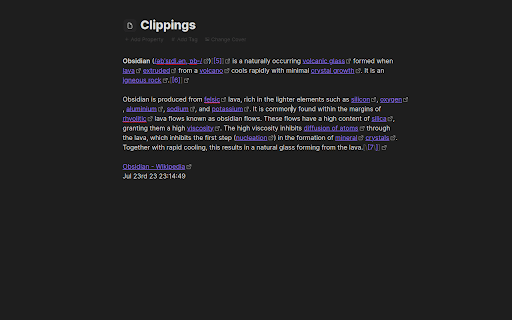
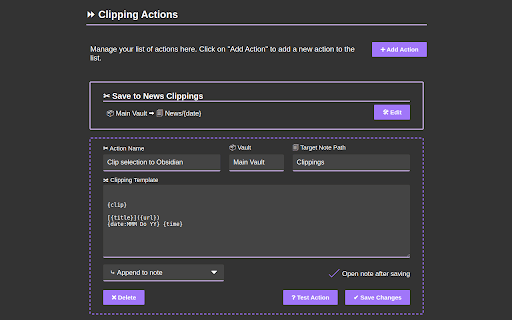
Clipsidian lets you capture in-browser selected content and send it directly to your Obsidian vault. Copy selected web page content to your Obsidian notes: - In your web browser, select the content you want to add to your Obsidian vault. - Right-click on the highlighted content. - From the context menu, select a clipping action. Obsidian should open (if it isn't already open) and your clipping should be saved! Configure your clipping actions: - Open the Clipsidian extension options in your browser and set up as many clipping actions as you need. Choose where to save each clipping, append them to existing notes or create new ones dynamically with placeholders like {date}. Customizable Web Clipping: - Easily collect clippings and keep them organized. Define your own clipping actions with Clipsidian, precisely choosing the destination for every web clipping within your many vaults. Dynamic Target Note Paths: - With the ability to use placeholders like {title}, {date}, and {time} in your target note paths, Clipsidian allows for seamless organization of your clippings. This dynamic functionality enables you to save clips to specific notes based on the clipped page or time of clipping. Enriched Clipping Templates: - Auto-embed valuable metadata with placeholders like {date}, {time}, page {title} and page {url} with every web clipping. Flexible Date and Time Formatting: - Customize how the {date} and {time} placeholders appear in your clippings. Clipsidian let's you change the format of your dates and times, including setting the locale to match your language. - Example: {date:LLLL dd, yyyy} turns into January 1st, 2000

Save to Obsidian
Early WIP Web Clipper intended for use with Obsidian.md An unnoficial chrome extension to precisely get data from webpages. created with the intent to use with Obsidian.md properties. Heavily inspired by Save to Notion This extension is **NOT** affiliated in any way with the Obsidian.md team

Omnisearch Companion
Display relevant search results from the Obsidian Omnisearch plugin. Display results as you search directly retrieved from your Obsidian vault. Selecting results will open them inside of Obsidian making search a seamless experience. Obsidian and the Omnisearch plugin must be installed before this plugin will work. The HTTP server option in Omnisearch settings must also be activated. Ensure the port set in Omnisearch matches the port in your Omnisearch Companion settings.

Obsidian clipper
Easy to clip web content and paste into your obsidian vault Obsidian Clipper is a browser extension used for parsing and clipping web content as a markdown format, and then export to your obsidian vault of provided folder. ✂️ Easy clipping: With just clicking button, you can quickly clip the web content to your Obsidian vault. 📝 Markdown editor panel: Obsidian Clipper provides a markdown editor panel that allows you to edit and format your clipped content before saving it to your vault. With the editor panel, you can edit headings, lists, images, and other formatting to your notes or delete unuseful content. The panel also has a preview mode that lets you see how your content will look once saved by clicking outside of the editing panel. 🎨 Customizable options: Obsidian Clipper allows you to customize your clipping options to suit your needs. You can choose the target Obsidian vault, folder, and content format, making it easy to organize your notes and keep them in the right place. 🛡️ Sanitized content: For your security, Obsidian Clipper sanitizes all content you clip to prevent XSS attacks before it is saved to your local vault. 🌐 Works with many websites: Obsidian Clipper works with many websites, so you can clip content from news articles, blog posts, research papers, and more. 🚀 Fast and lightweight: Obsidian Clipper is designed to be fast and lightweight, so it won't slow down your browsing experience. The extension only runs when you use, so you can clip content and continue browsing without any interruptions. 🚀 To start using Obsidian Clipper, simply install the extension in your browser and follow the setup instructions. Once installed, you can setup your preferences and copy or edit the current tab content when opening the extension popup (If nothing shows up, please try to refresh the page) 🙏 We hope you find Obsidian Clipper useful in your note-taking and research tasks. If you have any feedback or suggestions, please don't hesitate to leave the comments or send email to me. You can find the source code here ⛩

Obsidian Clipper
Obsidian Web Clipper Chrome Extension to save articles and pages from the web in Obsidian Effortlessly save web articles to your Obsidian vault with just one click. Perfect for researchers, students, and avid readers who want to organize and reference online content. - Uses Readability.js to extract clean, readable content - Captures essential metadata: domain, title, timestamp, excerpt, and word count - Simple one-click saving to your specified Obsidian vault - Customizable settings for organizing your saved articles - Install the extension - Set up your preferred Obsidian vault in the extension settings - Click the extension icon on any web page to save the article Compatibility: Currently tested and optimized for Google Chrome. Get started by configuring your Obsidian vault in the extension settings. Happy clipping!
