
ndldlpgkifnkldgeoadgejpmbehbfflc
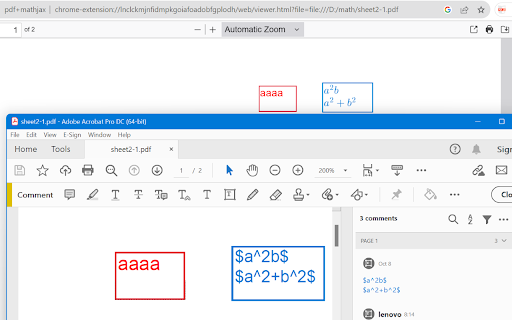

PDF viewer for chrome, with ability to render LaTeX in text annotations. It can add text annotations when the ꕯ button is pressed,… PDF viewer for chrome, with ability to render LaTeX in text annotations. It can add text annotations when the ꕯ button is pressed, and instantly render it as LaTeX when exiting editor (click somewhere else, or press Esc to exit editor). You can drag the text box to move it. You can cut the text box then paste it to other pages of the document. If you don't like the editor, you can just use it as a PDF viewer. After adding text annotations through other software, then the viewer can render LaTeX contained in your annotation. Since LaTeX is saved as string rathar than image, it can be edited after saving and reopening. It contains PDF.js version 3.11.174 [ce8716743] and MathJax version 4.0.0-beta.3 so it doesn't need remote hosted code, so it can be used offline.

LaTex Math Equations Viewer
Conveniently render LaTex Math formulas in the browser. Usage: Select the latex formula you want to render, then right-click and choose Render in LaTex Math Equations Viewer from the menu.

LaTeX Copy
Make copying LaTeX effortless and efficient! How it works: 1.Hover Simply hover your mouse over any LaTeX expression, and it will be highlighted for easy identification. 2.Click to Copy With a single click, the highlighted LaTeX expression is instantly copied to your clipboard—no manual selection or extra steps required.

ArXiv Markdown Parser
Fetches arXiv paper in HTML and converts it to Markdown with LaTeX inlined. Turn ArXiv Papers into Markdown with One Click Are you tired of wrestling with PDFs when you want to analyze or excerpt research papers? Especially in the age of LLMs, sharing and processing text-rich documents quickly is more vital than ever. This extension is built precisely for that. With a single click, you can seamlessly convert any arXiv paper into clean, readable Markdown—perfect for swift copying, downstream analysis, or use in LLM-powered workflows. Why Markdown matters? * LLM Integration: Markdown text is much easier to feed into LLMs like ChatGPT. You’ll save time by bypassing messy PDF extraction, ensuring the model gets the cleanest possible text for summary, translation, or analysis tasks. * Fast Table & Equation Copying: Research papers often contain complex tables and equations. Converting to Markdown makes it simple to copy these elements directly into your notes or into an LLM prompt without fighting garbled formatting. * Seamless Collaboration: Markdown is one of the most popular formats for academic and technical documentation. It’s version-control friendly, easy to annotate, and quick to share in group research settings (e.g., GitHub repositories or collaborative wikis). Why use this extension in your research / study workflow? * Speed Up Literature Reviews: Quickly grab the body text, references, or equations and drop them into an LLM. Get concise summaries or generate annotated bibliographies in minutes. * Accelerate Knowledge Extraction: Large Language Models excel at extracting facts, highlighting key results, or making comparisons, but the simpler and cleaner the input, the better. By converting arXiv papers to Markdown, you reduce the friction in extracting the content you need. * Enhance Learning: Instead of navigating a long PDF, you can structure the text for personal study. Add headings, highlight key points, or insert your own notes without struggling with traditional PDF editing tools. * Better Equation Handling: Ever tried copying and pasting LaTeX from a PDF? It’s a hassle. Now, you can quickly get the LaTeX or Markdown version of any equation, ready to be pasted into your notes, slides, or LLM prompts for further exploration. * One-Click Simplicity: Installing our extension takes seconds, and using it is even simpler: Open any arXiv paper you want to read or analyze (in abs/pdf/html pages) Click on the extension icon in your browser. Choose whether you want the output Markdown to include table of contents and references. Voilà! Instantly get clean Markdown text of the entire paper, including equations, tables, figures and inner references (as links). No more elaborate conversions, no more copy-paste nightmares—just frictionless research and learning. Powered by LaTeXML and Turndown.

LaTeX From Web
Copy LaTeX formulas from web page with a hover and click. LaTeX From Web is a powerful browser extension that enables users to extract and copy LaTeX code from mathematical equations displayed on any website. With a simple hover and click, you can grab the exact LaTeX source without viewing the page’s HTML or developer tools. Key Features: - Wide Site Compatibility: Seamlessly works on Wikipedia, Stack Exchange, arXiv, and any other website using MathJax or KaTeX to render equations. - Cross-Browser Support: Fully functional on Chrome, Firefox, Edge, Safari, and other Chromium-based browsers. - Precision Copying: Each individual equation is recognized and linked to its correct LaTeX source, ensuring accurate results. - Smart Detection: The extension automatically identifies and activates only on supported equations, minimizing interference with other page content. - Modern UI: Comes with a clean, dark-themed popup panel designed for minimalism and usability. - Usage Tracking: Displays daily stats including the number of LaTeX copies and visited sites for your reference. - Lightweight and Secure: No third-party scripts or analytics — 100% privacy focused. How to Use: - After installing the extension, click on the icon in your browser toolbar. - Use the toggle to enable the extension. - Navigate to any webpage containing rendered equations. - Hover over any equation and a "Copy LaTeX" button will appear. - Click the button to copy the LaTeX code to your clipboard. - You can paste this code into your LaTeX editor, Overleaf, Notion, or anywhere you need it. Troubleshooting: - If the "Copy" button doesn’t appear, wait a moment for the equations to fully render, then try hovering again. - If the extension doesn’t respond, ensure it's toggled on in the popup and refresh the webpage. Bugs or glitches in older versions have been fixed in the latest release. License: This extension is open-source and distributed under the MIT License. Developed by Manoj Aryal Version 1.1 – Featuring enhanced LaTeX extraction and a streamlined, modern interface.
