
pgjcgpbffennccofdpganblbjiglnbip
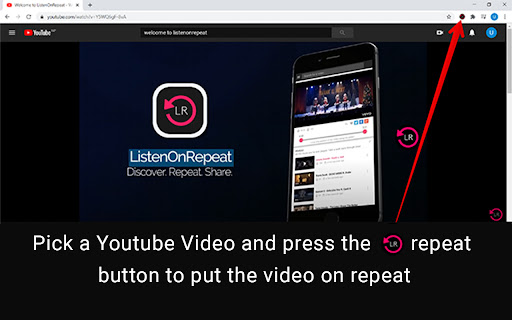
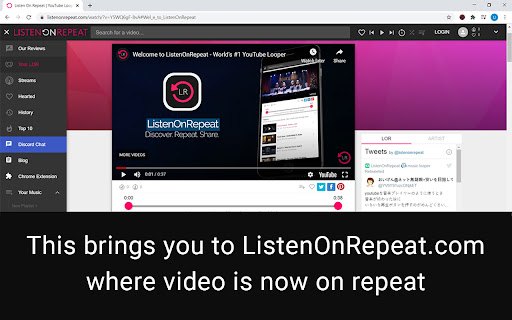
Looper for YouTube - Puts any YouTube Video on an Endless Loop Join Thousands of Users Who Use Listen On Repeat Every Day! Looking for the easiest way to loop YouTube videos? The Listen On Repeat YouTube Looper is the fastest and most convenient solution! With just one click, you can automatically loop any YouTube video without ever needing to press replay. Why Choose Listen On Repeat? • #1 Platform for Repeating YouTube Videos: Listenonrepeat.com is the leading site worldwide for looping YouTube videos, providing more than just a repeat button. • Custom Playlists & Music Discovery: Create your own playlists, discover new music weekly, and explore daily reviews of trending songs and artists. • Advanced Features: Set custom start and stop times for videos, enjoy music blog content, and access exclusive podcasts and radio. • Seamless Integration: No need to manually replace “youtube.com” with “listenonrepeat.com.” Simply click the extension button while watching any video on YouTube, and it will automatically loop the video on Listenonrepeat.com. How It Works: 1. Go to any YouTube video. 2. Click the Listen On Repeat button in your Chrome toolbar. 3. The video will open on Listenonrepeat.com and start looping instantly! Join thousands of users who already enjoy uninterrupted playback of their favorite videos. Whether you’re listening to music, watching tutorials, or looping your favorite clips, this extension makes it effortless! Want more? If you’re looking to download full YouTube playlists or songs directly to Listenonrepeat, try our extension Listenonrepeat: YouTube to LOR at https://go.blastden.com/youtubetolorextension Please rate ★★★★★ if you like it

SponsorBlock for YouTube - Skip Sponsorships
Skip sponsorships, subscription begging and more on YouTube videos. Report sponsors on videos you watch to save others' time. SponsorBlock lets you skip over sponsors, intros, outros, subscription reminders, and other annoying parts of YouTube videos. SponsorBlock is a crowdsourced browser extension that lets anyone submit the start and end times of sponsored segments and other segments of YouTube videos. Once one person submits this information, everyone else with this extension will skip right over the sponsored segment. You can also skip over non music sections of music videos. This is open source and the entire database is public. Access your data for youtube.com, www.youtube-nocookie.com: - Used to modify the YouTube webpage "Authentication Information": When you install the extension, it will generate a random "userID" that is used when submitting or voting. This allows you to appear on the leaderboard and helps determine reputation of submissions. With this extension, you will automatically skip YouTube sponsors.

YouTube Repeat
Let youtube repeat replay song in one click! Loop youtube video, listen song on repeat, and enjoy infinite loop for hours 🎵 Meet youtube repeat, your new Chrome tool developed by professionals from Milext Studio. This extension lets you loop any part or the whole of a youtube video. Set it up once, and it runs till you stop it. 🚀 How to loop a youtube video? Just follow these simple steps: 1️⃣ Download youtube repeat extension from the Chrome Web Store. 2️⃣ Open your favorite video. 3️⃣ Click on the newly added repeat button in the status bar. 4️⃣ Choose to loop the full clip or set a part. 5️⃣ Sit back and enjoy non-stop playback! 🎶 Youtube repeat is packed with useful features designed to enhance your video viewing experience. 🎬 Seamless Integration: It blends in with youtube video interface effortlessly. This makes it feel like a inherent part of YouTube. It's simple and intuitive, making it a breeze to use. You get a seamless, native look and feel with repeat youtube. 🖥️ Browser Compatibility: Built to work flawlessly on Chrome, it's browser friendly. It doesn't interfere with your browsing speed or performance. Enjoy uninterrupted browsing and looping with youtube repeat. It's unobtrusive, light, and efficient. 🔁 Control over Loops: With our tool, looping a specific part of a video is a walk in the park. Just pick the start and end points, and voila! Repeat any section of a video as much as you want. You now have precision control over the loops. 🎼 Repeat Count: Not just the segment, you can decide the number of repeats too. Want to play it ten times, or until you decide to stop it? You get to choose with youtube repeat. Enjoy a personalized video experience! 🎞️ Works with Vimeo: And it doesn't stop with youtube. The extension extends its looping love to Vimeo videos too! Now enjoy your favorite Vimeo content with our repeat feature. It's more fun across platforms. 🎓 Youtube repeat thrives on offering benefits to learners and students. ➤ Repeat Lessons: Do you need to grasp a tough part of a lesson? Loop the part with looper for youtube. Watch, pause and replay till you get it. ➤ Foreign Language Drill: Are you learning a new tongue? Pick a phrase or word in a language video and repeat! Listen and practice till perfect. Youtube repeat can be your language friend. ➤ Exam Prep: Revising for tests gets a boost. Repeat parts of a lecture, a study guide, or an exam tip. The more you hear, the more you recall. Get your loop youtube study edge now. 🎤 Youtube repeat extension brings in a host of benefits for singers and musicians too. ➤ Perfect Pitch: Got a tough part in a music piece? Want to get the pitch and tone right? Use repeat youtube to replay the part and practice along. Sing or play it till you hit it right. ➤ Music Pieces: Working with a complex music piece? Break it down into parts. Loop each part using youtube repeater and master one at a time. It's like your own music tutor. ➤ Song Lyrics: Need help with the lyrics? The chorus or a line not catching up? Set it on a loop and play youtube video on repeat. Listen, sing along, and get those words tight. 🕺 Welcoming all dancers to a better practice session with youtube repeat. ➤ Dance Practice: Got a tough step to master? Use looper youtube to replay the part. Mirror the moves till you nail it. ➤ Choreo Learning: Step by step, learn a whole choreography. Break it down, loop each part, and put it all together. Youtube replay makes it easy. ➤ Sync Drills: Syncing with a team? Use loop youtube to play the group parts. Practice till you all move as one. 🎧 Youtube repeat goes beyond students and musicians, helping various users. ➤ Workouts: Keep up with your fitness regime. Repeat a workout or yoga move till you get it right. Let yt video looper be your virtual fitness partner. ➤ Cooks and Chefs: Repeating the steps in a recipe has never been this easy. Loop the tricky part till you master the dish. Looper youtube is your kitchen companion. ➤ DIY Lovers: Not clear with a step in your DIY video? Just repeat that part until clear. Let youtube repeater guide you in your DIY tasks. 📌 Frequently Asked Questions: ❓ How do I install the extension? 💡 To install youtube repeat, just click on the "Add to Chrome" button. After quick installation, you’ll be able to looping youtube videos. ❓ How to loop a certain part of a youtube video? 💡 To replay a specific part of a youtube video, load the video page, click on the repeat button, set the start and end points for the loop, tick a box "Loop a portion" and voila! ❓ Does youtube count repeat views? 💡 Yes, our extension has a built-in counter, which help you to know how many times youtube video has been played. ❓ Does youtube repeat require access to my personal data? 💡 No, the extension does neither require access to your youtube account nor your personal data, ensuring your privacy. ❓ Do I need to sign up or create a youtube account to use it? 💡 There's no need to sign up or create a youtube account to use our extension, providing you with instant access ❓ I have some ideas and feedback for youtube repeat. Can I share them with the developers? 💡 Absolutely! Our team is always open to hearing from our users. Don't hesitate to send in your proposals, ideas, or reviews. We value what you have to say. ❓ If I encounter a problem while using youtube repeat, is there a customer support available? 💡 If you have any problem, feel free to contact us directly via email or leave a ticket in the Chrome Web Store. We’ll be glad to be of help 🥇 Youtube repeat is the ultimate Chrome extension for loop playback and YouTube replay functions. Download and install our extension today and get the best out of your YouTube experience! Happy viewing and repeated listening! 🎉

YouTube Looper
Custom loops extension for Youtube videos This is a great tool to help you do music training, or any kind of thing you can leverage repetition on video sections! Features - create multiple loops so you can train sections with ease - your loops are locally stored, when you get back to your videos your loops will still be there - set a custom playback rate (you can use very precise rates as 0.7 0.85 so you can train on your speed) - automatically generate loops for videos that have markers - quickly navigate to recent videos you looped at using the popup window - Manage, export / import and sync loops between different devices using the dashboard page Pro tips: - Hold shift key to adjust time in steps of 100ms instead of 1 second. - Hold shift and click on play to start loop 3 seconds before the loop time. - Click on the Speed label to reset speed to 100% - Click on the time numbers to edit via text (for very precise editing) - If you end a loop before the start, it will flip start/end automatically (actually, that happens if try to make the start to go after the finish in any editing way possible). You can find the source code and documentation for this project at https://github.com/wilkerlucio/media-looper.

YouTube Looper Pro - Repeat Video Sections
Loop any video section with A-B repeat. Perfect for musicians, dancers & language learners. Save loops, adjust speed. Ever wanted to replay a specific section of a video over and over? Whether you're practicing music, learning a language, or breaking down choreography — the built-in loop option only repeats the entire video. You need a dedicated looper. Looper Pro adds precision A-B looping directly into the player. Mark any start and end point, and that section repeats automatically. No manual rewinding, no URL hacks, no leaving the page. ▸ Open any video and click the Loop button (or press L) ▸ Press [ at your desired start point ▸ Press ] at your end point Your selected section starts looping immediately. Drag the visual markers on the progress bar to fine-tune, or set a target repeat count for structured practice sessions. The looper works on any video — music, tutorials, lectures, dance, gameplay, and more. 👥 Perfect For 🎸 Musicians and Instrumentalists Loop difficult passages at half speed to build muscle memory. Perfect for learning guitar solos, piano pieces, bass lines, and drum patterns. Slow down to 0.25x while maintaining your loop points. Repeat until your muscle memory kicks in. Keyboard shortcuts mean your hands stay on the instrument, not the mouse. 💃 Dancers and Choreographers Learn choreography step by step. Loop dance tutorials at half speed, then gradually increase tempo as you master each section. Works for K-pop, hip-hop, ballet, or any style. Perfect for breaking down complex moves and practicing until they become automatic. 🗣 Language Learners Perfect your pronunciation with shadowing practice — loop native speaker phrases and repeat along with them. Listen on repeat until you catch every syllable. Works with conversations from movies, shows, lectures, or language courses. 📚 Students and Educators Review key concepts by looping lecture segments. Repeat explanations until they click. Perfect for exam prep, homework help, or classroom review. Teachers can save loop points to replay important segments during class. 🎮 Gamers and Speedrunners Analyze pro gameplay frame by frame. Loop tutorials to learn advanced techniques, movement tech, and strategies. Slow down to catch every detail. Study speedrun routes, combo timings, and optimal paths. 🏋 Fitness Enthusiasts Loop workout demonstrations to perfect your form. Repeat exercise demos until you master the movement. Great for yoga flows, stretching routines, HIIT workouts, and strength training. ✅ Precision A-B Loop Points Set exact start and end times with frame-level accuracy. Visual markers on the progress bar show your loop region. Drag to adjust without re-entering timestamps. ✅ Keyboard Shortcuts L toggles loop on/off, [ sets start point, ] sets end point. All shortcuts are fully customizable. Designed for hands-free control during instrument practice. ✅ Variable Playback Speed Supports 0.5x to 2x playback while looping. Speed persists across loops — perfect for gradual tempo training. Pro unlocks 0.25x to 4x for detailed practice. ✅ Save Loop Points Save and name your favorite sections per video. Return days later and they're waiting. Name them descriptively: "Chorus," "Verse 2," "Bridge Solo," "Intro Riff." Pick up practice exactly where you left off. ✅ Loop Counter Track repetitions automatically. Set a target count — loop 10 times then stop — for structured practice routines. Great for spaced repetition learning. ✅ Visual Timeline Your loop region highlights directly on the progress bar. Always know exactly what section will repeat at a glance. ✅ Clean Interface Matches the player's dark theme natively. Collapses when not in use. No clutter, no distractions. → Install the extension and pin it to your Chrome toolbar → Navigate to any video you want to practice with → Click the Loop button or press L on your keyboard → Play to your desired start point and press [ → Continue to your end point and press ] → The looper activates automatically and begins repeating → Adjust speed, save the loop, or modify the range anytime 💡 Pro Tips: • Set loop points while the video plays — no need to pause • Combine with built-in captions for language learning • Save loops before closing the tab to preserve progress • Create multiple saved loops per video for different sections • Use the loop counter to track practice sessions • Start slow (0.5x), master the section, then increase to full speed Q: Can I save loops across different videos? A: Yes. Loops are saved per video, and your full library is accessible from the popup. Q: Why do other tools skip the last second? A: Many extensions fail at video boundaries. Looper Pro handles end-of-video buffering correctly, so your loop plays completely every time. Q: How many loops can I save for free? A: 5 per video on the free plan. Pro users get unlimited saves. Q: Does it collect my data? A: No. All data stays locally in your browser. Zero tracking, zero data collection, zero external requests. Q: How is this different from the right-click "Loop" option? A: The built-in option repeats the entire video. This extension lets you select a specific section and loop only that part. • Lightweight — minimal memory and CPU usage • No background processes when not active • Built on Manifest V3 for modern security standards • Works alongside other extensions without conflicts • Actively maintained with regular updates ✓ Free core features, no sign-up required ✓ Zero data collection — your privacy is fully respected ✓ Actively maintained — not abandoned like some alternatives ✓ Real support — we respond to every message ⭐ If it's helped your practice, a review helps others find it too.
