
jhkfddihpaahlogkaaljcfjlfpiomacl

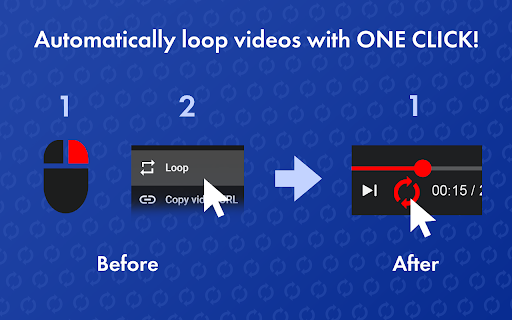


Let youtube repeat replay song in one click! Loop youtube video, listen song on repeat, and enjoy infinite loop for hours 🎵 Meet youtube repeat, your new Chrome tool developed by professionals from Milext Studio. This extension lets you loop any part or the whole of a youtube video. Set it up once, and it runs till you stop it. 🚀 How to loop a youtube video? Just follow these simple steps: 1️⃣ Download youtube repeat extension from the Chrome Web Store. 2️⃣ Open your favorite video. 3️⃣ Click on the newly added repeat button in the status bar. 4️⃣ Choose to loop the full clip or set a part. 5️⃣ Sit back and enjoy non-stop playback! 🎶 Youtube repeat is packed with useful features designed to enhance your video viewing experience. 🎬 Seamless Integration: It blends in with youtube video interface effortlessly. This makes it feel like a inherent part of YouTube. It's simple and intuitive, making it a breeze to use. You get a seamless, native look and feel with repeat youtube. 🖥️ Browser Compatibility: Built to work flawlessly on Chrome, it's browser friendly. It doesn't interfere with your browsing speed or performance. Enjoy uninterrupted browsing and looping with youtube repeat. It's unobtrusive, light, and efficient. 🔁 Control over Loops: With our tool, looping a specific part of a video is a walk in the park. Just pick the start and end points, and voila! Repeat any section of a video as much as you want. You now have precision control over the loops. 🎼 Repeat Count: Not just the segment, you can decide the number of repeats too. Want to play it ten times, or until you decide to stop it? You get to choose with youtube repeat. Enjoy a personalized video experience! 🎞️ Works with Vimeo: And it doesn't stop with youtube. The extension extends its looping love to Vimeo videos too! Now enjoy your favorite Vimeo content with our repeat feature. It's more fun across platforms. 🎓 Youtube repeat thrives on offering benefits to learners and students. ➤ Repeat Lessons: Do you need to grasp a tough part of a lesson? Loop the part with looper for youtube. Watch, pause and replay till you get it. ➤ Foreign Language Drill: Are you learning a new tongue? Pick a phrase or word in a language video and repeat! Listen and practice till perfect. Youtube repeat can be your language friend. ➤ Exam Prep: Revising for tests gets a boost. Repeat parts of a lecture, a study guide, or an exam tip. The more you hear, the more you recall. Get your loop youtube study edge now. 🎤 Youtube repeat extension brings in a host of benefits for singers and musicians too. ➤ Perfect Pitch: Got a tough part in a music piece? Want to get the pitch and tone right? Use repeat youtube to replay the part and practice along. Sing or play it till you hit it right. ➤ Music Pieces: Working with a complex music piece? Break it down into parts. Loop each part using youtube repeater and master one at a time. It's like your own music tutor. ➤ Song Lyrics: Need help with the lyrics? The chorus or a line not catching up? Set it on a loop and play youtube video on repeat. Listen, sing along, and get those words tight. 🕺 Welcoming all dancers to a better practice session with youtube repeat. ➤ Dance Practice: Got a tough step to master? Use looper youtube to replay the part. Mirror the moves till you nail it. ➤ Choreo Learning: Step by step, learn a whole choreography. Break it down, loop each part, and put it all together. Youtube replay makes it easy. ➤ Sync Drills: Syncing with a team? Use loop youtube to play the group parts. Practice till you all move as one. 🎧 Youtube repeat goes beyond students and musicians, helping various users. ➤ Workouts: Keep up with your fitness regime. Repeat a workout or yoga move till you get it right. Let yt video looper be your virtual fitness partner. ➤ Cooks and Chefs: Repeating the steps in a recipe has never been this easy. Loop the tricky part till you master the dish. Looper youtube is your kitchen companion. ➤ DIY Lovers: Not clear with a step in your DIY video? Just repeat that part until clear. Let youtube repeater guide you in your DIY tasks. 📌 Frequently Asked Questions: ❓ How do I install the extension? 💡 To install youtube repeat, just click on the "Add to Chrome" button. After quick installation, you’ll be able to looping youtube videos. ❓ How to loop a certain part of a youtube video? 💡 To replay a specific part of a youtube video, load the video page, click on the repeat button, set the start and end points for the loop, tick a box "Loop a portion" and voila! ❓ Does youtube count repeat views? 💡 Yes, our extension has a built-in counter, which help you to know how many times youtube video has been played. ❓ Does youtube repeat require access to my personal data? 💡 No, the extension does neither require access to your youtube account nor your personal data, ensuring your privacy. ❓ Do I need to sign up or create a youtube account to use it? 💡 There's no need to sign up or create a youtube account to use our extension, providing you with instant access ❓ I have some ideas and feedback for youtube repeat. Can I share them with the developers? 💡 Absolutely! Our team is always open to hearing from our users. Don't hesitate to send in your proposals, ideas, or reviews. We value what you have to say. ❓ If I encounter a problem while using youtube repeat, is there a customer support available? 💡 If you have any problem, feel free to contact us directly via email or leave a ticket in the Chrome Web Store. We’ll be glad to be of help 🥇 Youtube repeat is the ultimate Chrome extension for loop playback and YouTube replay functions. Download and install our extension today and get the best out of your YouTube experience! Happy viewing and repeated listening! 🎉

iLoop: Youtube Loop Repeat Replay Part Video
=============================== Whether you need it? =============================== - You want to loop, repeat, replay part of the video on Youtube - You need to manually click to repeat every time - Then this extension is for you. - This is a simple extension which adds a repeat button and a slider to easily select the repeat range. =============================== How to use =============================== - To On/Off repeat: toggle the repeat button - To change the repeat range: use the slider or edit the start time, end time directly.

Just Repeat - Looper for YouTube
Extension to repeat certain points of a youtube video. So we can enjoy all the good stuff Just Repeat is a versatile and user-friendly Chrome extension designed to enhance your YouTube experience by enabling seamless repetition of specific segments within videos. With Just Repeat, you can effortlessly create loops, study or analyze content more effectively, and enjoy your favourite parts of a video repeatedly. ➤ Loop Creation: Easily create loops by selecting precise start and end times within any YouTube video. Just Repeat provides a simple and intuitive interface that allows you to define customized loop ranges with accuracy. ➤ Loop Management: Manage your loops efficiently from the extension's popup window. Just Repeat keeps track of all your created loops, enabling you to edit, delete, or organize them effortlessly. Stay organized and access your loops whenever you need them. ➤ Chrome Storage Integration: Just Repeat leverages the power of Chrome storage to save your created loops even when navigating to a different YouTube page or closing the browser. Your loops are securely stored and synchronized, ensuring you can easily access them when returning to the page. ➤ Intuitive UI and User Experience: Just Repeat features a clean and user-friendly interface, ensuring a smooth and enjoyable experience while interacting with loop functionality. The extension seamlessly integrates into the YouTube interface, making it easily accessible whenever you need it. ➤ Privacy and Security: Just Repeat respects your privacy and does not collect or store any personally identifiable information. All data related to your loops and settings is securely stored locally on your device. ➤ Regular Updates and Support: Just Repeat is actively maintained and updated to ensure compatibility with the latest YouTube features and improvements. The dedicated support team is available to assist you with any inquiries or issues you may encounter. Transform your YouTube experience with Just Repeat and unlock a new level of control and convenience while enjoying your favourite videos. How To Use Once the extension is installed, you can use it to create and manage loops in YouTube videos. Here's how to use the extension: 1. Open a YouTube video in your browser. 2. Drag the range slider beside the loop button on the YouTube video control strip to select the end time of the loop. 3. Loop Button Icon Click on the Loop button to create a loop at the YouTube player current time 4. The Loop Complete Icon will appear If the loop was successfully made 5. If the loop was unsuccessful (e.g. 06:09 - 0:02) the end time was less than the start time) 6. The selected loop will be added to the list of loops for the current video. To DELETE a loop, click on the delete button next to it in the loops list. To SELECT AND PLAY a loop, click on the play button next to it in the loops list. Please Rate ★★★★★ Stars if you enjoy it Feel free to reach out if you experience any problems at

YouTube Video Loop
Adds a button to loop a video on YouTube Adds a button to loop a video on YouTube.

YouTube Looper
Custom loops extension for Youtube videos This is a great tool to help you do music training, or any kind of thing you can leverage repetition on video sections! Features - create multiple loops so you can train sections with ease - your loops are locally stored, when you get back to your videos your loops will still be there - set a custom playback rate (you can use very precise rates as 0.7 0.85 so you can train on your speed) - automatically generate loops for videos that have markers - quickly navigate to recent videos you looped at using the popup window - Manage, export / import and sync loops between different devices using the dashboard page Pro tips: - Hold shift key to adjust time in steps of 100ms instead of 1 second. - Hold shift and click on play to start loop 3 seconds before the loop time. - Click on the Speed label to reset speed to 100% - Click on the time numbers to edit via text (for very precise editing) - If you end a loop before the start, it will flip start/end automatically (actually, that happens if try to make the start to go after the finish in any editing way possible). You can find the source code and documentation for this project at https://github.com/wilkerlucio/media-looper.
